Yeah you have a great point. I just looked into their Pixel code, and it’s definitely just using the state based on what we provide through the Web Pixel API.
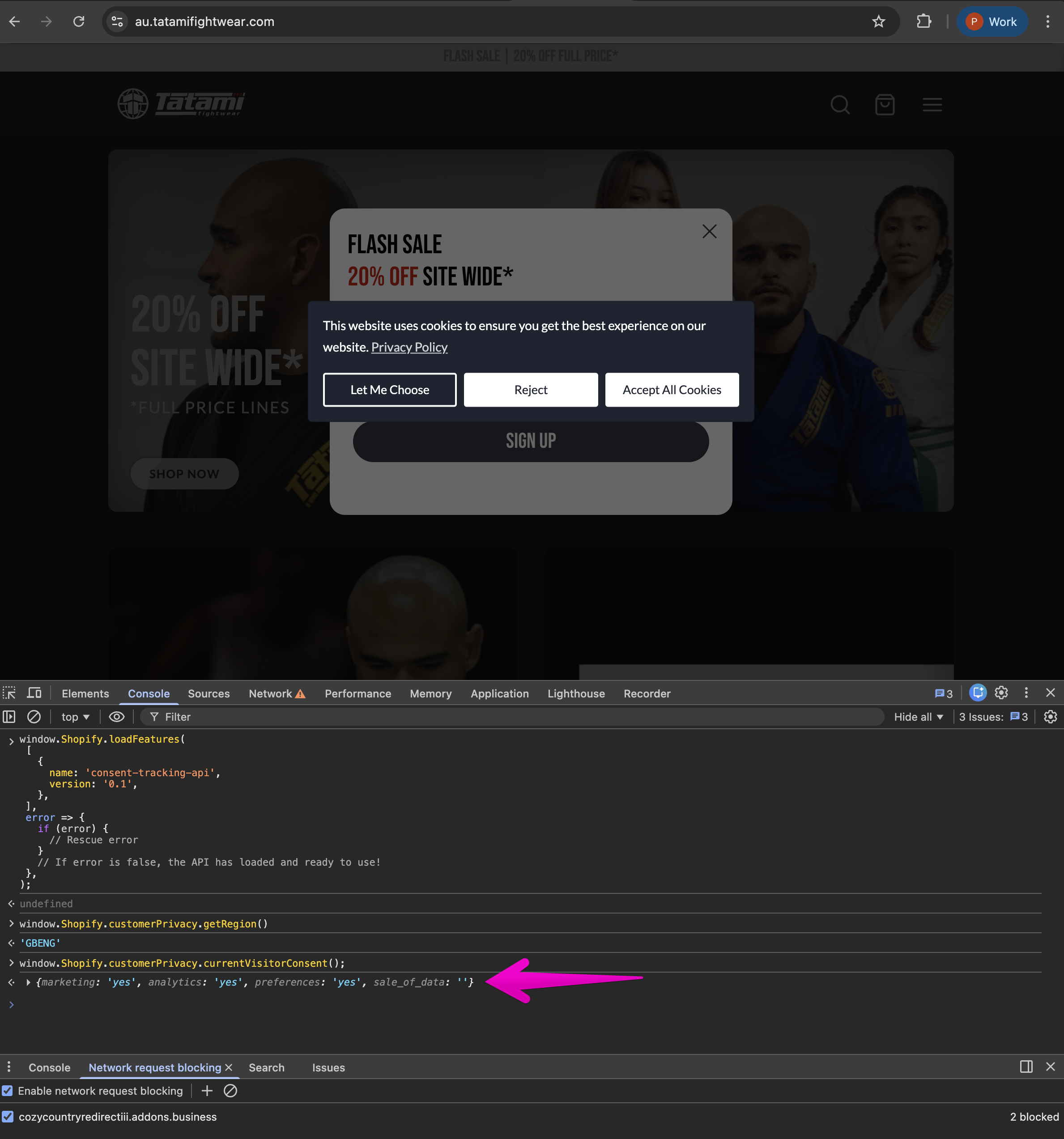
When I ran a test on the store you shared with my VPN set to the UK, it worked as expected. Can you share what you get when you run the following in the console?
window.Shopify.customerPrivacy.currentVisitorConsent();
window.Shopify.customerPrivacy.getRegion();
window.Shopify.customerPrivacy.shouldShowBanner();
window.Shopify.customerPrivacy.marketingAllowed();
window.Shopify.customerPrivacy.preferencesProcessingAllowed();
window.Shopify.customerPrivacy.analyticsProcessingAllowed();
window.Shopify.customerPrivacy.saleOfDataAllowed();
Hey @ceri_waters you can turn off the “Conversion measurement” on Google & Youtube sales channel under the setting and that will do 2 things:
- Turn off the Google Ads conversion and remarketing data tracking for Google Ads
- Turn off the default consent datalayer push
Aparently this is the only way we have found out to stop the Google & Youtube app from pushing the incorrect default consent is to not use the app for Google Ads tracking entirely.
Once you do this, you will have to configure the Google Ads conversion and remarketing tracking some other way through customer events pixel or by using a third party app.
p.s. sent you a connection request on linkedin just to stay in touch as this is a very niche issue that only few people notice who are deep in the Shopify and marketing pixel tracking world so would love to stay in touch 
HI @Paige-Shopify , Apologies for the delay.
So.. this is actually showing consent ‘yes’ for everything, even through consent hasn’t yet been given - I’ve cleared cookies and tried incognito mode. My region is also in the list for cookie consent requirements.
I’ll write some code to detect any calls to the Shopify Consent endpoint, but this occurs even on Horizon with no Cookie Solution active.
Strange, I’m wondering if a previous consent grant is getting cached somehow.
@ceri_waters, can you try a completely new private browsing window and a different device as well?
@Paige-Shopify Thanks for the quick response, just tried on a separate PC in Chrome Incognito and it’s the same issue I’m afraid.
Even tried it on my phone and the result is the same.
Are you seeing the same behavior on all shops you’ve tested or specific ones?
Is the issue still occurring for the original shop you brought up?
Original shop is fine, as I said that one just randomly started working 
Haven’t noticed it on any other stores
@Paige-Shopify Forgot to mention.. this particular store actually has expansion stores with the exact same theme/apps etc. too and they’re all fine 
I was discussing this issue with developers of the Customer Privacy API, and they just noticed that your screenshot shows that you’re on the au.tatamifightwear.com shop and not the www.tatamifightwear.com shop where we’ve been getting redirected to this entire time.
If I block the automatic redirection functionality, I found:
- I could replicate the issue
- Our logs for my session shows that user consent was provided.
setTrackingConsent was called even though I had not interacted with the cookie banner.setTrackingConsent was actually called on page load.
It’s possible that the cookie banner sets the default based on the default market of the shop.
For reference:
@Paige-Shopify Oh, that’s annoying
Strange.. even when I’ve disabled ConsentMo and previewed Horizon I still get the same issue, as per my loom as well the initiator was the Google/YouTube Pixel.. but I’ll double check to see if that’s changed.
No worries at all! I help out with Pixel issues all the time and this one had me stumped. Glad we were able to figure it out eventually


 (I had reached out and asked them to check everything but there we are..)