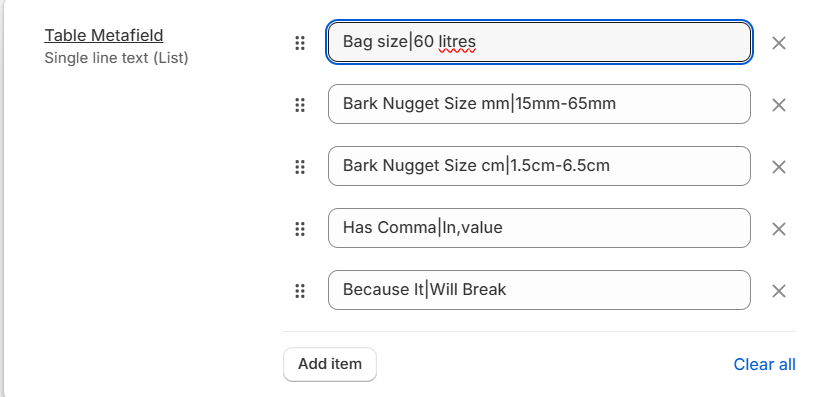
Dynamic source with list single line text field

Short description of issue

Dynamic source with list single line text field

Reproduction steps

N/A

Additional info

So I’ve setup a list of single line text values metafield to achieve a table layout. The user would enter their values like so:

Row 1|Row 1 Value
Row 2|Row 2 Value
Row 3|Row 3 Value

Then in the loop I would split by | to get the two values.

Now, I’m trying to use this metafield as a dynamic source into a text input within a block.

The issue I’m having is I’m unable to loop over these values in the metafield, it seems to be be combining the values into a single string separated by commas. So doing the following:

<h3>block.settings.table_metafield: {{ block.settings.table_metafield }}</h3>

// Result
block.settings.table_metafield: Row 1|Row 1 Value,Row 2|Row 2 Value,Row 3|Row 3 Value

And then I can’t even do a split by comma incase my values contain a comma.

Is there a workaround here to achieve this?

Essentially this is a section to create some product tabs, with two block types, table and richtext.

The user can then populate these using dynamic sources from a product.

What type of topic is this

Troubleshooting

Upload screenshot(s) of issue


Input setting I’m using:

{
  "type": "text",
  "id": "table_metafield",
  "label": "t:sections.product-tabs.blocks.table.settings.table_metafield",
  "info": "Select a metafield as the dynamic source, this metafield must be a list of single line text fields. Each single line text field must be separated by a '|' which creates the row title and the row value, e.g. Bag size|60 liters"
}

Tried to test this and had some additional findings. When using the List Type Text Metafield as a dynamic value in the Text setting input. A grammatical assumption is made & the word ‘and’ is inserted to join the last item to the sentence, as well as the items being joined by a comma.

Any chance of a reply from the Shopify team here?

Hi Luke
I am sharing my powerful table generator.

To use it, you need to create a rich text meta field and start each line with a new line, separating the columns with a | line.

  {%- when 'table' -%}
              {% if block.settings.table_body != blank %}
                {%- liquid
                  capture class
                    if block.settings.table_body_mobile != blank
                      echo ' small-hide'
                    endif
                    if settings.animations_reveal_on_scroll
                      echo ' scroll-trigger animate--slide-in'
                    endif
                  endcapture
                -%}
                <table
                  class="rich-text__table{{ class }}"
                  {{ block.shopify_attributes }}
                  {% if settings.animations_reveal_on_scroll %}
                    data-cascade
                  {% endif %}
                  style="{{ styles }}"
                >
                  {%- liquid
                    assign rows = block.settings.table_body | remove: '<p>' | split: '</p>'
                    assign max_cols = 0
                    assign texts = null
                    for row in rows
                      assign cols = row | append: ' ' | split: '|'
                      if cols.size > max_cols
                        assign max_cols = cols.size
                      endif
                      assign texts = texts | concat: cols
                    endfor
                    capture table
                      tablerow text in texts cols: max_cols
                        if text contains '[' and text contains ']'
                          assign settings = text | split: '[' | last | remove_last: ']' | split: ':'
                          assign value = text | split: '[' | first | strip
                          assign colspan = settings | first | strip
                          assign rowspan = settings | last | strip
                          if colspan != '0'
                            echo 'colspan="' | append: colspan | append: '"'
                          endif
                          if rowspan != '0'
                            echo 'rowspan="' | append: rowspan | append: '"'
                          endif
                          echo '>' | append: value
                        else
                          echo text | strip
                        endif
                      endtablerow
                    endcapture
                  -%}
                  {{-
                    table
                    | replace: '>colspan=', ' colspan='
                    | replace: '>rowspan=', ' rowspan='
                    | replace: '>-</td>', '> </td>'
                  -}}
                </table>
              {% endif %}

It contains significantly more functionality, but I’m not sure you need it.

After my tests, I have the following:

By default, the customizer will set product.metafields.namespace.key | metafield_text in the JSON template. In this case, the returned data is the comma separated (+ and at the end) string.

You can also manually edit the template JSON to use the metafield value product.metafields.namespace.key.value as dynamic source. In this case, the returned data is a concatenated string.

Of course, using hardcoded metafield access, we have the expected result, an array of the different text elements.

I would argue that the second test case should return an array, this would solve the issue but there should be a way of selecting between | metafield_text and .value as a consequence.