I am trying to create a customer by submitting a registration form with custom input fields. However, once I hit the Admin API URL, the next lines of my JavaScript stop executing. I’m not sure what the issue is, but based on my research, it seems to be caused by a CORS error.
Please help me resolve this. How can I bypass the CORS error I’m encountering?
Are you using a direct api integration from Shopify Admin?
Or are you trying to use the Admin from a theme?
I am using the Admin API from a theme, within a .liquid file, using custom JavaScript.
You absolutely should not do that. Admin API is designed for administrative tasks from a backend, you shouldn’t ever access it from a theme or frontend.
You should try the storefront API if you need to use it on the frontend Shopify API, libraries, and tools
async function createCustomer(customer) {
debugger;
const url = “https://15e83g-r6.myshopify.com/api/2025-07/graphql.json”;
const token = “4a########################”;
const query = mutation customerCreate($input: CustomerCreateInput!) { customerCreate(input: $input) { customer { firstName lastName email phone acceptsMarketing } customerUserErrors { field message code } } } ;
const variables = {
input: {
firstName: customer.firstName,
lastName: customer.lastName,
email: customer.email,
phone: customer.phoneNumber,
password: customer.password || “Default@123”,
acceptsMarketing: customer.acceptsMarketing
}
};
try {
const response = await fetch(url, {
method: “POST”,
headers: {
“Content-Type”: “application/json”,
“X-Shopify-Storefront-Access-Token”: token
},
body: JSON.stringify({ query, variables })
});
const result = await response.json();
console.log("Customer Create Response:", result);

// Check for GraphQL-level errors
const errors = result.data?.customerCreate?.customerUserErrors;
if (errors && errors.length > 0) {
  console.error("Shopify returned user errors:", errors);
  alert("Failed to create customer: " + errors[0].message);
  return null;
}

return result;
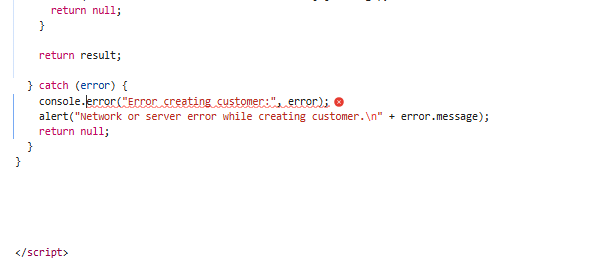
} catch (error) {
console.error(“Error creating customer:”, error);
alert(“Network or server error while creating customer.\n” + error.message);
return null;
}
}
I have tried using the Storefront API in my JavaScript, but I’m still getting the same CORS error. Although the customer gets created on the admin side after hitting the API endpoint, I’m unable to capture the response to execute further code for displaying a success or error message. Similarly, when I was using the Admin API, the customer was created successfully, but the subsequent code for displaying messages was not executing.
I speculate it may be due to network issues. Have you used a VPN? Has TUN mode been turned on?
Hi @kyle_liu
I’m not using a VPN. Just wanted to inform you that for my other store, the Admin API is working perfectly without any CORS errors. However, the store I’m currently working on is throwing a CORS error.
What errors do you get back with the storefront api?
Hello @JordanFinners

I am getting an error after hitting the API. It is supposed to return the result so that I can display an appropriate message like “Successful” or “Failed” based on the response received from the API.
Also, how can I update metafields using the Storefront API?
What is the error in the console tab? Please.
Doesn’t look like updating metafields is supported via the storefront api, because it is unauthenticated. And would make your metafields vulnerable to bad actors.
What are you trying to achieve/whats the problem you are looking to solve? Not updating metafields but what are you trying to update/store


I have a custom registration form for users. When it’s submitted, I want to create a customer in the Shopify Admin and also save additional values in metafields.
Initially, I used the Admin API (which works fine on my other store), but on this store, I keep getting an unknown CORS error. After that, I switched to the Storefront API, but I’m still getting the same type of error — it doesn’t display any specific message in the console. Because of this unknown error, the code doesn’t proceed, and I can’t return any valid value.
My question is: How can I create a customer using the Admin API on this store? Just for context, both the Admin and Storefront APIs work perfectly on another store I’ve set up — with no errors — and they allow me to run the full code. I’m not sure why I’m getting this issue only on the current store.
If you want to use the admin api, you will need to set up your own backend/api to properly interact with the Admin API.
You should never do this from a theme or frontend as it leaks your Admin API credentials and exposes you to bad actors and malicious attacks.
In your case I would probably look at something like Shopify Forms app which is designed for this kind of use case
Yes, the Forms app is already installed on my store. However, I am currently unsure how to configure it to achieve the following:
- Create a customer via the form submission, such that the customer appears in the Shopify Admin under Customers—just as it would when using the Admin API.
- Store custom field values (e.g., additional registration data) in Customer Metafields during the same form submission.
To proceed effectively, I kindly request complete step-by-step guidance on the following:
- How to configure the Forms app to create a customer record in the Shopify Admin.
- How to map custom form fields to metafields associated with the customer.
- Any required configuration or code (if applicable) to support this mapping.
- How to validate that the customer and metafields have been created successfully.
I’d recommend reading through the Form help documentation. https://help.shopify.com/en/manual/promoting-marketing/create-marketing/forms-app
It states any customers submitted who aren’t already customers will be create and you can control the field settings as to where they are saved e.g to a metafield.
It can do everything you need, just have a work through the docs
I am unable to use the Forms app to create a custom registration form because it does not support some of the custom functionalities required in my form. I kindly request you to suggest an alternative way to create a customer account using this custom registration form (including saving metafield values), without encountering CORS errors. The goal is to capture the API response and return it appropriately, so I can display a message such as “Account created successfully” or “Account creation failed.”
Hi,
If you are in need to have such custom functionality. You will need to create a private Shopify app and build out your own API for this that can then handle the Admin API requests on the server as you are supposed to, without causing a security issues.
I’m sure there are other apps available on the app store that might be able to do this with the custom functionality you are after.
My primary suggestion would be to consider a simplified version of this with the Shopify forms app, and deliver that so you can start building up the customer information.
I would also consider the UX (user experience of your form). Long complex, custom forms will lead to less users completing them.
For example HubSpot , found reducing the number of form fields from 4 to 3 can increase conversions by up to 50% .
Other background links
create a private Shopify app and build out your own API for this that can then handle the Admin API requests on the server : For this, could you please provide me with the complete, detailed steps on how I can create and achieve this?
Unfortunately people most likely can’t/won’t be able to provide you the full steps to something like this.
I’d suggest reading up online and learning how to do it yourself, or perhaps using AI (but again, be careful here regarding security).
Failing that, I’d recommend hiring a developer to build this out for you, you can find Shopify experts here → https://www.storetasker.com/