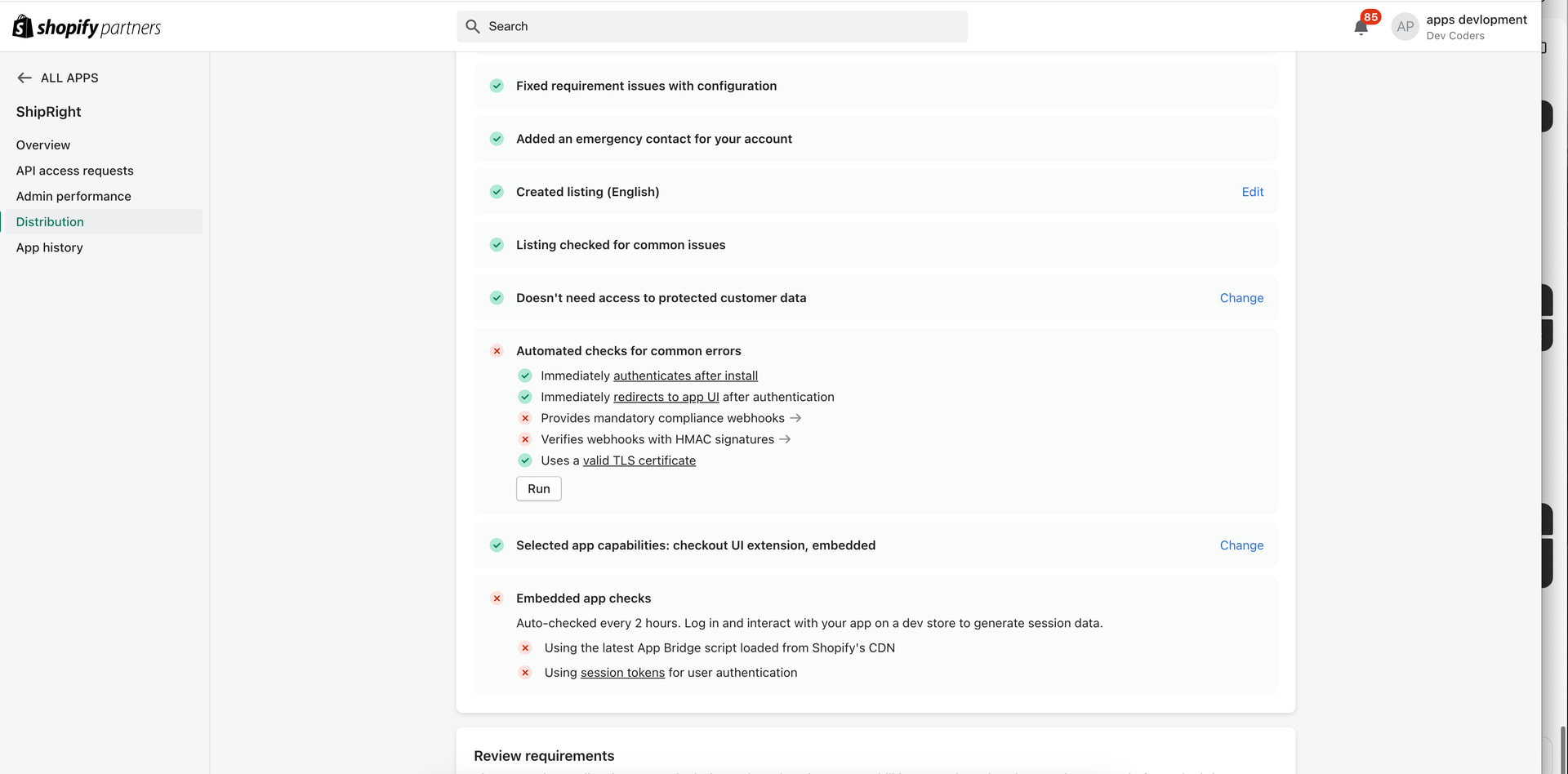
in abve screenshot its showing error for first time app submission
1.Provides mandatory compliance webhooks
i have added compliance webhook in shopify.app.toml file see below
Customer Data Request
[[webhooks.subscriptions]]
compliance_topics = [“customers/data_request”]
uri = "https://mydomain.com/webhook/customers-data-request"
delivery_method = “HTTP”
format = “json”
# Customer Redact
[[webhooks.subscriptions]]
compliance_topics = [“customers/redact”]
uri = "https://mydomain.com/webhook/customers-redact"
delivery_method = “HTTP”
format = “json”
# Shop Redact
[[webhooks.subscriptions]]
compliance_topics = [“shop/redact”]
uri = "https://mydomain.com/webhook/shop-redact"
delivery_method = “HTTP”
format = “json”
2.Verifies webhooks with HMAC signatures
=> For this i am verifying HMAC request in webhook receiver function and passing responses proper valid and unauthorised
Note:
1.Its first time app submission
2.is anything i am doing wrong due this error i am unable to submit app for verification.
====Embedded app checks Issue===
Using the latest App Bridge script loaded from Shopify’s CDN and verifying user token using jwt from frontend see below
document.addEventListener(‘DOMContentLoaded’, function () {
// Get query parameters from the URL
const params = new URLSearchParams(window.location.search);
const host = params.get(“host”); // Base64 encoded Shopify host
const shop = params.get(“shopOrigin”); // Shopify shop domain (e.g., ‘domain.myshopify.com’)
        // Debug output
        console.log('Query params:', { host, shop });

        if (!shop || !host) {
            console.error("Missing 'shop' or 'host' in URL params.");
            return;
        }

        // Redirect if not embedded
        if (window.top === window.self) {
            console.log('Redirecting to embedded version...');
            window.location.assign(`https://${shop}/admin/apps/appname?host=${host}`);
            return; // Stop further execution
        }

        // Initialize App Bridge
        const AppBridge = window['app-bridge'];
        const createApp = AppBridge.createApp;
        const actions = AppBridge.actions;

        const app = createApp({
            apiKey: "SHOPIFY_API_KEY",
            host: host,
            forceRedirect: true
        });
        window.ShopifyData = {
            app: app
        };
         // Get JWT session token
        const { getSessionToken } = window['app-bridge-utils'];
        getSessionToken(app).then(token => {
            // console.log("Shopify session token (JWT):", token);

            // Example API call
            fetch('/api/protected', {
                method: 'GET',
                headers: {
                    'Authorization': `Bearer ${token}`,
                    'Content-Type': 'application/json'
                }
            })
            .then(res => res.json())
            .then(data => console.log("Backend response:", data))
            .catch(err => console.error(err));
        });

        // Toast
        const toast = actions.Toast.create(app, {
            message: "Welcome to App!",
            isError: false,
        });
        toast.dispatch(actions.Toast.Action.SHOW);

        // Navigation Menu
        const AppLink = actions.AppLink;
        const NavigationMenu = actions.NavigationMenu;

        const dashboardLink = AppLink.create(app, {
            label: 'Dashboard',
            destination: '/',
        });

        const navigationMenu = NavigationMenu.create(app, {
            items: [dashboardLink],
            active: dashboardLink,
        });

        console.log("App Bridge initialized.");
    });
Can anyone help in this what i am doings wrong?
