Hello everyone. I’m running around trying to add Compliance Webhooks, I’m looking all over the partner dashboard and I can’t find the fields. . May anyone please tell me how I can add the webhooks urls I already have? Simply trying to find the fields. I’m new at this, I apologize.

Hi @user310
You can add it via the shopify.app.toml file. After configuring the required webhooks, simply run the command npm run deploy.
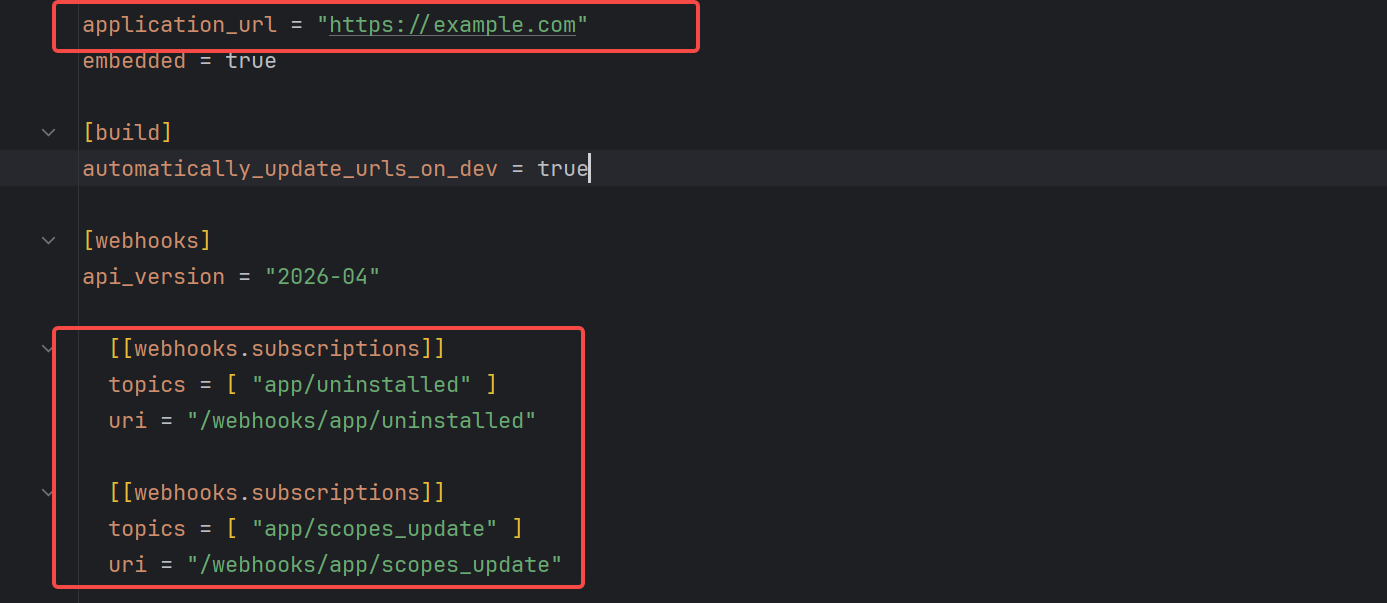
@user310, you can configure compliance webhooks in shopify.app.toml file.
[webhooks]
api_version = "2026-01"

[[webhooks.subscriptions]]
uri = "/gdpr/customer_data_request"
compliance_topics = ["customers/data_request"]

[[webhooks.subscriptions]]
uri = "/gdpr/customers_redact"
compliance_topics = ["customers/redact"]

[[webhooks.subscriptions]]
uri = "/gdpr/shop_redact"
compliance_topics = ["shop/redact"]
I know this might sound like a dumb question, but where can I locate the file? Like is there a specific place I can go to access it? (shopify.app.toml)
Firstly, you need to use shopify cli to create an app ,then you will find the file.
Are you using the Shopify app template?
I recommend you to learn it first, it will be very helpful for you to develop public apps
Thank you everyone! I followed your resources and learned everything and was able to add the compliance webhooks. Thanks again to everyone.
Thank you! Using this and other resources I figured it out!
Anyone know how to add these compliance web hooks if you are not using the CLI? For example, I am making an API based app which is not embedded.
It doesn’t have a TOML file and the options are not in the developers centre (anymore)
You can still use the CLI/toml file even if its not embedded
@steve_winn Question may be old but for anyone else…
You do have to use the CLI to generate the compliance URIs for the TOML file.
Quick and easy though even if you have already set up your app and just need the compliance.
Open a terminal/PowerShell on your local machine. Run:
node -v
npm -v
If “command not found” or older versions:
- Download Node.js LTS from https://nodejs.org/
- Install it (Windows: .msi installer, Mac: .pkg installer)
- Restart your terminal
- Re-run
node -vto verify
npm install -g @shopify/cli@latest
Verify:
shopify version
Run:
shopify auth login
The CLI expects a project folder. Doesn’t have to be your real codebase — can be a stub folder just for managing config.
mkdir ~/Documents/your-app
cd ~/Documents/your-app
Now connect your app you already created in your dashboard to that folder so it will create that TOML so you can edit it:
shopify app config link
CLI prompts:
- “Which existing app is this for?” → select YOUR APP from the list
- “Configuration file name” → press Enter (defaults to
shopify.app.toml)
Add your compliance subscription block at the bottom (or under [webhooks]):
[[webhooks.subscriptions]]
compliance_topics = [ "customers/data_request", "customers/redact", "shop/redact" ]
uri = "https://your-custom-server/webhooks/compliance"
Save and run:
shopify app deploy
Hope that helps anyone else here that created their app and did not use CLI since 2026!
Thanks. This is what I had to do in the end.
The automated check is testing two separate things, and it’s usually the second that fails:
1. Subscription — the three topics declared in shopify.app.toml, then deployed:
[[webhooks.subscriptions]]
uri = "/webhooks/customers/data_request"
compliance_topics = ["customers/data_request"]

[[webhooks.subscriptions]]
uri = "/webhooks/customers/redact"
compliance_topics = ["customers/redact"]

[[webhooks.subscriptions]]
uri = "/webhooks/shop/redact"
compliance_topics = ["shop/redact"]
Then shopify app deploy. Declaring them in the TOML without deploying is the most common miss.
2. HMAC verification — each endpoint must verify the X-Shopify-Hmac-Sha256 header against your app secret and return 401 Unauthorized on an invalid signature. The check actively sends a bad-HMAC request and expects the 401; returning 200 (or 500) on a forged request fails the check even when your subscriptions are correct. Endpoints also have to accept POST with Content-Type: application/json.
If subscriptions are deployed and the endpoint 401s on bad HMAC, the check passes.
(optional) If you’d rather not hand-roll it, Term Tool outputs this exact TOML block and the HMAC-401 handler — but the above is the whole of it by hand.