I’m using the s-page web component in my Shopify embedded app and adding content to the slot="aside" for the sidebar. I’m also trying to add a footer at the bottom of the main layout.
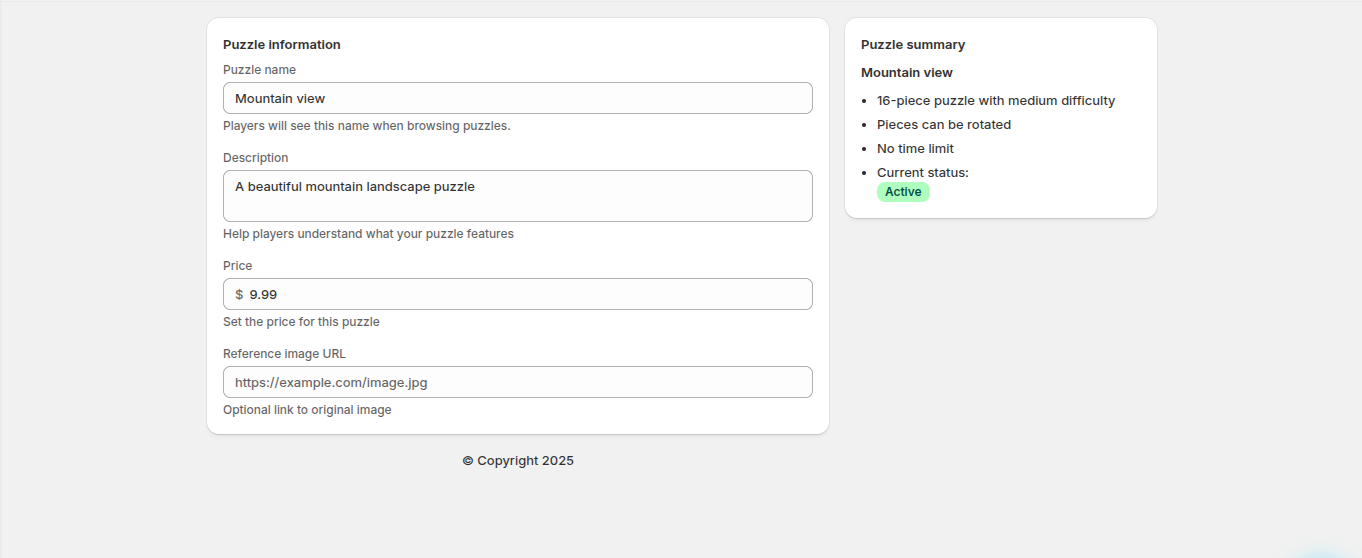
Since there’s no dedicated footer component available like in the Polaris React package, I’m manually inserting a footer inside the s-page component. However, the footer is not being horizontally centered on the page — it appears misaligned, especially when the aside slot is active.
I’ve attached a reference image to better illustrate the layout issue.
Has anyone faced a similar problem or found a workaround for manually centering the footer within the s-page structure? Any suggestions or best practices for placing a custom footer would be really helpful.
Thanks in advance!
// ===
// Details page pattern
// ===

export default function DetailsPage() {
  const handleFormReset = (event) => {
    console.log("Handle discarded changes if necessary");
  };

  const handleFormSubmit = (event) => {
    event.preventDefault();
    const formData = new FormData(event.target);
    const formEntries = Object.fromEntries(formData);
    console.log("Form data", formEntries);
  };

  return (
    <form data-save-bar onSubmit={handleFormSubmit} onReset={handleFormReset}>
      <s-page>
        {/* === */}
        {/* Title Bar */}
        {/* Note: ui-title-bar requires AppBridge to render correctly */}
        {/* === */}
        <ui-title-bar title="Mountain view">
          <button variant="breadcrumb" href="/app/puzzles">
            Puzzles
          </button>
          <button>Duplicate</button>
          <button tone="critical">Delete</button>
        </ui-title-bar>
        {/* === */}
        {/* Puzzle information */}
        {/* === */}
        <s-section heading="Puzzle information">
          <s-grid gap="base">
            <s-text-field
              label="Puzzle name"
              name="name"
              labelAccessibilityVisibility="visible"
              placeholder="Enter puzzle name"
              value="Mountain view"
              details="Players will see this name when browsing puzzles."
            ></s-text-field>
            <s-text-area
              label="Description"
              name="description"
              labelAccessibilityVisibility="visible"
              placeholder="Brief description of your puzzle"
              value="A beautiful mountain landscape puzzle"
              details="Help players understand what your puzzle features"
            ></s-text-area>
            <s-money-field
              label="Price"
              name="price"
              labelAccessibilityVisibility="visible"
              placeholder="0.00"
              value="9.99"
              details="Set the price for this puzzle"
            ></s-money-field>
            <s-url-field
              label="Reference image URL"
              name="reference-image-url"
              labelAccessibilityVisibility="visible"
              placeholder="https://example.com/image.jpg"
              details="Optional link to original image"
            ></s-url-field>
          </s-grid>
        </s-section>

        {/* Use the aside slot for sidebar content */}
        <s-box slot="aside">
          {/* === */}
          {/* Puzzle summary */}
          {/* === */}
          <s-section heading="Puzzle summary">
            <s-heading>Mountain view</s-heading>
            <s-unordered-list>
              <s-list-item>16-piece puzzle with medium difficulty</s-list-item>
              <s-list-item>Pieces can be rotated</s-list-item>
              <s-list-item>No time limit</s-list-item>
              <s-list-item>
                Current status:{" "}
                <s-badge color="base" tone="success">
                  Active
                </s-badge>
              </s-list-item>
            </s-unordered-list>
          </s-section>
        </s-box>

        <s-box>
          <s-stack direction="inline" justifyContent="center">
           © Copyright 2025
          </s-stack>
        </s-box>
      </s-page>
    </form>
  );
}
 - I can’t share any concrete details at the moment, but just wanted to check with you. It seems like the issue you’re seeing is similar to this one?