Installing custom app

Hello, I am trying to develop a server side custom app for my basic store. I have created a custom app, set its distribution type to custom app, and synchronized its config with the cli.

Upon installing the app via the Install Link in the partners page, the app redirects to my application url, but fails to redirect to my application to complete the flow and provide me a session.

If I try to use the authorization grant flow the Install button is disabled(related).

Furthermore I have tried using client credential grant but I encounter the following error.

[wrangler:error] Error: Received an error response (400 Bad Request) from Shopify:
If you report this error, please include this id: 2e208d48-a774-43fd-927a-c7296d0523d4-1761693396

Attached below is my config and stores, where targetstore.com is the store I intend to install my custom app into:

# Learn more about configuring your app at https://shopify.dev/docs/apps/tools/cli/configuration

client_id = ""
name = "my-app"
application_url = "https://muslim-serving-dated-amongst.trycloudflare.com"
embedded = false

[build]
automatically_update_urls_on_dev = false

[webhooks]
api_version = "2025-10"

[access_scopes]
# Learn more at https://shopify.dev/docs/apps/tools/cli/configuration#access_scopes
scopes = "read_orders,read_products,read_product_listings,read_metaobjects,read_inventory,write_metaobjects"
use_legacy_install_flow = true

[auth]
redirect_urls = [
  "https://muslim-serving-dated-amongst.trycloudflare.com/auth",
  "https://muslim-serving-dated-amongst.trycloudflare.com/auth/callback",
]

[pos]
embedded = false

[customer_authentication]
redirect_uris = [
  "https://muslim-serving-dated-amongst.trycloudflare.com/auth/callback"
]
logout_urls = [
  "https://muslim-serving-dated-amongst.trycloudflare.com/auth/logout"
]
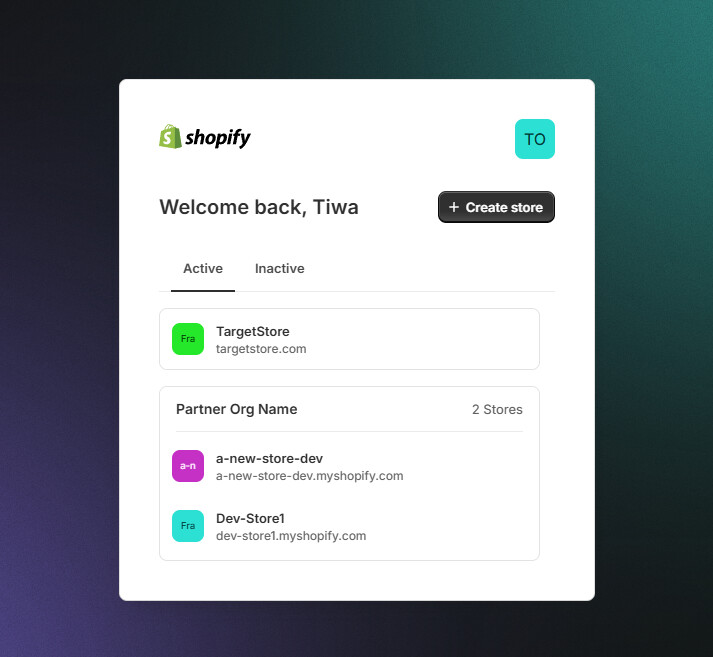
I speculate this issue might be due to the TargetStore not grouped with the dev stores?

I am unsure of where I went wrong and how to resolve. Any assistance is appreciated.

Hi @Tiwa_Ojo

You need to create a development store in this way.

Hello @kyle_liu, thanks for the reply, I am able to create and install my app on a dev store. I am unable to install the app onto an actual store with a paid plan(Basic).

I am unsure if the root cause is due to not grouping the dev stores with the target store, the target store plan has a restriction not presented, or an error in my steps to install the app.

I am simply looking for a way to create a session within my app in order to authenticate my requests to the Admin GraphQL API.

Hardcoding the shop and using client credientials oauth grant flow for token acquisition throws a 400 error.

@Tiwa_Ojo, just need to gather some context first so I can help.

  1. Is your app an extension-only app?
  2. Just double-checking, when generating the installation url, it was the target shop’s admin URL that was provided?

Hello @Paige-Shopify, thanks for the reply.

  • No my app is not an extension-only app. It is a standalone non-embedded app.
  • Yes. While setting up the distribution method, I used one of the *.myshopify.com domains as defined within the admin page. e.g. targetstore.myshopify.com. Moreover, I had the Allow multi-store install for one Plus organization option selected in all my troubleshooting attempts.

Thanks for sharing that context!
Thankfully you were able to provide a request ID we can use to investigate this issue. Please bear with me while I look into this.

I noticed that you are handling the installation flow yourself with:
use_legacy_install_flow = true

If you want a Shopify-managed install, I recommend setting use_legacy_install_flow false or removing it altogether from your app’s .toml file. You can find more information on this in the Set up embedded app authorization doc.

Hey @Paige-Shopify, Thanks for the reply. I have tried both approaches(setting use_legacy_install_flow=true/false), neither have worked. Attached below is a sample of my code

import '@shopify/shopify-api/adapters/cf-worker';
import { shopifyApi } from '@shopify/shopify-api';

export default {
  async fetch(request: Request, env: Env, ctx: ExecutionContext): Promise<Response> {
    // extract the pathname from the request URL
    const url = new URL(request.url);
    const params = new URLSearchParams(url.search);

    const api = shopifyApi({
      apiKey: env.SHOPIFY_API_KEY,
      apiSecretKey: env.SHOPIFY_API_SECRET,
      scopes: env.SHOPIFY_SCOPES,
      hostScheme: "https", //url.protocol.includes('https') ? 'https' : 'http',
      // ...other configurations like hostName, sessionStorage, etc.
    });

    let shopifyGraphqlClient;

    switch (url.pathname) {
      case "/auth":
        const shop =
          api.utils.sanitizeShop(`${params.get("shop")}.myshopify.com`, true) ||
          "";

        // Reference: https://github.com/Shopify/shopify-app-js/blob/main/packages/apps/shopify-api/docs/reference/auth/begin.md
        const res = await api.auth.begin({
          isOnline: false,
          rawRequest: request,
          // This should be the same as the "Redirect URL" in your app setup in the Partner Dashboard
          callbackPath: "/auth/callback", // `${url.origin}/auth/callback`,
          shop: shop,
        });

        return res;
      case "/auth/callback":
        // Reference: https://github.com/Shopify/shopify-app-js/blob/main/packages/apps/shopify-api/docs/reference/auth/callback.md
        const callback =
          (await api.auth.callback) <
          Headers >
          {
            rawRequest: request,
          };

        console.debug(callback.session);

        // TODO: Create GraphqlClient, add session token to KV storage, and create/update the metafield with the session info
        shopifyGraphqlClient = new api.clients.Graphql({
          session: callback.session,
        });

        // The callback returns some HTTP headers, but you can redirect to any route here
        return new Response("", {
          status: 302,
          headers: [...callback.headers, ["Location", "/"]],
        });
    }

    // Example GraphQL query using the shopifyGraphqlClient
    const ProductVariantsListDocument = /* GraphQL */ `
      query ProductVariantsList(
        $first: Int!
        $after: String
        $query: String
        $sortKey: ProductVariantSortKeys
        $reverse: Boolean
      ) {
        productVariants(
          first: $first
          after: $after
          query: $query
          sortKey: $sortKey
          reverse: $reverse
        ) {
          edges {
            cursor
            node {
              id
              title
              sku
            }
          }
          pageInfo {
            hasNextPage
          }
        }
      }
    `;
    const response =
      (await shopifyGraphqlClient.request) <
      ProductVariantsListQuery >
      (ProductVariantsListDocument,
      {
        variables: {
          first,
          after,
          query,
          sortKey,
          reverse,
        },
      });

    console.log(response);
  },
};

The results I get is below

Furthermore, I have tried installing via incognito mode and on a different browser(Edge & Firefox)

I am using Cloudflare Workers and developing within a docker container with a --net= host.

Hello @Paige-Shopify, do you have any possible solutions I could try? This issue is currently a blocker for my team and me.

1 Like

Sorry I missed your previous response!

I understand you’re trying different approaches to install your app in order to resolve this issue.

Would a Shopify-managed installation meet the requirements of your app? You can make use of the app/installed webhook if you need to run any app installation proccess.

If that approach is suitable, we can troubleshoot the Shopify-managed installation approach first.

Is your app’s shopify.app.toml set up like this?

# Learn more about configuring your app at https://shopify.dev/docs/apps/tools/cli/configuration

client_id = "ID_HERE"
name = "extension-only-test"
application_url = "https://shopify.dev/apps/default-app-home"
embedded = true

[build]
automatically_update_urls_on_dev = true

[webhooks]
api_version = "2025-10"

[access_scopes]
# Learn more at https://shopify.dev/docs/apps/tools/cli/configuration#access_scopes
scopes = ""

[auth]
redirect_urls = [ "https://shopify.dev/apps/default-app-home/api/auth" ]

@Tiwa_Ojo Just following up on this issue.
I was able to replicate the issue you’re encountering on an extension-only app when using the manual OAuth flow.

But I noticed that I was still able to install find using the Shopify-managed installation approach for custom apps.

I found using the link provided in the Partner Dashboard worked for me.

For reference, these are the steps:

  1. Go to partners.shopify.com
  2. In the navigation section click App distribution
  3. Click All apps
  4. Click on your app
  5. Click distribution
  6. Enter the URL of the shop that you wish to install the app on and click the Generate button if you haven’t already
  7. Use the generated URL to install the app

Can you let me know if that URL allows you to install the app?

Hello @Paige-Shopify , thanks for the reply. I have a few questions in regards to your suggestions

  • If I were to use the shopify managed installation flow, what might this look like in code. How can I create a GraphQL Client with a session to authenticate my api calls
  • Similarly as above, if I were to install the app via the partners generated url, how might I establish an offline session in order to create a GraphQL Client for my api calls? Is there a callback I need to implement?
    • Although I am able to install the app via this method, do you have suggestions on how might I configure my config to redirect back to my application so I might establish a session for my GraphQL Client. The web page simply redirects to the home page(/) after installation.

The 3rd and last option of authenticating via the client credentials yields the following error "Received an error response (400 Bad Request) from Shopify:\nIf you report this error, please include this id: a220e8b4-2107-452c-b982-0bb87de11efa-1762794257"

Shopify-managed installation is the default installation behavior for apps that have a shopify.app.toml config file unless use_legacy_install_flow = true. No callback implementation is needed because the entire authentication flow for installation is handled automatically by the Shopify admin.

The recommended way to make GraphQL calls is via Direct Admin API access.
This is already included in the app template for embedded apps.
It handles authentication for you but it uses an online access token by default. You can change it to use offline access tokens by setting the following in the shopify.app.toml file:

[access.admin]
direct_api_mode = "online"

For alternative approaches, see the authentication examples here.
If you are using JS or TS, this is a great resource:

Regarding redirection:

  • For embedded apps (embedded = true in shopify.app.toml): After installation, merchants go to admin.shopify.com/store/{shop}/apps/{your-app}. Your app (application_url in shopify.app.toml) is loaded in an iframe inside the Shopify admin. You can then handle onboarding/setup within your app pages.

  • For non-embedded apps (embedded = false in shopify.app.toml): After installation, merchants are redirected externally to your app (application_url in shopify.app.toml). You can handle any necessary onboarding/setup there.

Regarding the 400 error: Can you share more details about when and how you’re getting the error? I had a look at the logs for the request ID but the information I found so far isn’t conclusive enough to pinpoint the issue.

Hope that answers your questions well, let me know if you need me to clarify anything :slight_smile: