Migrating to Polaris Web Components - Some rough edges

I’m migrating both checkout and admin extensions to Polaris web components. Admin was smooth sailing, the changes there are genuinely great. Checkout though… it’s more challenging and feels like some functionality got dropped.

Overall I’m happy with the unification of Polaris components across surfaces, the API is cleaner and more consistent which is awesome. But hitting some real blockers:

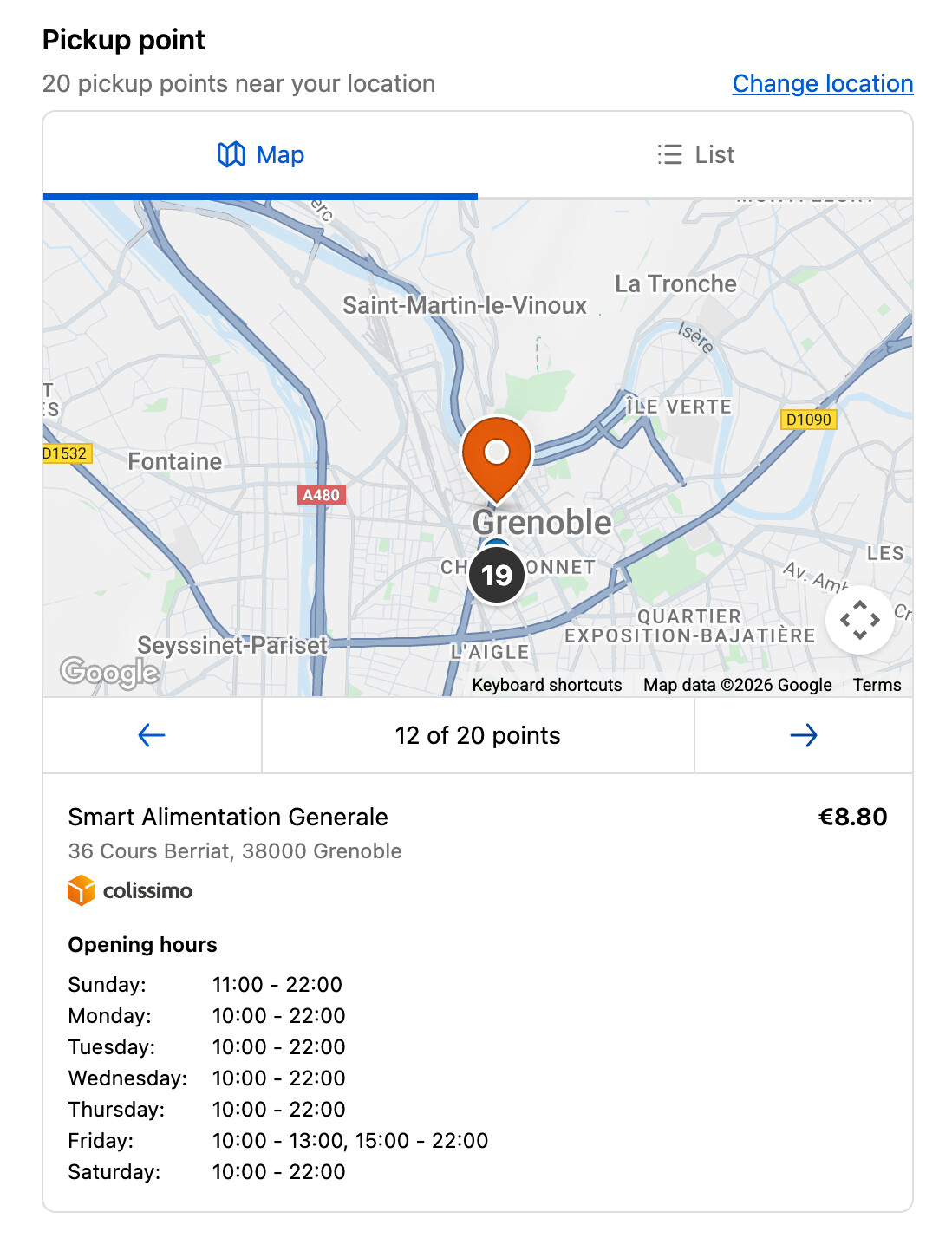
The old React View had a position property for absolute/relative/sticky positioning. Used this for overlaying UI elements like floating a pickup point selection card over a map. The new Box doesn’t have positioning at all. Is there a recommended pattern for this or another component I should be using?

The @container syntax for responsive values is confusing and seems incomplete. I’m trying to do conditional border styles like border="@container (inline-size > 500px) base, none" but TypeScript errors out. Can’t figure out the right syntax or if certain properties just don’t work with container queries. The old Style.default().when() helper handled everything seamlessly - is there better documentation on what works with @container?

There’s no clear list of what got removed in the migration. I keep discovering things by breaking my app - like <Map> lost the onZoomChange callback. Would really help to have a migration guide that calls out removed features instead of finding out through trial and error.

Anyone else migrating checkout extensions and hitting similar issues? Any workarounds for overlays without position support? Really excited about where this is going but need some guidance on these gaps.

Hey @Patrick_Jakubik thank you for the detailed feedback. We’ll look into getting a more robust guide up for partners that shows what has changed between 2025-07 and 2025-10.

For Box we currently do not support position, that’s right. We’ll take this feedback into consideration. I think for your Map example you could make use of Popover with MapMarker to create similar functionality or move the pickup point selection card to outside the Map altogether.

For @container we currently do not support conditional border styles. Please reference the docs or types to see what props are currently available for use on container queries (for example for inlineSize you’ll see the MaybeResponsive generic, but with border you won’t)

Thanks for the quick reply, Jun.

Having position support would be huge for us. We tried Popover early on but it doesn’t work for our use case - it opens where you click, which isn’t mobile-friendly. The standard pattern (like maps.google.com) shows details in a sidebar on desktop or bottom sheet on mobile. Without positioning, we can’t implement this UX that users actually expect.

I understand you’re consolidating APIs, but from our perspective this update creates a lot of migration work while actually removing functionality we rely on. Building checkout extensions that work well on mobile and desktop is already extremely challenging. Losing tools like positioning and callbacks makes it harder, not easier. What’s the benefit to us as extension developers?

On a practical note - can we do partial migration? We’ve built admin extensions on 2025-10 that are ready to ship, but we can’t launch them until the checkout migration is complete. Right now mixing 2025-10 (Preact) and 2025-07 (React) extensions in the same project throws CLI errors. Is supporting mixed API versions something you’re planning to enable?

I really do appreciate the direction with unified Polaris components - it’s cleaner when it works. Just need clarity on how to bridge these gaps without degrading our user experience.

Hey @Patrick_Jakubik - just realized there’s a new onViewChange callback that should have location and zoom available on the event and replace onZoomChange and onCenterChange. Please test that and let us know if that works. As for partial migrations/having a single app that has different extensions targeting different API versions, this should be doable. Can you share the CLI errors you’re seeing and provide some context around the app that’s being migrated (e.g., is it a remix app, does it use js or ts, etc.)?

Thanks, I already saw onViewChange but zoom is always undefined on the event - only location seems to be available.

Still getting used to the new event format too - they have a lot of data but the types seem inaccurate.

Regarding the CLI errors: I’m using following packages:

@shopify/cli 3.85.4
@shopify/ui-extensions-react 2025.7.1
@shopify/ui-extensions 2025.10.2

There is no 2025.10 version of React package. On our main branch (without any updates to 2025-10 besides the ui-extensions package), I get this output from CLI when running dev command:

As you can see, checkout and POS extensions are failing with “No matching export” errors, while admin extensions and functions build fine.

We have a Node/TypeScript pnpm workspace monorepo with all extensions in one package (TypeScript).

Hey @Jun-Shopify, I wanted to follow up on this.

I’ve successfully resolved the Shopify CLI issues and made progress with the partial migration. However, I’m now stuck on our last extension - which is the most critical one for our app - because it relies on functionality that was removed in the 2025-10 release (specifically, absolute positioning and StyleHelper).

Just to recap, on 2025-10:

  • I’m unable to position the selected pickup point box in the top left corner on desktop and at the bottom of the screen on mobile
  • I’m also unable to implement autocomplete suggestions

I wanted to check if there are any plans to address these limitations in upcoming updates? Maintaining the current extension UX is really important to us - please see screen recording. We’re a public app with many Plus merchants who specifically value this experience.

Hey Patrick, sorry for not getting back to you with a response earlier. We made the decision to stop supporting absolute positioning because its inappropriate use, led to issues. In the absence of that, there’s no way for you to reproduce your exact UI, right now. For now, there are a few alternatives we would recommend:

  1. To solve both the autocomplete and marker problems at once you could: split the modal you have into a 2-column layout. One side would have the search bar, search results as well as the marker details, while the other side will have the map. This is very similar to maps.google.com and would address both the marker and autocomplete gaps. See image below for example:

  2. For the marker alone, besides option 1, you could consider following the pattern we use in our native Pickup Point feature and show the marker details below the Map on both large and small screens, or use the existing popover component inside the Map. See the image below for an example:

  3. For the Autocomplete alone, besides option 1: your other options here would be to either just render the results above the Map such that either the Map gets pushed down or reduced in size (e.g: using 1fr height within a Grid to take as much space as possible). Or settling for just a search feature until we provide an autocomplete component.

In the long term we plan to update component library, so your original experience is possible, but we don’t have a timeline for those improvements yet.

Hello, allow me to share my experience on the subject.

I have, so to speak, run into the same problem as Patrick_Jakubik while I was migrating my checkout extension, which aims to display a map with a list of pickup points in a modal.

The fact that this card is displayed in a modal is essential in our view for the user experience, because displaying it directly in the delivery method section makes the card too small.

But as mentioned earlier in this discussion, placing the map in a modal is a technical challenge with serious limitations for responsive design. By using the <s-modal> component with the size attribute set to max, the modal has dynamic dimensions relative to the user’s screen. However, I’m having a lot of trouble making the modal’s content fill all the available space with a structure similar to Google Maps (i.e., one column with the list of points on the left and the selected point, and a second column with the map). Unless I’m mistaken, the only solution I’ve found is to specify a fixed size in pixels in the <s-scroll-box> component to scroll only my list of points and not the entire modal.

This is roughly the layout I came up with, but the result is rather mixed:

<s-grid
    gridTemplateColumns="1fr 2fr"
    display="@container (inline-size > 777px) auto, none"
>
    <s-stack>
        {/* wanted to wrap with a s-scroll-box here, but without a fixed px value it's not working */}
           {/* pickup points list component */}
        {/* </s-scroll-box> */}

        {mapSelectedPickupPoint ? (
            {/* selected pickup point component */}
          ) : (
            <></> {/* nothing if no selected pickup point */}
          )}
   </s-stack>

   <s-stack>
       <s-map
            apiKey={googleMapsApiKey}
            latitude={parseFloat(
              pickupPoints[0].coordGeolocalisationLatitude,
            )}
            longitude={parseFloat(
              pickupPoints[0].coordGeolocalisationLongitude,
            )}
            zoom={13}
            minBlockSize="100%"
            maxBlockSize="100%"
            accessibilityLabel="Map showing pickup locations"
       >
            {pickupPoints.map((pickupPoint, index) => (
              <PointMarker
                key={index}
                pickupPoint={pickupPoint}
                onPress={() => {
                  setMapSelectedPickupPoint(pickupPoint);
                }}
              />
            ))}
       </s-map>
   </s-stack>
</s-grid>

So, the problem I’m having is that if my first column, containing the list and the selected item, isn’t the same height as or greater than the modal’s height, I end up with a large white space below my content. I’ve tried several different layouts and playing around with the various component attributes, but without success. If anyone has a solution, I’d be very grateful!
Here is a screenshot of how it looks in the extension:

Thank you!

@Patrick_Jakubik @Osaru @Jun-Shopify

Hey folks, as a developer, I wanted to take a moment to echo some of Patrick’s thoughts.

Almost 6 months later, there still isn’t a proper migration guide that actually outlines the features/functionality that have been dropped. This is a pretty big oversight and definitely makes for a poor DX.

The decision to stop supporting something as fundamental as position:absolute because of its “inappropriate use” is honestly…ridiculous. I understand wanting to implement guardrails, but dumb devs are gonna do dumb things, and removing core functionality won’t protect them, it’ll just limit the rest of us.

I’ve been developing on Shopify for several years now and the experience has been frustrating to say the least. Things often don’t work as expected, and like Patrick mentioned, the onus is often on us developers to figure it out via trial and error. And more often than not, even after we bring it to your attention, absolutely nothing done about it.

My dudes… please listen to the community and add back core functionality like position:absolute.

Aaron nailed it. We’re still stuck on 2025-07 six months later with no viable path forward.

The decision to remove position:absolute because of “inappropriate use” goes against what the web platform is fundamentally about. The web is open by design. Developers should be free to build creative, differentiated experiences - even messy ones. The more constraints you impose, the less room there is for innovation, and eventually every app ends up looking and working exactly the same. At that point, what’s the value of extensibility?

Merchants - especially Plus merchants - are paying serious money to extend their checkouts. We can’t go back to them and say “the UI extension that’s been working great for years now needs to look worse because of a platform update”. Updates should make things better and more open over time, not take capabilities away.

I understand the desire to prevent misuse, but the right approach is documentation and guidance - not removing core web primitives. position:absolute isn’t some dangerous hack, it’s a fundamental CSS property that every web developer relies on.

We need position support back, or at the very least an honest acknowledgment that checkout extensions are now more limited than they were a year ago.