Sales channel app and accessing orders from other channels

We have a Sales channel app that helps customers create fundraisers on raisewave channel and sell special fundraising products only on this channel.

Some of our customers are asking to create fundraisers on their own online store instead of a separate channel but the challenge is that our sales channel app doesn’t have access to orders on the online store or any other channel than our own. I believe the flag “read_only_own_orders” is enabled on the backend for us.

Now I am trying to figure out we can get access to the read_orders scope as I am hoping to solve for this use case through one fundraising app rather than building another fundraising app for customers who want to keep the fundraising on their store..

Anyone run into this issue ?

Mirvise

Hi @Mirvise,

You should be able to add the read_orders scope to a Sales Channel App, just like any other Admin API access scope, though after you add the scope and the merchant approves it’s use, you will have to request access to protected customer data to be able to request orders via the app.

How you add the read_orders scope, will depend on the installation type that your app uses:

Here’s some documentation on requesting access to protected customer data as well:

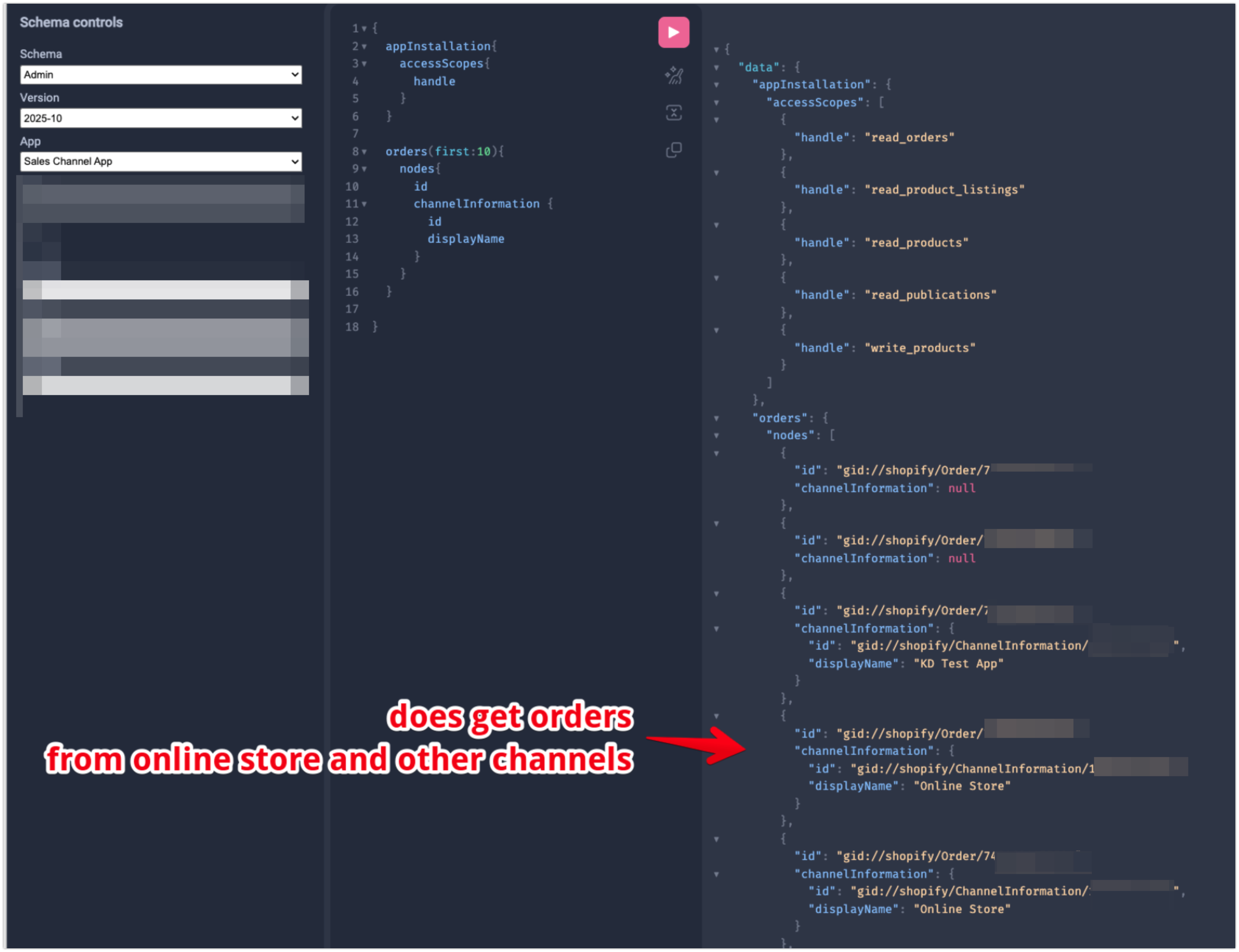
I can confirm that I tested this further with my own Sales Channel App on a test store, and after I added the read_orders scope, and requested access to protected customer data, I was able to retrieve orders from the Online Store Channel successfully.

Thanks Kellan for the quick reply!

Just to confirm, so your Sales Channel App had the “read_only_own_orders” flag enabled on it and then you added the read_orders scope to it and it all worked?. The read_only_own_orders did not block the other channels, eh?

Will test this out and confirm with you!

Thanks again

Hi @Mirvise,

I do apologize, though after reviewing this further this behaviour you’re seeing is actually expected. The read_only_own_orders scope is added during the App Store review process, and it is expected that Sales Channels do only access their own orders, as described in the Checklist of requirements for apps in the Shopify App Store documentation.

Note: As of March 9th, 2020, all sales channels (with the exception of mobile app builders) must have the read_only_own_orders scope applied. The read_only_own_orders scope is added by the review team during the approval process and ensures that a channel can read only the orders it created. Make sure that your channel is requesting only orders it created for a faster review and approval.

I was able to use the read_orders scope on my test app, as it hasn’t gone through the full App Store review process yet, since it is just for testing.

I do see that there is exceptions for Mobile App Builders, and I’ll be checking with our App Store team if there are any other possible use cases for an exception. Otherwise you could look into creating a secondary app to manage fundraisers in general, with the Sales Channel app specifically for publishing products to your platform, and processing orders for customers coming from your external platform.

1 Like

Thanks for confirming.

Yeah, we are a unique case because some brands have special fundraising products that they only want to sell through another platform and don’t want to mix it with their own online store.

Some brands want to run fundraisers only on their online store because they want to use all their other apps, carts, and theme.

I am trying to avoid building two different apps for the same fundraiser use case. It will be great if we could also get access to online orders (that’s the only channel we need), so that we can track if a fundraiser on their website results in a sales so we can attribute it properly.

Thanks

How deep, or interactive, in the other orders does it need to be.
Could be as simple as having merchant set a webhook
https://help.shopify.com/en/manual/fulfillment/setup/notifications/webhooks
also see custom fulfillments for mail scenarios

There’s providing a shopify-flow task merchants can choose to use to forward data to another downstream process ; or even more advanced like order edits.
Alternative pursue code/integrations with other non-free apps/services that process orders or can do general automations like mechanic or zapier.

Not counting other things like web-pixels depending on your attribution-tracking needs.

Hi @Mirvise and @PaulNewton,

I’ve discussed this with our App Review Team further, and we have confirmed that there are no possible exemptions to the read_only_own_orders requirement for Sales Channels, other than for Mobile App Builders in particular.

We discussed the manual webhook workaround that @PaulNewton mentioned as well, asking the merchant to create a manual webhook via the Shopify admin, and we have confirmed that this would go against our App Store Requirements as well, as it is technically attempting to bypass the read_only_own_orders requirement for Sales Channels.

However we do recommend the workaround of creating a secondary app to manage fundraiser products and to retrieve and manage orders from all sales channels, and have the primary sales channel app specifically for publishing products and processing checkouts from your external platform. This would not go against our App Store requirements as it is creating a whole new app with a separate purpose from the Sales Channel app, and is able to request the correct and necessary scopes to access the needed orders, with merchant approval through the api permissions.

I do understand this may not be ideal for your use case at this time, and I will be submitting some feedback internally that you would like to see the ability for Sales Channel apps to request access to orders from other channels. And while I can’t guarantee it will be added in the future, I can assure you that our developers and product managers do take all our partner and merchant feedback into great value when determining future changes and updates on the platform.

1 Like

They’re both order apps to the same destination for the same purpose.
How does the investment of purposefully made app-store* app not create a catch-22 with the duplicate/multiple apps rule.

Meanwhile a merchant choosing where to send THIER data with a CONFIGURATION somehow creates a greater conflict for something an app isn’t even responsible for. store settings

:foot: :water_pistol: :collision: That there is an unintuitive landmine for someone to walk into during review, or worse after the fact, a process that wont care about this discussion and could action the partner by the letter of the law as written.

is this exacerbated? by it not being easy to have non-public custom apps for multiple stores , so app-store dupe rule is n/a

What about merchants hypothetically using permalinks to bridge this?
They’d have to do/get theme customizations, or ?app theme-extensions:thinking: ?, to build the link instead of /cart.
Technically the attribution would be arguable for it’s context but be correct for it’s business goal.

Then it’s a matter of access too???
And or would that trigger any rules conflicts for sales-channels?

Hi @PaulNewton

I appreciate your feedback and concern and I have shared some feedback internally regarding this. As mentioned I have discussed this behaviour with our App Store Review team who confirmed and recommended what I shared above specifically.

Regarding your concern with multiple apps, I did confirm with the App Store Review team that there is no actual restrictions that an App (Sales Channel or otherwise) does not have any secondary app’s that work along side it. The only actual restriction for that is with Payment Extension Apps specifically, that are only allowed to use the Payment API and can’t require any secondary apps to bypass this requirement to make Admin API calls for example.

Regarding the webhooks subscribed via the Admin. The concern isn’t with the merchants creating webhooks, its with a public App Store App, requiring the merchant to create a webhook specifically to bypass the read_only_own_orders scope with the Sales Channel, in order to receive orders that the app should not have access to in the first place.

This is why we recommend to use a second app that does have the correct read_orders scope, is not a Sales Channel in itself, and allows for App Review and Merchant approval of scopes used, and these apps can work together in tandem without concern.

Regarding permalinks, we do actually recommend that Sales Channels use either permalinks or Storefront API / Storefront API powered SDKS to create the orders. If created via permalinks, they can attribute the order to their sales channel by adding a Storefront Access Token to the permalink parameters, as described in the Shopify.dev documentation.

Multiples are literally in the guidelines as Prohibited, with no carve out exemption for companion apps.
Nor specification it applies only to payment-extensions; which seems a thing more related to checkout bypass so makes me think a bunch of wires could be getting crossed; confusing :face_with_spiral_eyes:.
https://shopify.dev/docs/apps/launch/app-requirements-checklist#13-sales-channels:~:text=Multiple%20apps%20with%20overlapping%20functionality%20created%20by%20the%20same%20Partner

:clipboard: There’s a difference in my ask to scrutinize carefully when the meta is about avoiding bypass quagmires.

To clarify, I’m talking about permalinks NOT being created in/on the sales-channel or that sales-channels platform.
But creating permalinks OUTSIDE of the sales-channel on the merchants storefronts to attribute orders to the sales-channel.
Not necessarily facilitated by the sales channel providing theme tools.
I’m pretty sure this is supposed to be allowed but the gotcha’s here are high and the rules list is veeery long now.


I 100% agree with the position on avoiding 3P’s forcing merchants to set up webhooks.
And yet per the guidelines

The read_only_own_orders scope is added by the review team during the approval process and ensures that a channel can read only the orders it created

That’s only for the channel to read through the app surface itself, for the approval process, in no way does that clarify merchants hooking up their data to an api[1] would trigger some unspoken bypass rule that applies to the sales-channel alone.
Importantly nor is there an escape hatch for merchant choice.
This really should read as 3P’s sales channels, ?public apps? , cannot force webhook ONLY integrations.
If that’s the unspoken rule with consequences/enforcement it should just be a rule.

Then it should pass on to merchant responsibility when it comes to forwarding data; since webhook config in the admin doesn’t have filters; like the api does.

:knot: :scissors:

[1]there’s also a similar gotcha issue on like free item apps creating orders confusingly triggering checkout bypass rules; public apps afaik

scratchpad, other work around from the available moving parts:
:technologist: sales-channel creates order > merchant dupes order > discounts order > permalink w/ attribution > ??? > sc order > profit?

Hi @PaulNewton,

Thank you again for the feedback, all feedback we get is valuable for our future updates to our platform and any regulations or terms, and while I will be sharing all feedback from this thread internally, I can’t guarantee if it will result in any immediate change, though I can assure you that it is heard and valued.

Please do note that with all of the points above, I have discussed them in detail with our App Store Review Team which is directly in charge of enforcing these regulations and restrictions, and confirmed everything I stated as true.

The requirement that you are referring to is specifically for duplicate apps, not multiple apps. This means that App developers can create companion apps as long as they do not have the same functionality as the original app. The direct quote from the App Store Requirement documentation is clear about this definition.

Multiple apps with overlapping functionality created by the same Partner - App must not be identical to other apps you’ve published to the Shopify App Store.

This means that as long as the companion app is not identical and does not overlap with the original app, it is fine to have multiple apps for use. In the example we were originally discussing with @Mirvise’s fundraiser app, to ensure it’s not a duplicate app with overlap they could structure it like so:

  • Sales Channel App:

    • Manage user account connection with the external platform
    • Manages product publishing on the Sales Channel for products sold on the external platform
    • Syncs updates to product feed to the external platform
    • Creates orders via permalink or Storefront API/SDK
  • Companion App:

    • Manages and updates fundraising product and variants on Shopify (does not handle product publishing)
    • Manages orders created from all sales channels (does not create orders)
    • Manages analytics and fundraiser information

With an example like this we can see that the apps are not identical and do not have overlapping functionality, and thus would be valid and eligible with our App Store Requirements, API and Partner Terms of Services.


Regarding the use of permalinks to attribute non-Sales Channel orders to the Sales Channel.

To attribute a permalink cart to a specific sales channel, you would need to add the sales channels access token to the permalink parameters. Other apps and sales channels would not have access to the Sales Channel app’s access token by default, and you’d have to use Theme App Extensions to add a permalink to the storefront directly through your own app.

However I have also discussed this with our App Store Review Team, and they did confirm that doing this would result in a failed App Store Review, as we would consider it as a bypass of the read_only_own_orders requirement, since the intention is specifically to grab information from orders that did not originate from their Sales Channel, instead originating from the Online Store Sales Channel.

They have confirmed again, that the best way to do this would be with a companion app as mentioned, and other attempts at workarounds would be considered against the App Store Review requirements, as long as they are intentionally trying to get information from orders not originating from the Sales Channel directly.

The same goes for the webhooks, we are not restricting merchants from adding webhooks as they wish, but if the Sales Channel app requires the merchant to add a webhook specifically for the intention of bypassing the requirement mentioned above, it would also result in a failure of the App Store Review.

TLDR:

  • As long as the Sales Channel App is trying to get data from orders that were not originated from the external Sales Channel platform, it would result in a failure of our App Store Review.
  • The only way to workaround this would be with a non-Sales Channel companion app that is allowed to retrieve the data from all orders on the store, regardless of where they originated. Only displaying and managing these orders within the non-Sales Channel App specifically.
1 Like

Awesome, thank you for the granular comparison example waaaaay cleaerer.
As my example of duplicate was waaaay glossier A>B>C comparison of what would be risky by just comparing goals e.g. "“order apps to the same destination for the same purpose”.

The permalink/webhook thing I get the logic but not very intuitive.

No need to reply.

1 Like

Thanks everyone for the input and @PaulNewton especially for advocating on our behalf.

It’s unfortunate that we cannot use the workaround i.e. customer webhook. Building a separate app for customers to run fundraisers on their own store is a bit of a janky experience and not something we would be interested in supporting at the moment as we would have to support a whole other app, not to mention all the backend operations including customer support and marketing of two different apps vs one.

Hi @Mirvise,

I appreciate your understanding with the limitations discussed here, and I completely understand your concerns with the workaround provided and how it might not be ideal for your use case.

While I can’t promise immediate change in this policy, I can assure you that I have submitted feedback on your behalf internally regarding the need to access 3rd party orders from sales channels, and our developers and product managers do take all of our partner and merchant feedback with great value when determining future platform updates and changes.

I do understand if the limitations here would be too much work to justify the update, however I can offer some concessions for your concerns as well.

Regarding the need for extra customer support and marketing for 2 apps vs one. I would recommend the following to help alleviate this.

  • Have the main app be a Listed Public app that you are focusing your marketing efforts on.

  • Have the secondary app be an Unlisted Public app, meaning that only merchants with a direct link to the App Store Page can install it. The App Store page wouldn’t be indexed by Google or other crawler bots, and can’t be found by searching the App name in the App Store, it would only be accessed by those with a direct link provided by you.

  • When a merchant installs the second app, it adds a Shop Metafield that is used to indicate to the main app if the second app is installed or not

  • In the main app have a UI section that does the following:

    • Checks if the secondary app is installed on the store, by checking for the Shop Metafield
    • If the secondary app is not installed, provide a link to the App Store page to install it
    • If the secondary app is installed, provide a link to the second app’s UI for fundraising/order analytics or any other functions that can’t be done in the Sales Channel app.

Hi @Mirvise,

I just wanted to follow up and see if we were able to answer all of your questions here?

I understand that these limitations are not ideal for your app development, and as mentioned I have submitted feedback internally regarding this. But if there’s anything else we can help you with here please let us know, otherwise we can go ahead and mark this thread as solved for now.