Hi everyone,
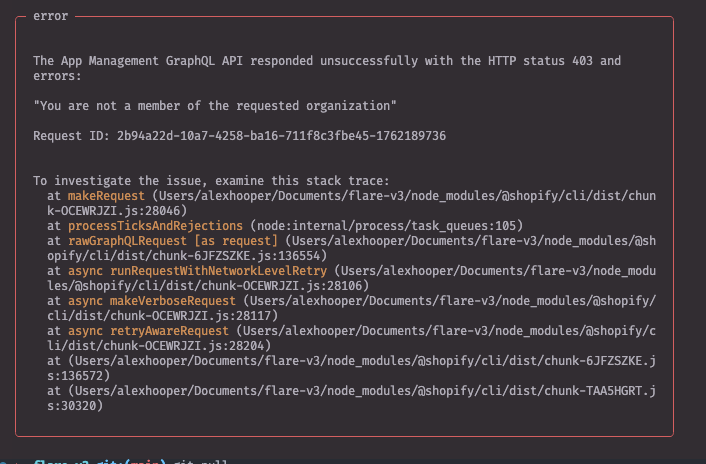
I’m running into an issue with the Shopify CLI that started today. I follow the usual flow from the `shopify app dev` docs, but the command now exits with a GraphQL 403.
Environment
-
macOS Sonoma (Darwin 23.0.0)
-
Node.js v23.1.0
-
Shopify CLI @GovRayt/cli 3.84.2
-
Remix app created from the standard Shopify template; no local code changes since the last successful run
-
Migrated over to the new Dev dashboard / extensions weeks back (no issues since migrating up until today)
Steps
-
Log into the CLI with shopify login --shop .
-
From the project root, run shopify app dev.
Observed result
The command aborts almost immediately with:
GraphQL Error (Code: 403): {"response":{"errors":"Cannot find a valid organization associated to this shop","status":403,"headers":{}},"request":{"query":"mutation DevSessionCreate($appId: String!, $assetsUrl: String!) { ... }","variables":{"appId":"169072558081","assetsUrl":"https://partners-extensions-scripts-bucket.storage.googleapis.com/.../source.br?..."}}

    at makeRequest (…/node_modules/@shopify/cli/dist/chunk-OCEWRJZI.js:28046:11)

    ...
What I’ve tried
-
shopify logout followed by a fresh shopify login
-
Re-ran the command from a clean shell session; same result every time
Nothing changed in my app or partner setup between the last successful run and today. The error makes it sound like my dev store is suddenly detached from any organization, but I can still see it under the correct Partner account.
Has anyone seen this 403 when creating a dev session? Does it indicate an issue on Shopify’s side, or is there something I need to re-link in my partner organization or app config? Happy to provide more details if needed. Thanks!