Here are some additional troubleshooting steps I have already tried:
Logged out of the CLI and back in
Restarted my Computer
Updated CLI to the latest version
Repeated the issue on multiple stores and themes
I’ve never had this issue before. It just started this morning and from what I can see, nothing has changed in my theme or on my system since it last worked.
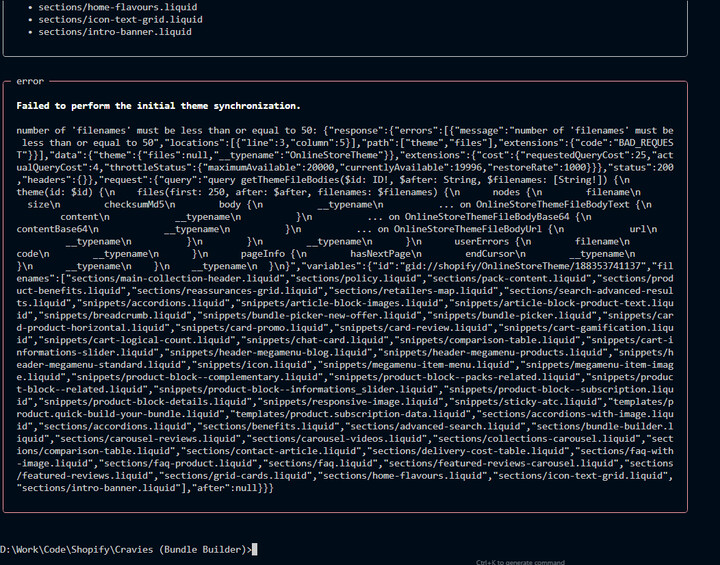
I can’t copy what is being shown in the CLI but I was able to take some screenshots. As you can see, I’m getting a lot of Synced and Overwritten liquid files throughout my theme and it’s just the same files over and over again, every once and a while, I’ll get the Throttled error message but I’m sure it’s because it sees me overwriting way too many files. Does this help @AlokSwamy ?
Hmm it looks like there is a massive difference between your remote theme (uploaded to Shopify) and what is there locally on your system. The overwrite should only happen when the checksum between the local version and the remote version differs.
To test out what is the difference, in a separate directory, could you do shopify theme pull and pull the latest files that exist, then run shopify theme dev. Let me know if it still does the overwritten message.
Another question: Do you have a build system that “compiles” liquid files. There could be a “war” between the files you generate from that build system, and what files exist remotely.
Both good questions and things I think I’ve already ruled out. I work on this theme every day so they should be pretty close to in sync but just to be sure, I did try the theme pull and then dev with the same result. Also, even if my local theme was massively out of date, I wouldn’t then see it syncing and overwriting the same files in a loop. In theory, once it updated that file and moved on, it wouldn’t then sync it again, right?
Also, I thought it might be an issue with the single theme I’m working on so then tried with a few of the other stores I manage and found the same thing there. The chances of all these themes being out of sync is really remote but was worth a shot.
And no, I don’t use any other kind of compiler or anything else that would be battling against the CLI. I do have the theme connected to a GitHub repo so thought initially that might be coming into play but even with that turned off, same issue.
I was hoping it was either an issue with the Shopify server or maybe a problem with the latest version of CLI and that other people were having the same issue. I just thought it strange that this started all of a sudden today. I’ve been updating some of these themes for many years and have never had this issue. Really strange.
Only the latest version of CLI has the ability to rewrite local files when running theme dev, but should only do it when it notices checksum issues between local and remote. The only way this can break is if the checksums never are the same. Maybe there is an issue with how local checksums are calculated since you’re on a Windows machine. I will need to look further into this. Thanks for notifying. CLI version <3.87 should not have this issue.
For bigger file count on a theme with latest 3.87.0 shopify cli it fails to synchronize.. Must downgrade to run theme dev at all on these repositories. npm uninstall -g @shopify/cli npm install -g @shopify/cli@3.86.0
For me, as soon as i encountered this issue and downgraded first time, it still persisted this error. Until i downgraded to 3.69.0 it kept happening for the whole day even with older cli versions and on top of that for all repositories (even fresh ones with Dawn), which was very weird. That’s why i didn’t know what to do. Was this cache or?
I’m also getting the same issue it started today randomly, no clue why its happening.
Also this is off a clean theme init on the skeleton theme so maybe its an issue with the latest version of the cli?? I think it happened right after upgrading to the latest version.
Me as well. Same issue. Windows 11 with latest version of CLI, started happening right after upgrading to the latest version. I downgraded to the previous version and it worked fine.
I use –theme-editor-sync quite often, I thought it might just be that command, but it was shopify theme dev itself.
I just want to say that it feels like the Shopify CLI dev team is always surprised when there’s issues with their system not working on Windows 11. I get it, Windows is a total pain in the butt, but it’s still a significant enough portion of the dev community, it would be great if the dev team over there could do rigorous testing on Windows 11 before pushing the new update to CLI. It causes a headache on our end, slows us down, creates confusion, and forces us to waste time trying different techniques to fix it, as if the issue is on our end.
Same experience here. It worked fine yesterday. After running npm install -g @shopify/cli@latest and then running shopify theme dev, it began hammering the API nonstop with messages like overwritten, sync, overwritten, sync....
Update:
I was not sure what version I had before, so I rolled back to 3.70.0.
Rolling back to 3.87.0 as @eyyMinda suggested did get back up and running. Thank you for confirming it’s not just me. I’m going to avoid updating back to the latest until Shopify gets this sorted. Would be nice if someone from Shopify responds to this thread when they do.
Hey @AlokSwamy update works smoothly thank you! To add, not sure if this helps anything, but it seemed that for me the issue was it was detecting different line endings:
My problem/solution:
When running shopify dev I get the following error. This matched the users screenshot from above mostly, however this happens immediately after running dev and he may have missed it after it outputted the file names repeatedly.
Error: “The following Liquid files were updated locally and remotely”
Then listed 10 or so files.
I ran this command in terminal to normalize line endings:
find . -name “*.liquid” -type f -exec sed -i ‘’ ‘s/\r$//’ {} ;
”Removes carriage returns (\r) at the end of lines, converting:
CRLF (Windows: \r\n) → LF (Unix: \n)
So it normalizes line endings to Unix-style (LF).”
After running this command, the list of files that appeared in my staged/diff interface were the same files that cli ouputed as being “updated locally and remotely”




 There has been a patch release fixing the issue for