Issue Summary:
I’m experiencing inconsistent behaviour with Shopify’s GraphQL API when querying customer data. The
same query returns proper customer data for repeat customers but randomly returns empty arrays for
new customers, causing downstream logic failures.
GraphQL Queries Used:
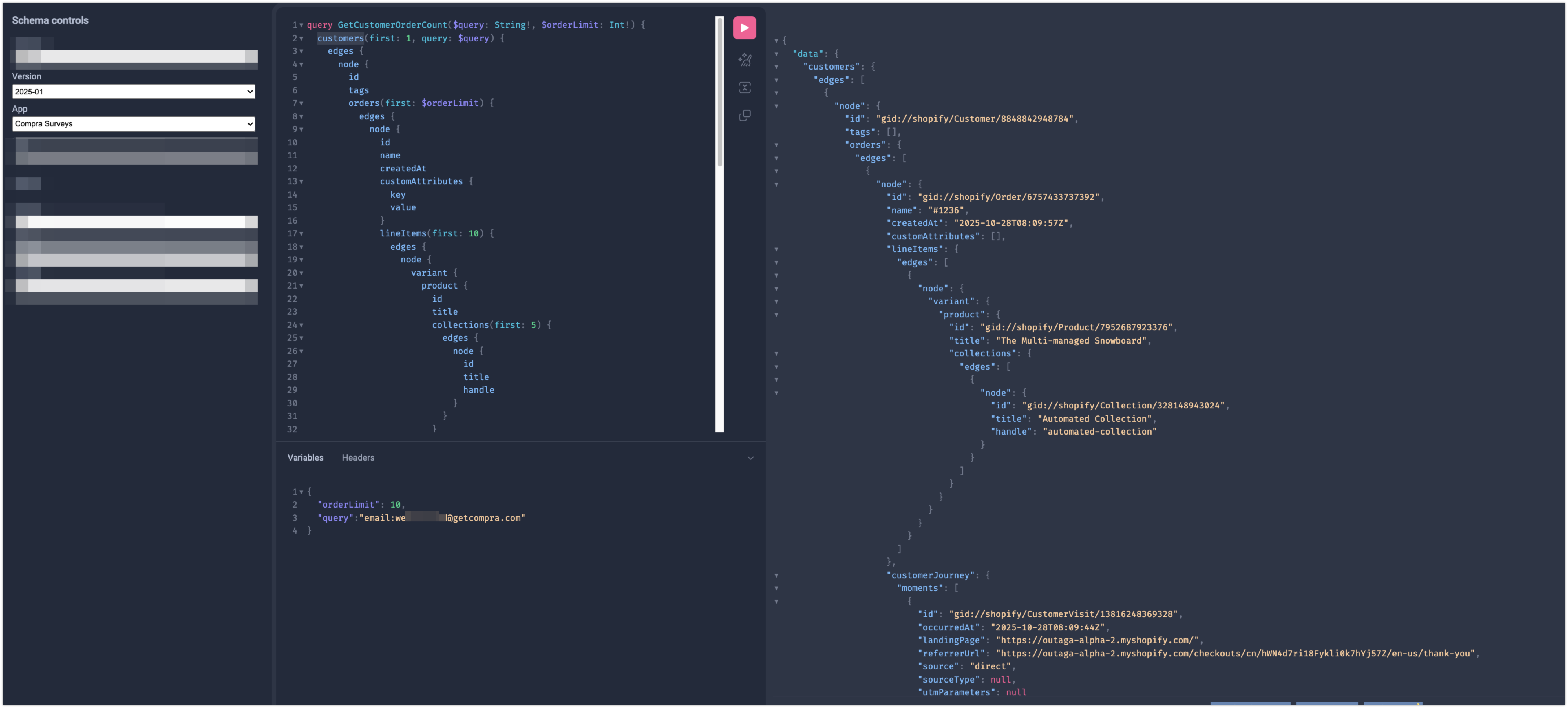
Query by Email
query GetCustomerOrderCount($query: String!, $orderLimit: Int!) {
customers(first: 1, query: $query) {
edges {
node {
id
tags
orders(first: $orderLimit) {
edges {
node {
order fields…
customerJourney { /* journey data */ }
}
}
}
}
}
}
}
Query by Order ID
query GetCustomerByOrder($orderId: ID!, $orderLimit: Int!) {
order(id: $orderId) {
customer {
same customer fields as above
}
}
}
Problem Pattern:
- Repeat customers: Consistently returns { customers: { edges: [Object] } }
- New customers: Randomly returns { customers: { edges: } } (empty array)
Questions:
- Is this a known limitation for newly created customers?
- Are there specific timing constraints after customer creation?
- Is there a recommended retry strategy for new customer queries?
- Should we implement different query patterns for new vs existing customers?
Environment:
- Using Shopify Admin API 2024-10
- Queries executed via authenticated GraphQL endpoint
- Issue occurs across different stores
Any guidance on resolving this inconsistency would be appreciated, as it’s affecting our customer
segmentation and survey targeting accuracy.
Hi @sameergshah,
We can certainly help look into this further, can you provide us with an x-request-id from the HTTP Response Headers for an API call that didn’t return a customer as expected?
Hi @sameergshah,
I’m just following up to see if this issue has been resolved on your end, and if not if you can provide us with a x-request-id for us to help look into this further!
‘X-Request-Id’: [ ‘313bcc9c-eebd-4bdf-9c82-bcdc938ce38a-1761638997’ ]
Here is the requestId
here is the empty response
data: { customers: { edges: } }
Hi @sameergshah,
I’ve looked into this further with the x-request-id provided, and I’m not seeing any specific errors occurring in the logs internally that would explain this behaviour.
Additionally I was not able to replicate this behaviour on the store and app in question, running the exact same query from the app returned the expected customer data.

I do see that the customer does have an order returned, and you mentioned this was only occurring for new customers only.
I tried to replicate this on my own test store as well, and I was still able to get the expected customer data returned, with a brand new customer just created without any orders placed.
One thing I noticed in the logs when invesitgating this was that the API version you called was 2024-10, which is now fully deprecated, and you should be using 2025-01 or later.
If you can please try to replicate again with a supported api version 2025-01 or later, and if the issue still occurs we will need you to reach out to our Shopify Support Team via the Shopify Help Center so we can look into this in further detail, and discuss the behaviour with our developers internally if needed.
If you are able to replicate this behaviour again, please do reach out to our Support Team as mentioned, with all of the following details from a new API call.
- The full plain text HTTP Request, including URL, Body, and Headers (no access tokens)
- The full plain text HTTP Response, including Body and Headers
https://drive.google.com/file/d/14QipkyFj0yLrzH4Rkme4mGvHibLpH81h/view?usp=sharing**
- Overview**
We changed the API to the 2025-07 version but the issue still persists.For more context, We are a Shopify survey SaaS application that enables merchants to collect post-purchase feedback through embedded surveys. These surveys are displayed on two post-purchase pages within the Shopify checkout flow:
-
Thank You Page
-
Order Status Page
2. Functionality
When an order is successfully placed, and the customer is redirected to either of the above pages, our app dynamically injects a survey block.
This block determines which survey to show based on eligibility logic that depends on multiple parameters, including:
-
New vs returning customer
-
Product(s) purchased
-
Total number of past orders
-
Additional merchant-defined filters
-
Collections, location etc
3. Data Retrieval Process
To execute the targeting logic, our backend requires customer and order-level parameters from Shopify.
For this purpose, the survey block on the post-purchase page triggers a call to our backend API (eligible-api), which then makes a GraphQL query to Shopify to fetch the new vs returning customer data, order count and customer tags data.Issue Description
Observed Behavior
-
A test order is placed on the Shopify store.
-
After completing the checkout, the customer is redirected to the Thank You page.
-
The survey block attempts to load and triggers the eligible-api request to our backend.
-
Our backend, in turn, performs a GraphQL network call to Shopify to retrieve customer and order parameters as mentioned above.
-
Shopify responds with empty data (an empty array ) for new customers only. We get the relevant data for the returning customers.
-
Because of this, the targeting conditions cannot be evaluated
Unexpected Finding
When the exact same process is executed under network throttling (3G mode) using Chrome DevTools, Shopify returns complete and valid customer data, and the survey loads successfully.
This behaviour suggests a potential timing or data availability issue possibly related to when customer or order data becomes accessible via GraphQL immediately after checkout completion.Supporting Evidence
Attached is a file containing 10 GraphQL response objects captured during testing:
Each object includes the corresponding request timestamp, query parameters, and Shopify’s response for reference.Next Steps / Request for Clarification
We would appreciate Shopify’s guidance on the following:
- Is there a known delay or race condition in GraphQL data availability immediately after order placement?
Hi @sameergshah,
Thank you for this additional context, this does help explain what might be happening here.
You are correct in that this would be occurring due to a known/expected race condition with order creation and the Thank You Page.
It’s important to know that order creation is done asynchronously after the customer is redirected to the Thank You page. This means that in some cases the order won’t be created immediately when the customer is on the Thank You page, and if the customer is new, the customer object also wouldn’t be created.
This also explains why you’re not able to replicate the error when throttling your back end API requests, allowing the order and customer time to be created and indexed, and thus available to your API call.
A possible option you have to workaround this, would be with implementing a retry mechanism with your fetch method, where if the API call from your back end doesn’t return a valid order or customer object immediately, to retry the call until it does return the expected objects, up to a maximum amount of retries to prevent unexpected behaviours and ensure smooth customer experience. If the call fails to return a customer object after retrying a number of times, you can then store the data on the order from the OrderConfirmationAPI on Checkout UI Extensions, that does provide a valid Order ID before the order is actually created. Then you can use this order id at a later time to get the created order/customer and handle as required.
This behaviour is discussed in our Shopify.dev documentation as well:
Note that for extensions on the Thank you page (target purchase.thank-you ), the order is not yet created when these extensions are displayed. However, the order id is available. You can use OrderConfirmationApi to obtain the order confirmation number, or the order id. Use the order id to uniquely identify the order, and to fetch additional information about the order using the GraphQL API after order creation is complete.
Hi @sameergshah,
Just checking up here to see if this helps answer your questions here, if so we can go ahead and solve this thread, otherwise we can absolutely help with any further questions!