The date is disabled but still can input
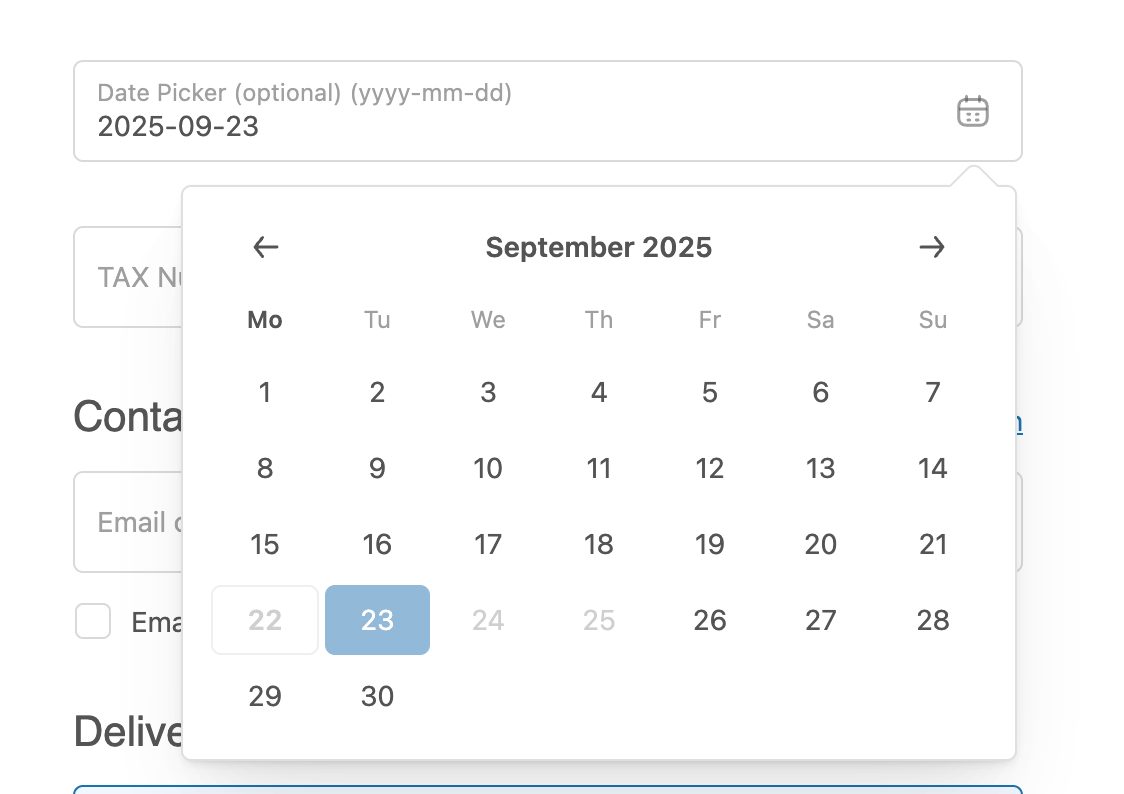
Package:
“ui-extensions”: “2025.1.0”,
”ui-extensions-react”: “2025.1.0”,
The date is disabled but still can input
Package:
“ui-extensions”: “2025.1.0”,
”ui-extensions-react”: “2025.1.0”,
Can you share the code you’re using where you’re setting disabled to true? It sounds like this previous issue but that was resolved last month.
Thank you for your response.
Here is the code I used for preview image above:
    <DateField
      label='Date picker (optional) (yyyy-mm-dd)'
      onChange={(value) => setSelectedDate(value)}
      onYearMonthChange={(value) => handleYearMonthChange(value)}
      disabled={['2025-09-22', '2025-09-23', '2025-09-24', '2025-09-25']}
      yearMonth={selectedYearMonth}
      value={selectedDate}
    />
Hi again - sorry for the delay in this, if you use a more recent version, are you still seeing this issue?
I updated to version 2025.04.1, and still have this issue.
However, I figured it out by using the readonly prop to disable input on the text field.