Hi. I launched my app on 6th October, after testing is carefully. I tested that a subscription and instance in my database is created + it is updated on plan changes and everything worked as expected.
Today, I wanted to onboard my first client. I am using the managed pricing, and made a private plan for this store. Yet, after I tested longer, I can’t figure why for this store I don’t get a webhook for the subscription create/update. I get these for my dev store where the test flag is on, but for a real client store I can’t get these webhooks.
shopify.server.ts contains the following:
// Webhook configuration

webhooks: {

APP_SUBSCRIPTIONS_CREATE: {

deliveryMethod: DeliveryMethod.Http,

callbackUrl: “/webhooks/subscriptions”,

},

APP_SUBSCRIPTIONS_UPDATE: {

deliveryMethod: DeliveryMethod.Http,

callbackUrl: “/webhooks/subscriptions”,

},

},
also, my webhooks.subscriptions.tsx is below:
import { type ActionFunctionArgs } from “@remix-run/node”;

import { authenticate } from “../shopify.server”;

import { SubscriptionService } from “../models/subscription.server”;

import db from “../db.server”;

export const action = async ({ request }: ActionFunctionArgs) => {

try {

const { topic, shop, payload } = await authenticate.webhook(request);

if (![“APP_SUBSCRIPTIONS_CREATE”, “APP_SUBSCRIPTIONS_UPDATE”].includes(topic)) {

return new Response(“Webhook topic not handled”, { status: 404 });

}

const webhookData = payload.app_subscription;

// Get the session for this shop to make GraphQL requests

const sessionRecord = await db.session.findFirst({

where: {

shop,

isOnline: false

  },

});

if (!sessionRecord) {

console.error(`No session found for shop: ${shop}`);

return new Response(“No session found”, { status: 404 });

}

// Fetch complete subscription data from GraphQL API

const SUBSCRIPTION_QUERY = `

  query getSubscription($id: ID!) {

    node(id: $id) {

      ... on AppSubscription {

        id

        name

        status

        test

        trialDays

        currentPeriodEnd

        createdAt

        lineItems {

          plan {

            pricingDetails {

              ... on AppRecurringPricing {

                interval

              }

            }

          }

        }

      }

    }

  }

\`;

const response = await fetch(

`https://${shop}/admin/api/2025-01/graphql.json`,

  {

method: ‘POST’,

headers: {

‘Content-Type’: ‘application/json’,

‘X-Shopify-Access-Token’: sessionRecord.accessToken,

    },

body: JSON.stringify({

query: SUBSCRIPTION_QUERY,

variables: {

id: webhookData.admin_graphql_api_id,

      },

    }),

  }

);

const result = await response.json();

if (result.errors) {

console.error(“GraphQL errors:”, result.errors);

return new Response(“GraphQL query failed”, { status: 500 });

}

const subscriptionData = result.data?.node;

if (!subscriptionData) {

console.error(“Subscription not found in GraphQL response”);

return new Response(“Subscription not found”, { status: 404 });

}

// Check if this is a renewal

const existingSub = await SubscriptionService.getSubscription(shop);

const isRenewal = topic === “APP_SUBSCRIPTIONS_UPDATE” &&

existingSub?.subscription &&

existingSub.subscription.status === “ACTIVE” &&

subscriptionData.status === “ACTIVE” &&

existingSub.subscription.currentPeriodEnd &&

subscriptionData.currentPeriodEnd &&

new Date(subscriptionData.currentPeriodEnd).getTime() !== new Date(existingSub.subscription.currentPeriodEnd).getTime();

console.log("DATA: ", subscriptionData);

// Update subscription in database with REAL data

await SubscriptionService.handleWebhookUpdate(shop, {

id: subscriptionData.id,

name: subscriptionData.name,

status: subscriptionData.status,

currentPeriodEnd: subscriptionData.currentPeriodEnd

});

// Handle subscription states

if (subscriptionData.status === “ACTIVE”) {

if (topic === “APP_SUBSCRIPTIONS_CREATE”) {

console.log(`✨ New subscription created for ${shop}`);

await SubscriptionService.resetUsage(shop);

  } else if (isRenewal) {

console.log(`🔄 Subscription renewed for ${shop} - resetting usage`);

await SubscriptionService.resetUsage(shop);

  } else if (!existingSub || existingSub.subscription?.status !== "ACTIVE") {

console.log(`✅ Subscription activated for ${shop}`);

await SubscriptionService.resetUsage(shop);

  }

} else if (\["CANCELLED", "EXPIRED", "DECLINED", "FROZEN"\].includes(subscriptionData.status)) {

console.log(`🚫 Subscription ended for ${shop} - status: ${subscriptionData.status}`);

await SubscriptionService.disableAccess(shop);

}

return new Response(“Webhook processed successfully”, { status: 200 });

} catch (error) {

console.error(“Webhook processing error:”, error);

return new Response(“Error processing webhook”, { status: 500 });

}

};
To further debug, I made this page in the app:
import { json, type LoaderFunctionArgs } from "@remix-run/node";

import { authenticate } from "../shopify.server";

import { useLoaderData } from "@remix-run/react";


export const loader = async ({ request }: LoaderFunctionArgs) => {

const { admin, session } = await authenticate.admin(request);

// Check webhooks

const webhookResponse = await admin.graphql(`

    {

      webhookSubscriptions(first: 20) {

        edges {

          node {

            id

            topic

            endpoint {

              __typename

              ... on WebhookHttpEndpoint {

                callbackUrl

              }

            }

          }

        }

      }

    }

  `);

const webhookData = await webhookResponse.json();

// Check subscriptions

const subResponse = await admin.graphql(`

    {

      currentAppInstallation {

        activeSubscriptions {

          id

          name

          status

          createdAt

          currentPeriodEnd

        }

      }

    }

  `);

const subData = await subResponse.json();

return json({

shop: session.shop,

webhooks: webhookData.data?.webhookSubscriptions?.edges || [],

subscriptions: subData.data?.currentAppInstallation?.activeSubscriptions || [],

appUrl: process.env.SHOPIFY_APP_URL

  });

};


export default function CheckWebhooks() {

const data = useLoaderData<typeof loader>();

const hasSubWebhooks = data.webhooks.some((w: any) =>

w.node.topic === "APP_SUBSCRIPTIONS_CREATE" ||

w.node.topic === "APP_SUBSCRIPTIONS_UPDATE"

  );

return (

<div style={{ padding: "20px", fontFamily: "monospace", maxWidth: "1200px" }}>

<h1>🔍 Webhook & Subscription Debug</h1>

<div style={{ marginBottom: "30px" }}>

<h2>Shop: {data.shop}</h2>

<p>App URL: {data.appUrl}</p>

</div>

<div style={{ marginBottom: "30px", padding: "20px", background: hasSubWebhooks ? "#d4edda" : "#f8d7da", border: "1px solid", borderColor: hasSubWebhooks ? "#c3e6cb" : "#f5c6cb" }}>

<h3>Status: {hasSubWebhooks ? "✅ Subscription Webhooks ARE Registered" : "❌ Subscription Webhooks NOT Found"}</h3>

</div>

<div style={{ marginBottom: "30px" }}>

<h3>📋 All Registered Webhooks ({data.webhooks.length}):</h3>

<pre style={{ background: "#f5f5f5", padding: "15px", overflow: "auto" }}>

{JSON.stringify(data.webhooks, null, 2)}

</pre>

</div>

<div>

<h3>💳 Active Subscriptions ({data.subscriptions.length}):</h3>

<pre style={{ background: "#f5f5f5", padding: "15px", overflow: "auto" }}>

{JSON.stringify(data.subscriptions, null, 2)}

</pre>

</div>

</div>

  );

}
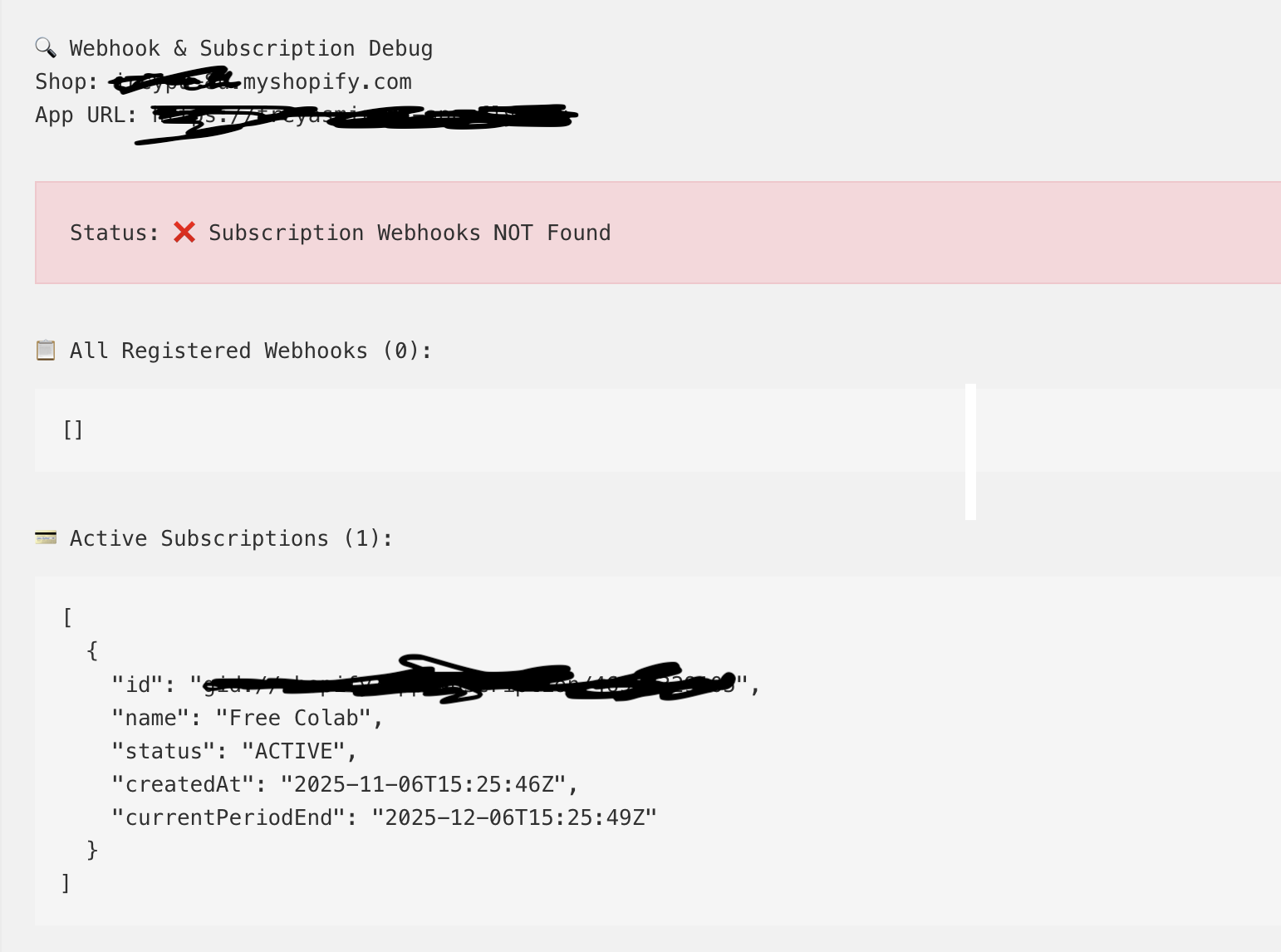
This confirms that I have an active subscription, but no webhook is registered. So I don’t receive the SUBSCRIPTIONS_CREATED webhook and that’s is why the entry in the database is not created, which makes the app usage impossible.
Can someone assist me please on how to correctly register the webhooks?
