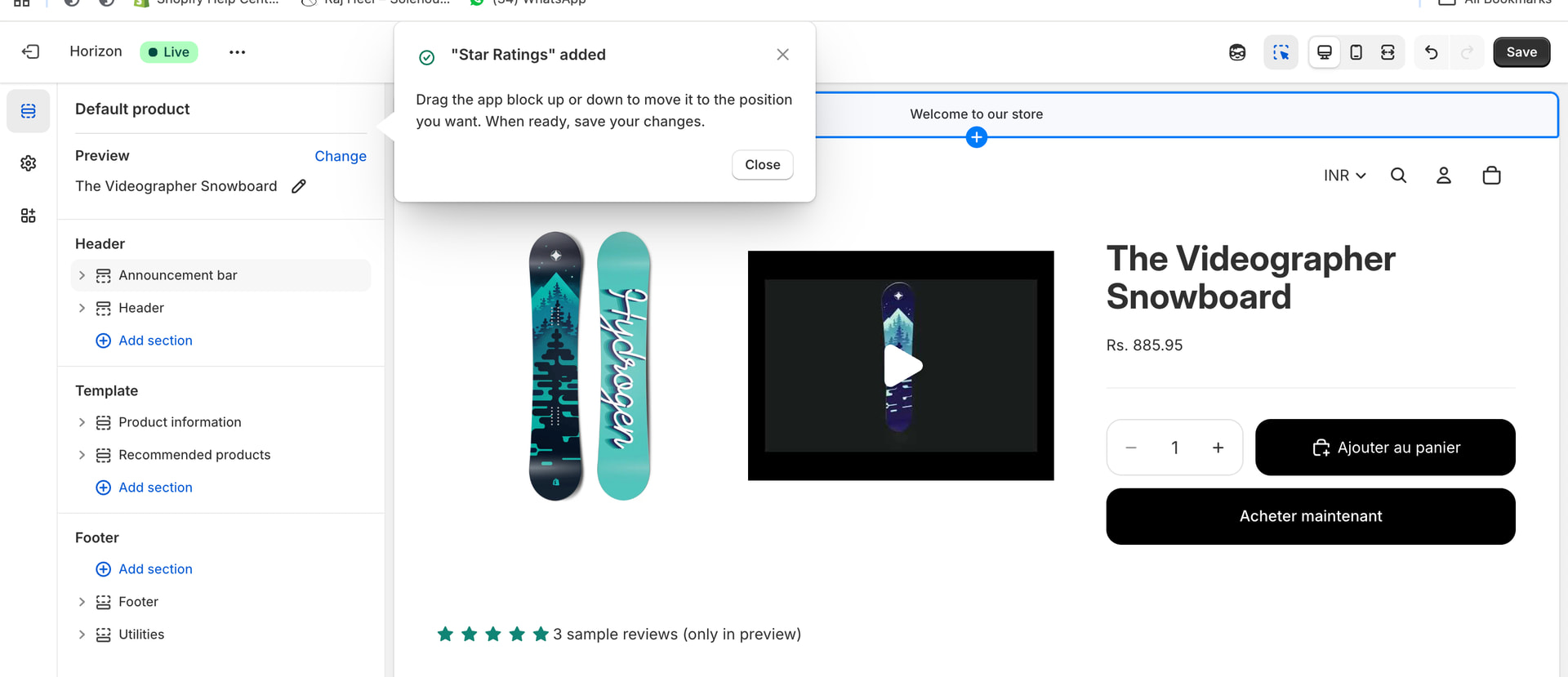
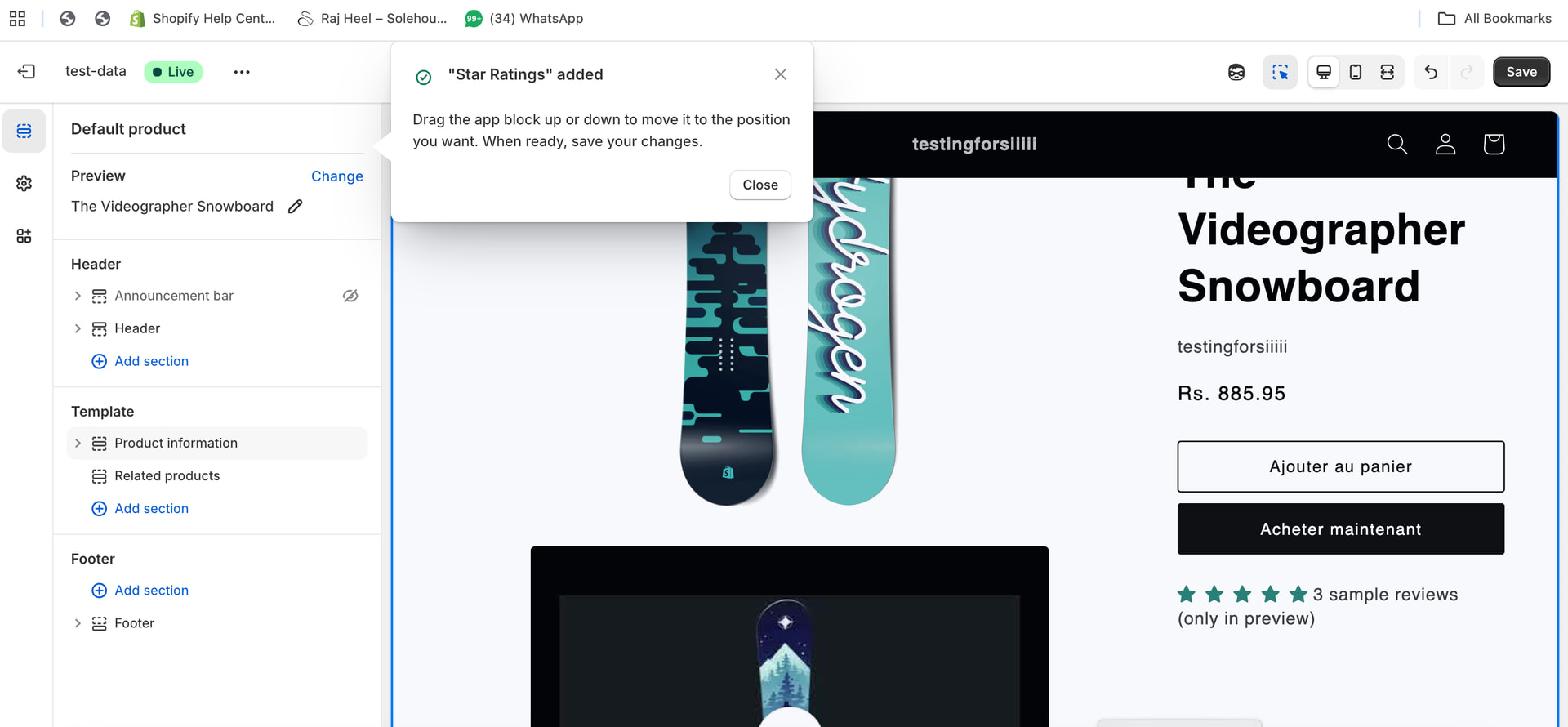
The deep links of various app blocks do not show the expanded and inserted app block in the appropriate section, checked multiple app blocks for various apps
Hey @Sakshi_Gupta – thanks for flagging this! We haven’t seen other reports of this yet, could you share a few details to see if we can narrow down the issue?
- Which browser are you using?
- Does the same behavior occur in a different browser or in an incognito/private window?
- Is this happening on a specific theme, or across multiple themes?
Hope to hear from you soon, thanks!
@Alan_G
I am using chrome Version 143.0.7499.170 (Official Build) (arm64)
It occurs on incognito browser and across all themes, and for app blocks for various apps not just our app!
I can replicate this each time!

Hey @Sakshi_Gupta – thanks for the additional details, and apologies for the delayed response here – been in and out over the holidays!
This is really helpful info. The fact that it’s happening across all themes and multiple apps definitely suggests something we need to dig into further on our end. Before I escalate this internally, it would be super helpful to get a couple more pieces of info:
-
Could you share an example of the exact deep link URL you’re using? Just want to make sure we can reproduce with the same parameters. Is it just the one in your screenshot there?
-
Would you be able to grab any browser console/network logs when this happens? If you open DevTools (right-click → Inspect → Console tab) before clicking the deep link, let me know if you see any errors pop up. A screenshot of the console output would be great!
This will help us pinpoint exactly what’s going wrong. Thanks for your patience – I’ll keep you posted as we look into this!
No worries @Sakshi_Gupta , thanks so much for sending those examples my way.
To help us dig deeper, could you let us know what exactly happens when you click the deep link? For example, does the theme editor open but the block just doesn’t appear, do you see an error message or toast notification, or does something else unexpected happen? Those console logs I mentioned earlier would still be super valuable too, you can just open DevTools before clicking the link and grab a screenshot of any errors that show up in the Console tab.
Also, if you happen to remember whether this was working for you at some point in the past and when it stopped, that timing would help us check if anything changed on our end around that time. Happy to keep looking into this for sure.
@Alan_G there are no error logs as such i see that stand out. As mentioned earlier the block seems to come as expected but if you see the coach marks on the left in the picture instead of opening up the exact position where the block isdeep linked it is weirdly positioned on the top without expanding the blocks, which makes it difficult for a merchant to understand they can move around the blocks!
Hey @Sakshi_Gupta, really appreciate you sticking with us on this!
Hopefully I’m understanding correctly, but the block is being added correctly and the sidebar isn’t expanding to show where it landed so the coach marks are appearing at the top instead of next to the actual block? If so, this does seem unexpected.
I’m going to dig into this further internally here for you. One thing that would really help is a quick screen recording showing the behavior when you click the deep link, just so they can see the exact sequence. And if you happen to remember roughly when this started happening, that timing could help us check if anything changed around then.
Thanks again for reporting this – I’ll keep you posted!

Thanks @Sakshi_Gupta - this is great, very much appreciate this. I’ll continue to look into this for you on my end and will loop back with you once I have more info.
Hey @Sakshi_Gupta - a few folks and I were testing this today and noticed we’re no longer able to replicate the issue. Can you let us know if you’re still seeing this pop up? For reference, I tested using the JudgeMe app and a default copy of the Dawn theme. Hope this helps!
@Alan_G I am still able to repro this on multiple apps! And tested this with multiple folks on my team too!
Thanks for confirming @Sakshi_Gupta - and sorry to hear it’s still happening. Can you let me know what theme/themes you folks are using? I can see if I’m able to replicate still and keep looking into this.
I tried multiple themes @Alan_G Dawn, Horizon. Atelier, Tinker - its across
Thanks @Sakshi_Gupta - I’ll set up a DM here so we can coordinate since I may need some specific shop info on our end. Speak with you that way soon!