Folks, I’ve a client requirement of capping products limit each month under a membership plan with any third party app.
By that I mean, we would have 3 tier plans. Tier one users can buy upto 2, while Tier two members can extend their limit to 6 and Tier three users can buy maximum of 10. Please suggest a way out of best possible app for this requirement,
Hey @Shikhar_Batra - definitely an interesting request! You could use an app like the ones below to cap certain products based on customer tags I believe:
If you’re selling the membership as a separate product and allowing them to purchase products afterwards, you could combine a customer tag with one of the apps above to facilitate this. Just curious about how you’re looking to set this up though, are you wanting to include the capped products when the membership is purchased?
Thanks for looking into this, Alan. Honestly, we haven’t gone deep into the details yet, and we’re open to any app or solution that meets our needs. Could you advise if it makes more sense to have the membership as a separate product? If we go that way, we’d want the product limit to kick in from the time the membership is purchased.
No worries @Shikhar_Batra! The way you implement this is ultimately up to you (our app ecosystem and APIs are pretty robust and allow a lot of flexibility), but I would say that selling the membership as a separate product is usually the cleanest approach because it gives you a clear start timestamp for the purchase cap, and if you use a subscription plan it naturally aligns to a monthly cycle.
If you want a quick app-only route, you can tag customers by tier and use a min/max app like those above but I believe most of these apps are designed to cap per order and don’t track cumulative “per month” usage across multiple orders out of the box (you could always reach out to these app devs to see if they’d be willing to work with you/your client to create a custom implementation though).
You could technically have the membership in the same checkout as immediately activating the tier, then persist usage via order webhooks so the allowance resets each cycle. Hope this helps with some options for you - let me know if I can help out further!
Hey Alan, hope all’s well. Been trying this above and we are able to cap the limit to customer lifetime and then reset it every month, but each customer would order on different date so it would collectively reset for each user. Hence we need to try a different approach.
I would need a suggestion from you, if we can show/hide Add To Cart & Buy Now buttons with conditional logics, as each membership has been assigned with a tag when bought. so would this make some sense or any hiccups attached to this approach
Can you guide us through, if do we need to create a extension or custom app for this approach? I’ll wait for your helpful suggestions.
Hey again @Shikhar_Batra great questions, thanks for following up here.
Hiding Add to Cart/Buy Now based on the membership tag could work, but it may not reliably enforce limits since customers can still reach checkout via other paths (through abandoned checkout links, etc), so that could present a bit of challenge, just wanted to mention that.
For per-customer, rolling monthly caps that start at the membership purchase time, you’ll want a custom app that includes a Cart & Checkout Validation Function extension plus a lightweight backend (we do have boiler plate backends using Remix in our libraries here that might be helpful).
The Function should be able to call your app through our network access functionality to grab the customer’s tier and remaining allowance and then block overages at cart/checkout with a clear message. On the backend side of things, you can build a bit of functionality that can track usage and each customer’s cycle window anchored to the membership purchase timestamp. Then, you can write the “remaining this month” value to a customer metafield for theme display if you like (Themes can display metafields, so if you wanted to build a theme or checkout extension this would definitely be a decent flow).
Then, I’d say using the orders/create (and optionally refund/cancel) webhooks to update the counts on your app’s side and roll the window forward per customer when their cycle renews would work for that part of the flow. If you want the membership to activate in the same checkout, you can treat it as active during validation when that product is in the cart, then finalize the state in your webhook once the order completes.
Requiring sign-in for capped products would definitely help avoid bypasses from guest checkout too, and if you still wanted to use the the theme-level button hiding, you could for sure use that as one way to further prevent overselling.
Based on our docs, building this does seem possible, but happy to help out a bit more if I can clarify anything - just let me know!
Thanks for the quick response Alan, honestly we might go up with theme level modification as the app thing is too overwhelming for us now.
I don’t think abandoned cart would create that issue, since the ATC button would be disabled by the logic.
Do you have any tips on how to manage the ATC button suppose we’ve a 3 tier membership plans, we’d have 2 variants monthly & annually? Any suggestions would help us in starting would really help, we’re quite comfortable with liquid and theme customization but a blueprint would help us a lot in proceeding.
One thing to confirm, that do we need shopify API to fetch the tags? We’re using the Appstle Memberships & also they have confirmed us they’ll provide relevant API’s to help us.
No worries @Shikhar_Batra, always happy to help! I’d say that ideally the app method would be my recommendation, but I definitely understand where you’re coming from, it is a little complex. Just wanted to mention the potential risks for the UI-only blocker (the abandoned cart issue, etc.)!
You wouldn’t need to use our backend APIs (Admin API) to read membership tags in theme code. I’m not sure how Appstle manages customer memberships, but for example, you can grab customer tags when the shopper is signed in based on their info on the storefront via Liquid, and you should be able to use what Appstle writes directly if they are using customer tags.
One option that I can think of would be to set a product metafield like membership.required_tier (bronze/silver/gold) and compare it against the customer’s tier tag to determine if they can buy a product. When can_purchase (or whichever flag you want to use!) is false, then, you don’t render the Add to Cart or the dynamic Buy Now/payment button, and show a clear message or a “Sign in to purchase” prompt or not show it at all.
That’s just a quick and simple high-level overview, but that might work as a starting point. Let me know if I can help out further as always!
Always feel good to clear my doubts — thanks again for your help.
I was just wondering — would using Shopify Flow be a more structured approach for this case?
Didn’t it make more sense to handle it with Flow directly as Appstle Membership, provides tags for membership products, customers, and orders when a membership product is purchased?
Hey @Shikhar_Batra , no worries at all! Flow can absolutely be the more structured way to orchestrate tags, counters, and “state” for your theme logic. It won’t, by itself, reliably enforce limits at checkout because Flow can’t block cart/checkout since it it only reacts to events, but if you’re comfortable starting with the theme/UI gate, Flow would definitely be a decent way to keep membership tier and allowance synchronized so the theme can make decisions. Longer term, if you need airtight enforcement (including edge cases like alternate checkout paths), a Cart & Checkout Validation Function with a small backend is still the recommended approach though, just from my perspective!
Essentially though, you could have Flow react to Appstle’s membership activated/renewed events (or their tags) to set customer metafields for tier, and then set other tags/metafield values like allowed_per_cycle, used_in_cycle, and the cycle start/end anchored to the purchase or renewal time.
Your theme should be able to read customer tags and customer metafields directly in Liquid when the shopper is signed in, so no Admin API calls are needed to decide whether to render Add to Cart or Buy Now. Then, you can mark the products you want capped with a product metafield or tag, tie the quantity to the remaining allowance, and don’t render the dynamic payment button when the buyer is over their limit or not eligible.
For rolling monthly windows, you’d likely have to get in touch with the Appstle folks to see how Appstle’s renewal event reset the cycle per customer, but if you bill annually but cap monthly, they may be able to help map the plan variant to the monthly allowed_per_cycle you want.
Hope this makes sense/helps as always, let me know if I can clarify
Hey @Shikhar_Batra , following up here. Did the above help? Let me know if I can mark this as solved if so, happy to help if you have any other questions though, just ping me here!
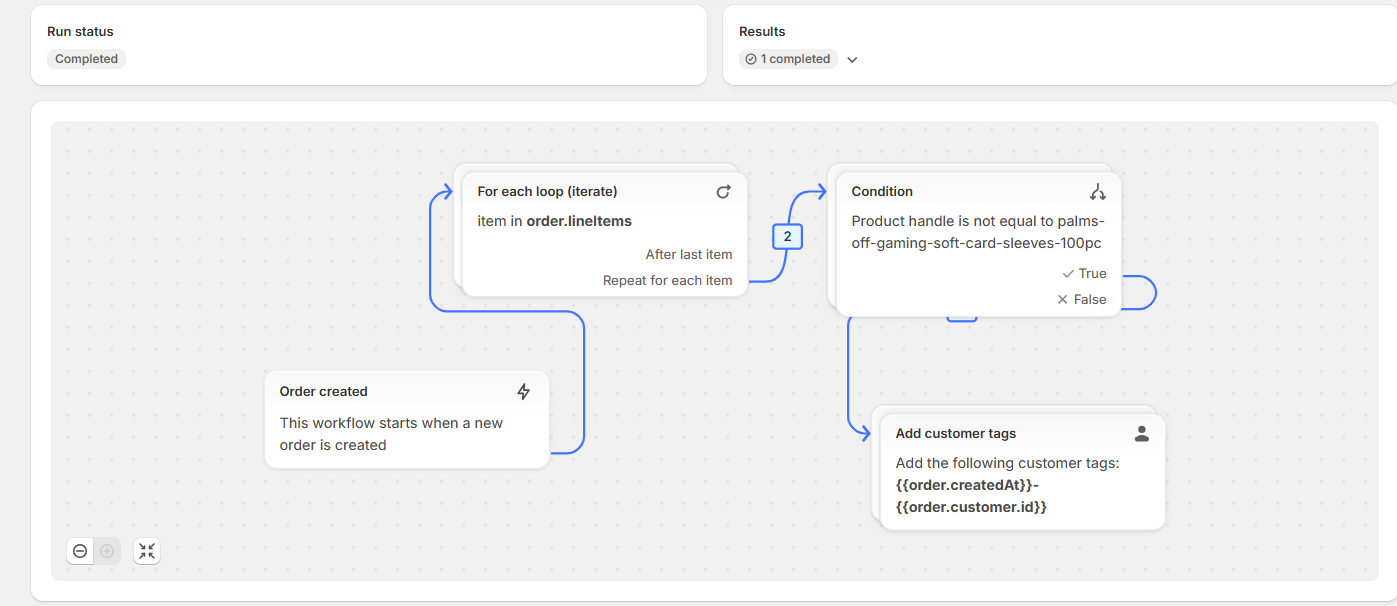
The way we’re tackling this is by taking the timestamp, when a order is created via shopify flow and mapping the conditions with relevant tags. We’ve been able to count the number of orders this way in the past month and year to apply relevant limits, so far we’ve been able to work well with the logic on the product page, and will soon implement this on the cart drawer as well. Will let you know, tomorrow if needed some help.
No worries, glad I could help a little bit @Shikhar_Batra , thanks for sharing your workaround as well, it might be helpful for other folks looking at building something similar. I’m not sure how you’re arranging your order pulls, but if you needed to pull a monthly list of orders all in one go, a bulk query might work as an option:
Hey @Alan_G ,
Hope all well.
Can you have a word for the flow as well? Like we’d need that we’d get customer tags added to each product, right now we’re only getting tags added per order.
Hey @Shikhar_Batra , hope all’s well with you too. I’ll close out our thread here and see if I can share any input in that thread since it looks like. Paul was helping you out with this question as well. I’ll loop back with you there
 - definitely an interesting request! You could use an app like the ones below to cap certain products based on customer tags I believe: