If you’ve used webhooks, you know the problem. You subscribe to products/update and now you have to figure out what actually changed. Was it the price? The title? A tag? You don’t know. So you fetch the full object, diff it yourself, or fire side effects every time regardless. That’s noise. And it compounds across every topic you subscribe to.
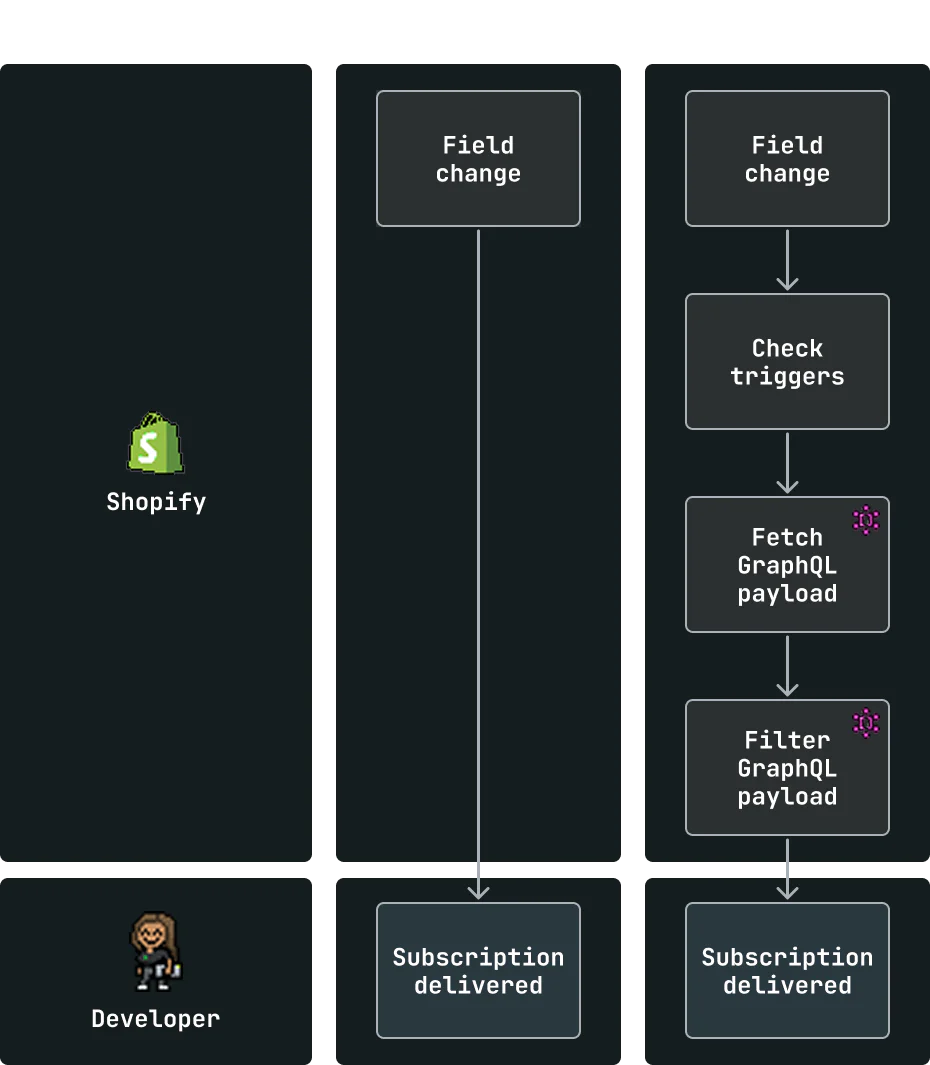
Next Generation Events address this at every layer of the subscription: what fires it, what you get back, and what conditions it has to meet before it ever reaches your endpoint.
How it works
You configure a subscription in shopify.app.toml, alongside the rest of your app config.
[events]
api_version = "unstable"

[[events.subscription]]
handle = "price_sync"

topic = "Product"
actions = ["update"]
triggers = ["product.variants.price", "product.variants.compareAtPrice"]

uri = "/api/events/price_tracker"

query = """
query priceSync($productId: ID!, $variantsId: ID!) {
  productVariant(id: $variantsId) {
    id
    price
    compareAtPrice
    sku
  }
  product(id: $productId) {
    id
    title
    status
  }
}
"""
query_filter = "product.status:'ACTIVE'"
handle identifies the subscription and routes deliveries to your app. You can have multiple subscriptions to the same topic: one that fires on price changes, another on status changes, a third on SEO fields. Each gets its own handle that’s unique in your app’s namespace and it comes through in every payload in both the body and headers so your app always knows which subscription is being referred to.
topic maps directly to GraphQL types like Product and Customer, the same names you use in the Admin GraphQL API.
actions are standardized to create, update, and delete. They describe what happened to the topic entity itself, not to a specific piece of data inside it. This is worth internalizing: adding a variant to a product is action: "update" on Product, not action: "create". The product was updated. Creating a new product from scratch is action: "create". Deleting it is action: "delete". The action tells you the lifecycle event on the root entity. triggers and fields_changed tell you what specifically changed inside it.
triggers pre-qualify at the field level. This subscription won’t fire on title changes or tag updates. It fires only when a variant’s price or compare-at price changes. The filtering happens before delivery, not after. Triggers are optional and omitting them means every trigger is subscribed to.
query defines the exact payload you get back. There’s no fixed schema anymore. It’s a standard Admin GraphQL API query you write, so your app gets precisely what it needs, eliminating most needs to do a follow up GraphQL call. Any errors returned by GraphQL are preserved in errors and uses the error states. This keeps everything consistent with the API surface you already know. Query is also optional, leaving it out means you get a thin payload with just fields_changed and query_variables. That’s useful if you only need to know something changed, want to fan out to different handlers before deciding what data to fetch, or just want the lightest possible delivery.
query_filter filters on the data returned by your query. This one only delivers for products that are ACTIVE on the Online Store. If the product isn’t active when the event fires, the delivery is skipped entirely. It is also worth nothing that any field you want to run a query_filter on, must exist in query.
Know exactly what fired, every time
Every delivery includes fields_changed: the specific fields that triggered the event, with full entity paths and IDs, alongside topic, action, handle and query_variables that let you know exactly what IDs were available for this subscription.
{
  "topic": "Product",
  "action": "update",
  "handle": "price_sync",
  "data": {
    "productVariant": {
      "id": "gid://shopify/ProductVariant/456",
      "price": "24.99",
      "compareAtPrice": "34.99",
      "sku": "SIGNAL-NOT-NOISE"
    },
    "product": {
      "id": "gid://shopify/Product/123",
      "title": "Peace & Quiet Tee",
      "status": "ACTIVE"
    }
  },
  "fields_changed": [
    "product[id: 'gid://shopify/Product/123'].variants[id: 'gid://shopify/ProductVariant/456'].price"
  ],
  "query_variables": {
    "productId": "gid://shopify/Product/123",
    "variantsId": "gid://shopify/ProductVariant/456"
  }
}
You don’t have to infer what changed, diff against prior state or make an extra API call. It’s in the payload.
Handling large payloads
If your query fetches a lot of data (deep variant lists, metafield values, rich HTML), the payload can get large. When a delivery exceeds the size limit for your delivery method, we don’t truncate it. Instead, we send a smaller envelope with a download URL pointing to the full payload that follows the same format as Bulk Operations.
{
  "topic": "Product",
  "action": "update",
  "handle": "complex_product_sync",
  "payload_url": "https://storage.googleapis.com/payloads/...",
  "payload_size_bytes": 8456320,
  "expires_at": "2026-05-15T18:15:00Z"
}
Fetch the URL before it expires to get the full payload. Your endpoint needs to handle both shapes: the standard delivery and the download envelope. If you’re writing a query that could return significant data for high-volume shops, plan for this from the start.
What’s live today
Events are in Developer Preview on the unstable version with the Product and Customer topics, and you can test them out today and give us feedback before we lock things down.
APIs may change before we ship a stable version. We’re also still expanding trigger coverage within each topic. If a field you need isn’t triggerable yet, let us know below.
What’s next
We’re expanding to more topics through 2026. Our goal is full parity with the current webhook surface, so every topic available today in webhooks will be available in Events. No current use case will be left behind.
Get started
- Read more about Events and Webhooks: https://shopify.dev/docs/apps/build/events-webhooks
- Build with Events: https://shopify.dev/docs/api/events/latest
FAQ
Can I use this in production?
We strongly recommend against it. Events are on the
unstableAPI version, which means APIs may change before we ship a stable version. Use this to test, explore, and give us feedback. We’ll communicate clearly when it’s ready for production.
Can I reference a .graphql file instead of inlining the query in TOML?
Not yet. For now, queries live inline in
shopify.app.toml. File references are on the roadmap and will be available ahead of the full release.
How do query variables work?
When a subscription fires, IDs flow upward from the changed entity through the hierarchy and become available as GraphQL variables in your
query. If a variant’s price changed, you get both$variantsIdand$productId. Variable names are derived from the GraphQL field names on the parent topic.Producthas avariantsfield (plural), so the variable is$variantsId, not$variantId. This keeps variable names consistent with the API surface you already know. You can reference any of these in your query without fetching them separately.
Is my query limited to data from the topic entity?
No. Your
queryis a standard Admin GraphQL query and not limited to the topic entity. You can query across entities, pull in shop data, fetch metafields from unrelated objects, or combine multiple root nodes in one query as long as you have the correct access scopes for that object. The topic entity’s IDs are available as variables, but what you fetch is up to you. During Developer Preview, queries are limited to a complexity of 250 points.
How do I handle duplicate deliveries?
Use
Shopify-Webhook-Idas your idempotency key. It’s a composite of the underlying event and your subscription, so it’s unique per delivery.Shopify-Event-Ididentifies the underlying event and may appear across multiple subscriptions for the same change.
How do I test subscriptions before deploying?
We strongly recommend against using Events in production. Dedicated developer tooling for Events is coming. We know this is an important part of the workflow and we’re working on it. More on that soon.
Can I use PubSub or EventBridge instead of HTTP?
Yes. Events support HTTP, Google Cloud PubSub, and Amazon EventBridge.
Can I subscribe via GraphQL instead of TOML?
Not yet. Subscriptions are configured in
shopify.app.tomlonly for now. GraphQL-based subscription management is planned for a later stage.
When will other topics be available?
We’re expanding to more topics through 2026.

 . Super excited for this to be rolled out across the different resources!
 Will this be coming to the Admin GraphQL at any point? Ideally we’d want to limit it to specific merchants, not every installs - which doesn’t seem possible through