Products API rest to graphql migration issues

Hello everyone,

I am trying to migrate a products query that I run for stores from REST to graphQL the code seems to be working - however for one particular client I am 705 items missing :frowning: I think it is to do with archived products, which I am querying so I cannot see why when I do this as REST it works correctly and graphql as not, for reference on the REST i use a status=any [which is not acceptable on grapql]. The problem I also have with this client is they are using the taxonomy for product descriptions and this value doesn’t seem to exist in the REST version.

{
	"query": "query { products( first: 250 sortKey: CREATED_AT query: \"created_at:>=2000-01-01 AND created_at:<=2026-01-01 AND status:'active' OR status:'archived' OR status:'draft'\") 
	{ edges 
	  { 
	    cursor 
	    node 
		{ id 
		  legacyResourceId 
		  title 
		  productType
		  status
		  category { id } 
		  createdAt 
	      updatedAt 
	      variants(first: 250) { 
			edges 
		    { node 
				{ id
				  displayName
				  legacyResourceId 
				  createdAt 
				  updatedAt 
				  sku 
				  title 
				  price 
			      compareAtPrice 
				  inventoryItem 
				   {  id 
				      legacyResourceId 
					  unitCost {
						amount 
						currencyCode }
				}
			}
		}
		
	  }
		}
		}  
		pageInfo 
		{ hasNextPage endCursor }
		}
		}"
}

This is my current query, that works apart from missing 700+ products.

I have tried various things but it makes no difference.

When I requery it i change it to [where the zzzzzz is replaced with the next cursor]

"query": "query { products( first: 250 sortKey: CREATED_AT after: \"ZZZZZZZZZZZZZZZZZZZZZZZZZZZZZZZZZZZZZZZZZZZZZZZZZZZZZZZZZZZZZZZZZZZZZZZZZZZZZZZZZZZZZZZZZZZZ\" query: \"created_at:>=2000-01-01 AND created_at:<=2026-01-01 AND status:'active' OR status:'archived' OR status:'draft'\") 
	{ edges 
	  { 
	    cursor 
	    node 
		{ id 
		  legacyResourceId 
		  title 
		  productType
		  status
		  category { id } 
		  createdAt 
	      updatedAt 
	      variants(first: 250) { 
			edges 
		    { node 
				{ id
				  displayName
				  legacyResourceId 
				  createdAt 
				  updatedAt 
				  sku 
				  title 
				  price 
			      compareAtPrice 
				  inventoryItem 
				   {  id 
				      legacyResourceId 
					  unitCost {
						amount 
						currencyCode }
				}
			}
		}
		
	  }
		}
		}  
		pageInfo 
		{ hasNextPage endCursor }
		}
		}"
}

Can anyone point me in the right direction please?

Thanks

Lucy

@Lucy_hutchinson, there is the post already that you can post migration issue.

1 Like

Hi Lucy

Does it work if you change your query to be structured like this?
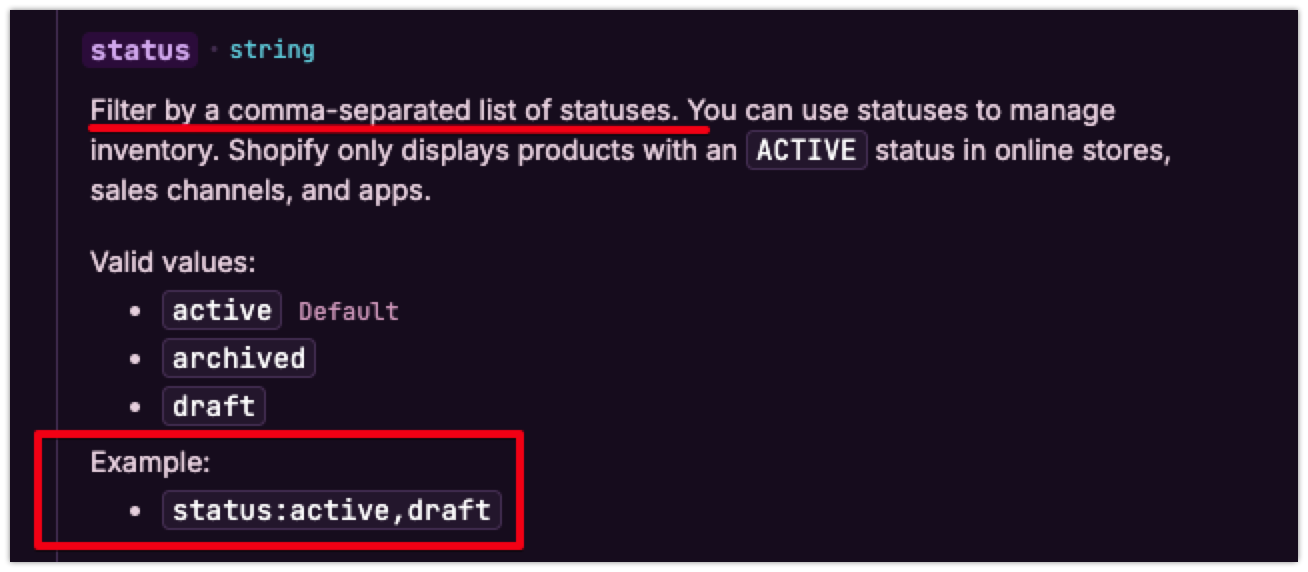
query: "created_at:>=2000-01-01 AND created_at:<=2026-01-01 AND status:active,archived,draft"

or simply query: "status:active,archived,draft" as it seems based off your dates that they are redundant? :blush:

Hi @Lucy_hutchinson,

@curzey’s suggestion above is correct as the products query’s status filter does work with a comma separated list, unlike most other query filters.

Additionally can you confirm if this query is on the Admin API or the Storefront API, as all products might not be returned on Storefront API requests, only those that are published to the app making the Storefront API query. If it is an Admin API query, all store products should be returned regardless.

If the above suggestion doesn’t help, and it is an Admin API query, or Storefront API query confirming the products are published to the app making the query, please provide us with an x-request-id of a specific query not returning expected products, along with example product ids that were not returned as expected, and we can help look into it further on our end.

1 Like

You cannot put the parameter together on online like suggested I’ve tried this already, I am using curl to pass the parameters to shopify I get the following.

“search”: [{“path”: [“products”],“query”: “created_at:>=2000-01-01 AND created_at:<=2026-01-01 AND status:‘active,archived,draft’”,“parsed”: {“and”: [{“field”: “created_at”,“range_gte”: “2000-01-01”,“range_lte”: “2026-01-01”},{“field”: “status”,“match_phrase”: “active,archived,draft”}]},“warnings”: [{“field”: “status”,“message”: “Input active,archived,draft is not an accepted value.”,“code”: “invalid_value”}]}


The headers returned [when I change it so it’s accepted properly are]

Connection=keep-alive
Date=Tue, 03 Mar 2026 09:41:07 GMT
Transfer-Encoding=chunked
Content-Type=application/json; charset=utf-8
Content-Language=en
Server=cloudflare
Vary=Accept-Encoding,Sec-Fetch-Site
referrer-policy=origin-when-cross-origin
x-frame-options=DENY
x-stats-userid=
x-stats-apiclientid=278314614785
x-stats-apipermissionid=862085415298
x-shopify-api-version=2025-07
x-shopify-api-gql-engine=cardinal
strict-transport-security=max-age=7889238
x-request-id=3d0412d7-d064-45bd-9af9-551fbaeb4e2d-1772530865
server-timing=processing;dur=1390, verdict_flag_enabled;desc="count=18";dur=2.129, graphql;desc="admin/query/other", _y;desc="8860f89d-37ce-42d7-9998-12d46cef2453", _s;desc="719945a4-d490-4485-983f-69c556527145", cfRequestDuration;dur=1465.999842, ipv6
content-security-policy=default-src 'self' data: blob: 'unsafe-inline' 'unsafe-eval' https://* shopify-pos://*; block-all-mixed-content; child-src 'self' https://* shopify-pos://*; connect-src 'self' wss://* https://*; frame-ancestors 'none'; img-src 'self' data: blob: https:; script-src https://cdn.shopify.com https://cdn.shopifycdn.net https://checkout.pci.shopifyinc.com https://checkout.pci.shopifyinc.com/build/04ed4e1/card_fields.js https://api.stripe.com https://mpsnare.iesnare.com https://appcenter.intuit.com https://www.paypal.com https://js.braintreegateway.com https://c.paypal.com https://maps.googleapis.com https://www.google-analytics.com https://v.shopify.com 'self' 'unsafe-inline' 'unsafe-eval'; upgrade-insecure-requests; report-uri /csp-report?source%5Baction%5D=query&source%5Bapp%5D=Shopify&source%5Bcontroller%5D=admin%2Fgraphql&source%5Bsection%5D=admin_api&source%5Buuid%5D=3d0412d7-d064-45bd-9af9-551fbaeb4e2d-1772530865; report-to shopify-csp
x-content-type-options=nosniff
x-download-options=noopen
x-permitted-cross-domain-policies=none
x-xss-protection=1; mode=block
reporting-endpoints=shopify-csp="/csp-report?source%5Baction%5D=query&source%5Bapp%5D=Shopify&source%5Bcontroller%5D=admin%2Fgraphql&source%5Bsection%5D=admin_api&source%5Buuid%5D=3d0412d7-d064-45bd-9af9-551fbaeb4e2d-1772530865"
x-dc=gcp-europe-west1,gcp-europe-west4,gcp-europe-west4
Alt-Svc=h3=":443"; ma=86400
cf-cache-status=DYNAMIC
Report-To={"endpoints":[{"url":"https:\/\/a.nel.cloudflare.com\/report\/v4?s=0kMYeQR84QMyhq558%2BhS5c0T2XLdN2Mi0MKGmhAVlWQ1L69X13MXVe1p7a0OWGD0WJGxiJhBefcZFtc0%2Bnq7zuywHjwR1kYzrJndC7mpCbcVQB8A5wx7p0fFLFqHv983OnJURIYXbcQQcGbuei0Z3qizsC1t1MRi6acGhWPL"}],"group":"cf-nel","max_age":604800}
NEL={"success_fraction":0.01,"report_to":"cf-nel","max_age":604800}
CF-RAY=9d67aef7ccb07f0d-LHR

The issue that I have is the REST API doesn’t support pulling the catergory {id} and for this particular client they use this.

If I export all the clients products from the shopify dashboard I get all products [ but you don’t get product id etc] and if I do it from REST all products download.

On REST API you can ask for status:any

This is unsupported on the QL.

Thanks

Lucy

You can’t do that - it doesn’t like having the status on one line with multiple parameters see below :frowning: But TBH I don’t think that’s an issue as If I look at the status of returned products I am getting a mix of Archived, Draft, Active but only 1012 products instead of 1717.

Yeah your query should also work regarding that, other than it would make more sense if it gave you too many products due to only filtering the dates for the first status. But are the dates neccessary?

  • Can you confirm youre using Admin API and not Storefront?
  • Can you try using 2026-01 version
  • Any chance (I dunno how the API handles it) any of the products use Unlisted status?
  • Any chance theres mismatch of what sales channels they’re surfaced to? (if not Admin API)

Hi @Lucy_hutchinson,

I’ve been able to replicate the invalid_value warning you received when passing the status as a comma separated string, and I’ve looked into that behaviour further, and I can confirm that it is a false warning occurring here.

The query is actually returning the products correctly filtered with the status passed, even though the warning is returned.

I can confirm that this is a behaviour that our developers are aware of and looking into further, however the documentation is correct that the query filter does work as such.

Example Query I ran:

curl -X POST \
  https://<shop_name>.myshopify.com/admin/api/2026-01/graphql.json \
  -H 'Content-Type: application/json' \
  -H 'X-Shopify-Access-Token: <access_token>' \
  -d '{
    "query": "query ProductsWithStatusFilter { products(first: 50, query: \"created_at:>=2000-01-01 AND created_at:<=2026-01-01 AND status:archived,draft\") { nodes { id title status createdAt } pageInfo { hasNextPage endCursor } } }" 
  }'

Response I received:

{"data":{"products":{"nodes":[{"id":"gid://shopify/Product/8170898161826","title":"The Archived Snowboard","status":"ARCHIVED","createdAt":"2024-02-05T19:00:13Z"},{"id":"gid://shopify/Product/8170898260130","title":"The Draft Snowboard","status":"DRAFT","createdAt":"2024-02-05T19:00:13Z"},{"id":"gid://shopify/Product/8592507633826","title":"DEF Product 2.2","status":"DRAFT","createdAt":"2025-02-14T17:17:15Z"},{"id":"gid://shopify/Product/8722329960610","title":"Test Auction Product","status":"DRAFT","createdAt":"2025-07-18T21:45:37Z"},{"id":"gid://shopify/Product/8813438927010","title":"Winter Hat - Inventory Quantity Test 1","status":"DRAFT","createdAt":"2025-10-27T19:15:11Z"}],"pageInfo":{"hasNextPage":false,"endCursor":"eyJsYXN0X2lkIjo4ODEzNDM4OTI3MDEwLCJsYXN0X3ZhbHVlIjoiODgxMzQzODkyNzAxMCJ9"}}},"extensions":{"cost":{"requestedQueryCost":9,"actualQueryCost":3,"throttleStatus":{"maximumAvailable":2000.0,"currentlyAvailable":1997,"restoreRate":100.0}},"search":[{"path":["products"],"query":"created_at:>=2000-01-01 AND created_at:<=2026-01-01 AND status:archived,draft","parsed":{"and":[{"field":"created_at","range_gte":"2000-01-01","range_lte":"2026-01-01"},{"field":"status","match_all":"archived,draft"}]},"warnings":[{"field":"status","message":"Input `archived,draft` is not an accepted value.","code":"invalid_value"}]}]}}%   

As seen in my response it returned 4 DRAFT status products, and 1 ARCHIVED product, which is correct for my test store, and does confirm that despite the warning that the status filters are being applied correctly, with all of the expected products returned.


Regarding the missing products from your query, if you can please confirm which API you are making this query, Admin API or Storefront API, additionally please do provide us with an x-request-id from a specific API call not returning expected products, as well what products are not returned that you are expecting, and we can definitely help look into it further.


Additionally, please do note that the REST Product API is actually fully deprecated and will result in deprecated call warnings for public apps still using the /products and /variants endpoint. This does also explain why the taxonomy data is not included in the REST API response as it was added after the REST Product and Variant deprecation.

Thanks so much for replying.

So I am using the API like you are in curl and using 2026-01 version.

E.g.

https://myclientname.myshopify.com/admin/api/2026-01/graphql.json

With this particular client I am expecting 1717 products, but I only get 1012. The RESTAPI returns all the products [using status:any and date ranges between 2000-01-01 and 2026-03-02

The hdr returned after the initial send is

Connection=keep-alive
Date=Tue, 03 Mar 2026 20:13:16 GMT
Transfer-Encoding=chunked
Content-Type=application/json; charset=utf-8
Content-Language=en
Server=cloudflare
Vary=Accept-Encoding,Sec-Fetch-Site
referrer-policy=origin-when-cross-origin
x-frame-options=DENY
x-stats-userid=
x-stats-apiclientid=278314614785
x-stats-apipermissionid=862085415298
x-shopify-api-version=2026-01
x-shopify-api-gql-engine=cardinal
strict-transport-security=max-age=7889238
x-request-id=e6f6f174-8009-481f-bcbb-65d0a6e1cdd7-1772568795
server-timing=processing;dur=1459, verdict_flag_enabled;desc="count=18";dur=8.229, graphql;desc="admin/query/other", _y;desc="c0c94a7c-0a2d-42a9-841a-5541f290bba3", _s;desc="d0940549-c931-4f83-ba61-f92e399eb392", cfRequestDuration;dur=1532.999754, ipv6
content-security-policy=default-src 'self' data: blob: 'unsafe-inline' 'unsafe-eval' https://* shopify-pos://*; block-all-mixed-content; child-src 'self' https://* shopify-pos://*; connect-src 'self' wss://* https://*; frame-ancestors 'none'; img-src 'self' data: blob: https:; script-src https://cdn.shopify.com https://cdn.shopifycdn.net https://checkout.pci.shopifyinc.com https://checkout.pci.shopifyinc.com/build/04ed4e1/card_fields.js https://api.stripe.com https://mpsnare.iesnare.com https://appcenter.intuit.com https://www.paypal.com https://js.braintreegateway.com https://c.paypal.com https://maps.googleapis.com https://www.google-analytics.com https://v.shopify.com 'self' 'unsafe-inline' 'unsafe-eval'; upgrade-insecure-requests; report-uri /csp-report?source%5Baction%5D=query&source%5Bapp%5D=Shopify&source%5Bcontroller%5D=admin%2Fgraphql&source%5Bsection%5D=admin_api&source%5Buuid%5D=e6f6f174-8009-481f-bcbb-65d0a6e1cdd7-1772568795; report-to shopify-csp
x-content-type-options=nosniff
x-download-options=noopen
x-permitted-cross-domain-policies=none
x-xss-protection=1; mode=block
reporting-endpoints=shopify-csp="/csp-report?source%5Baction%5D=query&source%5Bapp%5D=Shopify&source%5Bcontroller%5D=admin%2Fgraphql&source%5Bsection%5D=admin_api&source%5Buuid%5D=e6f6f174-8009-481f-bcbb-65d0a6e1cdd7-1772568795"
x-dc=gcp-europe-west1,gcp-europe-west4,gcp-europe-west4
Alt-Svc=h3=":443"; ma=86400
cf-cache-status=DYNAMIC
Report-To={"endpoints":[{"url":"https:\/\/a.nel.cloudflare.com\/report\/v4?s=DzqeVrh815kWQapZTqzUvkbCfJcO9sV7rSTezlJEMVV1VVJc0YwSYgoTnmhkj9Ij9n2kJaUVV%2Fk%2B7kztvq5DuhlMhV3N5WdolT6cP4x2ZJswhJ%2B9i84StzBiqGMo%2BVaPwFSI52FTBU0%2FuAL3%2FQxK9QDEkblWhWpctnoJrPRa"}],"group":"cf-nel","max_age":604800}
NEL={"success_fraction":0.01,"report_to":"cf-nel","max_age":604800}
CF-RAY=9d6b4cfa8caa0019-LHR

and the last hdr i get back is

Connection=keep-alive
Date=Tue, 03 Mar 2026 20:13:28 GMT
Transfer-Encoding=chunked
Content-Type=application/json; charset=utf-8
Content-Language=en
Server=cloudflare
Vary=Accept-Encoding,Sec-Fetch-Site
referrer-policy=origin-when-cross-origin
x-frame-options=DENY
x-stats-userid=
x-stats-apiclientid=278314614785
x-stats-apipermissionid=862085415298
x-shopify-api-version=2026-01
x-shopify-api-gql-engine=cardinal
strict-transport-security=max-age=7889238
x-request-id=f93c9f93-75b5-45a9-ab4a-a46c5efde76d-1772568806
server-timing=processing;dur=1715, verdict_flag_enabled;desc="count=18";dur=17.205, graphql;desc="admin/query/other", _y;desc="129d4e1e-4717-49e3-abdd-07d4178dfbe7", _s;desc="26cd6bb0-392d-4b76-9c0e-de51b68fb117", cfRequestDuration;dur=1775.000095, ipv6
content-security-policy=default-src 'self' data: blob: 'unsafe-inline' 'unsafe-eval' https://* shopify-pos://*; block-all-mixed-content; child-src 'self' https://* shopify-pos://*; connect-src 'self' wss://* https://*; frame-ancestors 'none'; img-src 'self' data: blob: https:; script-src https://cdn.shopify.com https://cdn.shopifycdn.net https://checkout.pci.shopifyinc.com https://checkout.pci.shopifyinc.com/build/04ed4e1/card_fields.js https://api.stripe.com https://mpsnare.iesnare.com https://appcenter.intuit.com https://www.paypal.com https://js.braintreegateway.com https://c.paypal.com https://maps.googleapis.com https://www.google-analytics.com https://v.shopify.com 'self' 'unsafe-inline' 'unsafe-eval'; upgrade-insecure-requests; report-uri /csp-report?source%5Baction%5D=query&source%5Bapp%5D=Shopify&source%5Bcontroller%5D=admin%2Fgraphql&source%5Bsection%5D=admin_api&source%5Buuid%5D=f93c9f93-75b5-45a9-ab4a-a46c5efde76d-1772568806; report-to shopify-csp
x-content-type-options=nosniff
x-download-options=noopen
x-permitted-cross-domain-policies=none
x-xss-protection=1; mode=block
reporting-endpoints=shopify-csp="/csp-report?source%5Baction%5D=query&source%5Bapp%5D=Shopify&source%5Bcontroller%5D=admin%2Fgraphql&source%5Bsection%5D=admin_api&source%5Buuid%5D=f93c9f93-75b5-45a9-ab4a-a46c5efde76d-1772568806"
x-dc=gcp-europe-west1,gcp-europe-west4,gcp-europe-west4
Alt-Svc=h3=":443"; ma=86400
cf-cache-status=DYNAMIC
Report-To={"endpoints":[{"url":"https:\/\/a.nel.cloudflare.com\/report\/v4?s=CD5MebcWIl3en3RvpYnJc66iiUlZNsaUMUMwIpydD24WFuJmpWYl2wFUb1ZkwbHkGoyxpB3cegb%2B2iPT3HDr2cPJbZEyqHA95FZEgJMvImoJyXm1WdAAVJ97MF%2FHO4Ox%2BSW5KOlor7mtUwDVmfSRCDJq7bp%2BIPMv%2BsluLb6z"}],"group":"cf-nel","max_age":604800}
NEL={"success_fraction":0.01,"report_to":"cf-nel","max_age":604800}
CF-RAY=9d6b4d421cf20019-LHR

The initial query run is

{"query": "query { products( first: 250 sortKey: CREATED_AT query: \"created_at:>=1970-01-01 AND created_at:<=2026-03-02 AND status:'active' OR status:'archived' OR status:'draft' OR status:'unlisted'\") { edges { cursor node { id legacyResourceId title productType status category { id } createdAt updatedAt variants(first: 250) { edges { node { id displayName legacyResourceId createdAt updatedAt sku title price compareAtPrice inventoryItem {  id legacyResourceId unitCost { amount currencyCode }}}}}}}  pageInfo { hasNextPage endCursor }}}"}

And the subsequent queries are

{"query": "query { products( first: 250 sortKey: CREATED_AT after: \"ZZZZZZZZZZZZZZZZZZZZZZZZZZZZZZZZZZZZZZZZZZZZZZZZZZZZZZZZZZZZZZZZZZZZZZZZZZZZZZZZZZZZZZZZZZZZ\" query: \"created_at:>=1970-01-01 AND created_at:<=2026-03-02 AND status:'active' OR status:'archived' OR status:'draft' OR status:'unlisted'\") { edges { cursor node { id legacyResourceId title productType status category { id } createdAt updatedAt variants(first: 250) { edges { node { id displayName legacyResourceId createdAt updatedAt sku title price compareAtPrice inventoryItem {  id legacyResourceId unitCost { amount currencyCode }}}}}}}  pageInfo { hasNextPage endCursor }}}"}

The dates are wider than what I have found through the RESTAPI but it was to prove that the dates are not restricting my results back.

The missing products I believe are a batch of the ARCHIVE products.

For reference there is one unlisted product but again if you add this as a parameter it complains like before.

My code works like this, different JSON but same execution correctly for orders, checkout abandons, customers without issues.

I am a little stuck.

thanks

Lucy

Hi @Lucy_hutchinson,

Thank you for sharing those examples, I’ve located the calls and looked into them further in our internal logs and I’m not seeing any relevant errors here, the only issue I’m seeing is the invalid_value warning, which we have confirmed is not actually affecting the query results.

At this point, we will need you to reach out via the Shopify Help Center, so that we can help look into this further in a fully authenticated support interaction, as this appears it might be an issue specific to the products on the shop, rather than an issue with the query itself, though we will need to investigate this further in an authenticated support ticket to confirm.

When reaching out, please be sure to log into the Help Center with a Staff or Collaborator account that has access to the store in question, and provide us with the following information (some of which you’ve shared here already)

Examples of the API calls:

  • The full plain text HTTP Request, including URL, Body, and Headers (no access tokens)
  • The full plain text HTTP Response, including Body and Headers

Examples of affected products not being returned as expected:

  • product id, or link to the product in the admin

It’s important that you provide us with specific examples of products that we can look into further, so we can see if we can replicate this behaviour with the same or other API calls, and see if there’s anything with the specific products that might explain why they’re not being returned.

Hello all,

I think there is a duplicate to this post, which is my fault. I have resolved this now. The correct number of products is now returned as I found a memory leak in my code.

Thanks

Lucy

1 Like