So, I had a somewhat working solution (shared over at Share: What I'm building with the new Polaris Web Components - #11 by _Ryan) that used the page actions like below, but with an update to the web components library it no longer works. Previously, the code below worked like the screen cap below. Now, when selections are made, no buttons appear in the page actions. I wonder if this is related at all to the recent disappearance of buttons when icons are set (described at S-button do not show icons when in page action slots - #8 by _Ryan)?
@Alan_G can I get you to look into this? @Anthony_Frehner this kinda hurts the case against versioning the web components, discussed elsewhere, as this breaks my app that was previously working. It’s a major regression for me!
Old behaviour:
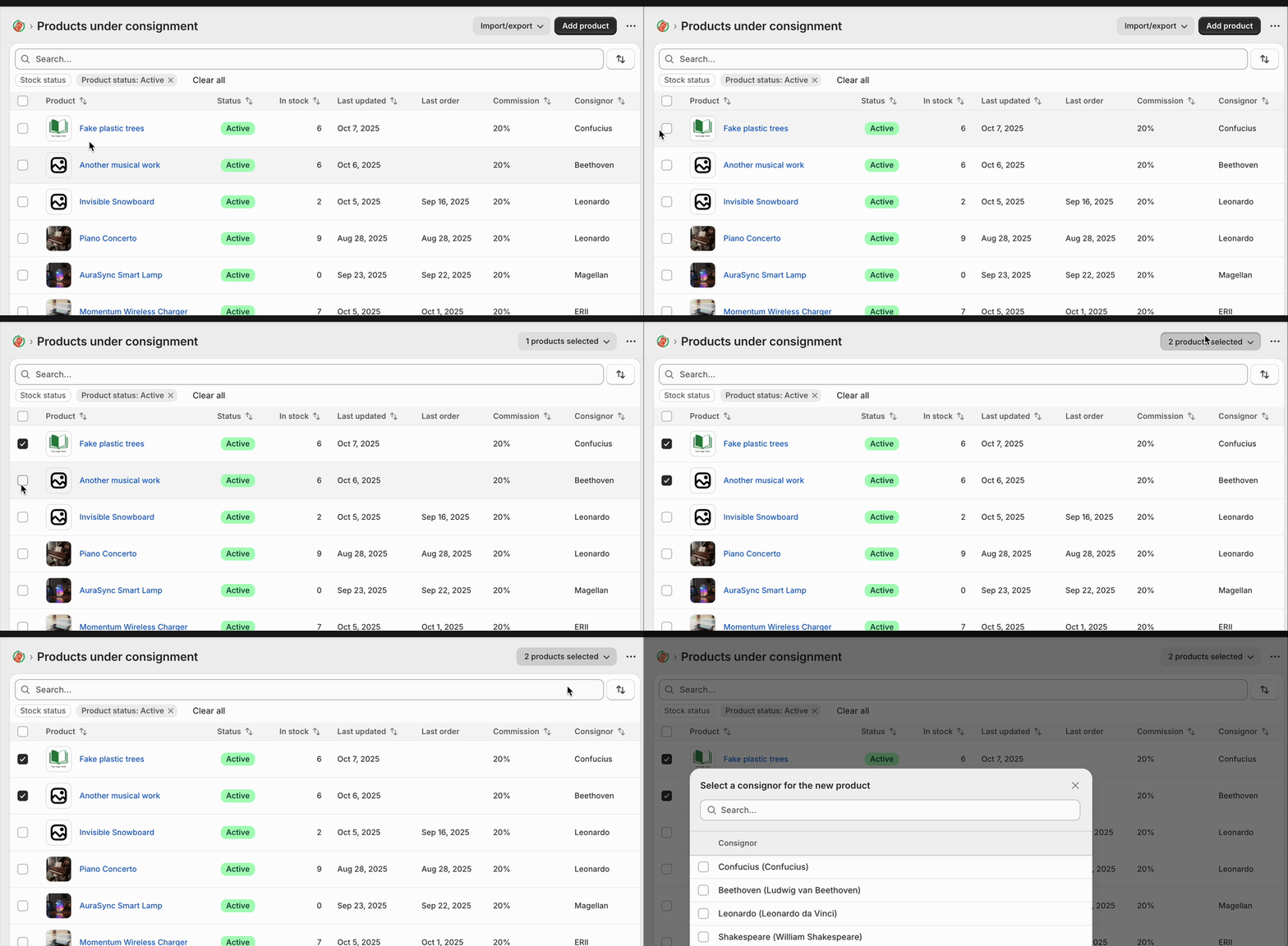
New behaviour:
no “products selected” menu appears
Code to recreate in your react-router template:
import { useCallback, useState } from "react";

interface DemoProduct {
  id: string;
  name: string;
  sku: string;
  price: string;
  stock: number;
  status: "active" | "archived";
  createdDate: string;
}

const DEMO_PRODUCTS: DemoProduct[] = [
  {
    id: "1",
    name: "Wireless Headphones",
    sku: "WH-001",
    price: "$79.99",
    stock: 45,
    status: "active",
    createdDate: "2024-10-15",
  },
  {
    id: "2",
    name: "USB-C Cable",
    sku: "UC-002",
    price: "$12.99",
    stock: 120,
    status: "active",
    createdDate: "2024-09-22",
  },
  {
    id: "3",
    name: "Phone Case",
    sku: "PC-003",
    price: "$24.99",
    stock: 0,
    status: "archived",
    createdDate: "2024-08-10",
  },
  {
    id: "4",
    name: "Screen Protector",
    sku: "SP-004",
    price: "$9.99",
    stock: 200,
    status: "active",
    createdDate: "2024-10-01",
  },
  {
    id: "5",
    name: "Portable Charger",
    sku: "PC-005",
    price: "$49.99",
    stock: 32,
    status: "active",
    createdDate: "2024-09-15",
  },
];

export default function TableDemo() {
  const [rowSelection, setRowSelection] = useState<Record<string, boolean>>({});

  const selectedCount = Object.values(rowSelection).filter((v) => v).length;

  const handleSelectAll = useCallback((checked: boolean) => {
    if (checked) {
      const allSelected: Record<string, boolean> = {};
      DEMO_PRODUCTS.forEach((product) => {
        allSelected[product.id] = true;
      });
      setRowSelection(allSelected);
    } else {
      setRowSelection({});
    }
  }, []);

  const handleRowSelect = useCallback((productId: string, checked: boolean) => {
    setRowSelection((prev) => ({
      ...prev,
      [productId]: checked,
    }));
  }, []);

  const allSelected = DEMO_PRODUCTS.every((p) => rowSelection[p.id]);

  return (
    <s-page heading="Table Demo">
      {selectedCount > 0 && (
        <>
          <s-button
            commandFor="bulk-actions-menu"
            accessibilityLabel="Selected product bulk actions"
            slot="secondary-actions"
          >
            {selectedCount} products selected
          </s-button>
          <s-menu accessibilityLabel="Bulk actions" id="bulk-actions-menu">
            <s-button icon="person">Assign to consignor</s-button>
            <s-button icon="person-remove" tone="critical">
              Remove from consignor
            </s-button>
            <s-button icon="money">Set commission</s-button>
          </s-menu>
        </>
      )}
      <s-section padding="none">
        <s-table>
          <s-table-header-row>
            <s-table-header listSlot="inline">
              <s-checkbox
                checked={allSelected}
                onChange={(e) => handleSelectAll(e.currentTarget.checked)}
              />
            </s-table-header>
            <s-table-header listSlot="primary">Product Name</s-table-header>
            <s-table-header>SKU</s-table-header>
            <s-table-header format="currency">Price</s-table-header>
            <s-table-header format="numeric">Stock Level</s-table-header>
            <s-table-header listSlot="secondary">Status</s-table-header>
            <s-table-header>Created Date</s-table-header>
          </s-table-header-row>

          <s-table-body>
            {DEMO_PRODUCTS.map((product) => (
              <s-table-row key={product.id}>
                <s-table-cell>
                  <s-checkbox
                    checked={rowSelection[product.id] ?? false}
                    onChange={(e) =>
                      handleRowSelect(product.id, e.currentTarget.checked)
                    }
                  />
                </s-table-cell>
                <s-table-cell>{product.name}</s-table-cell>
                <s-table-cell>{product.sku}</s-table-cell>
                <s-table-cell>{product.price}</s-table-cell>
                <s-table-cell>{product.stock}</s-table-cell>
                <s-table-cell>
                  <s-badge
                    tone={product.status === "active" ? "success" : "auto"}
                  >
                    {product.status}
                  </s-badge>
                </s-table-cell>
                <s-table-cell>{product.createdDate}</s-table-cell>
              </s-table-row>
            ))}
          </s-table-body>
        </s-table>
      </s-section>
    </s-page>
  );
}