Share: What I'm building with the new Polaris Web Components

After initially being very sceptical of the original Polaris Web Components I think the team has done a fantastic job between the initial RC and the public launch.

I’ve recently tested to see if we as an agency can go all in on them and forget about the old React library.

The short version of it is that we can and we’ve been able to bunch of pretty UI elements so far.

I just wanted to share this here to show what is possible with the new components as there is a whole ton of data that this needs to capture and it’s managed to do it all :call_me_hand:

I don’t seem to be able to attach videos here but you can see it posted here: https://x.com/_DanGamble/status/1977775925505761729

6 Likes

Thanks for sharing this @DanGamble, awesome work! The new Web Components/CDN based Polaris is super performant/snappy for sure, glad to see more folks embracing it! :partying_face:

@DanGamble have you used the table component at all? I’m trying to figure out how to implement selection/actions and it’s not clear how this is meant to be done. Curious if you’ve looked at this at all.

Hey @_Ryan,

I’ve not yet, no. What are you specifically trying to achieve?

I have a list of products, similar to the Product index on Shopify (but with product data specific to my app). Merchants need to be able to select one or more products and perform bulk actions on them to manipulate this data – again, similar to what can be done in the Product index. The approach should work with both web and mobile versions, which display a list instead of a table.

This is easily achievable with the old Polaris as the functionality is built-in to the IndexFilters component. I’m not looking for “a new IndexFilters”, in fact I much prefer the more composable approach taken by the new web components. However, the feature surface for the table components seems quite sparse at the moment, and the Shopify devs don’t seem to want to talk about it.

I have a version of this that works by adding checkboxes to each row and keeping the action triggers outside of the table, but the experience is not nearly as smooth as what Shopify achieve in their tables. And the checkboxes do not look good on mobile and don’t align with the native Shopify experience, which allows selection by long pressing an element. Because the s-table elements are very black box, it seems they really need to expose additional functionality to enable this – though I’d love to be wrong. In fact, I think the web components are very promising and could enable this, but they need some additional development. I’d love to hear that’s coming and a timeline so I can figure out when it’s worth migrating/building with the new components. (I already started but am regretting trying to be an early adopter here.)

@DanGamble The web components docs have a pattern that shows what I’m after in their “Index table” composition. They use checkboxes in the rows, but don’t actually give an example of where/how to place the action buttons: Index table

Are you talking about action buttons for bulk or for a row?

If you’re talking about bulk then I think you could achieve what the old index table did but you would need a small bit of custom div/styles to do it. I think it is a bit of a gap in the index table at the moment if you wanted to use fully native web components

Yeah, for bulk.

In the meantime, I’m moving bulk actions out of the table entirely and into the section heading. But this seems like a gap. Would love some guidance from shopify on this.

Hey @_Ryan, thanks for reaching out here. Just to clarify, for bulk actions, are you thinking of implementing a feature where someone can select multiple rows, etc? At the moment, you are write that this is a current limitation.

That said, I’d be happy to take a look at a snippet of what you’ve built so far if you’re comfortable sharing. It would help me see exactly what you’re working with and I might be able to suggest some workarounds or optimizations for your current setup. Even just the table structure and how you’re managing selection state would be useful.

I’m also happy to double check to see if any of the blockers you’re seeing are going to be addressed in our roadmap/at the very least pass along some feature requests for you. Hope to hear from you soon.

@Alan_G Yes, select multiple rows, etc. Glad to hear it’s a known limitation. Hopefully it’s up there on the roadmap, since this is pretty essential to the index tables.

I’ll share a code snippet with some fake data in a bit with my current implementation. It’s not going to be ideal but hopefully good enough for now. Will appreciate feedback on how to do it better.

@Alan_G Below you’ll find some code that you can copy into the react-router template (no dependencies) demonstrating how I’m doing selection/bulk action at the moment – tapping into the page actions. I’ve excluded the non-selection bits (like search, sort, filtering) to make it simple. Check it out on your mobile and on web – it’s not a great experience on mobile, but at least the action menu shows well, i.e. it overlays the screen even as you scroll.

Here’s what it looks like in my app at the moment:
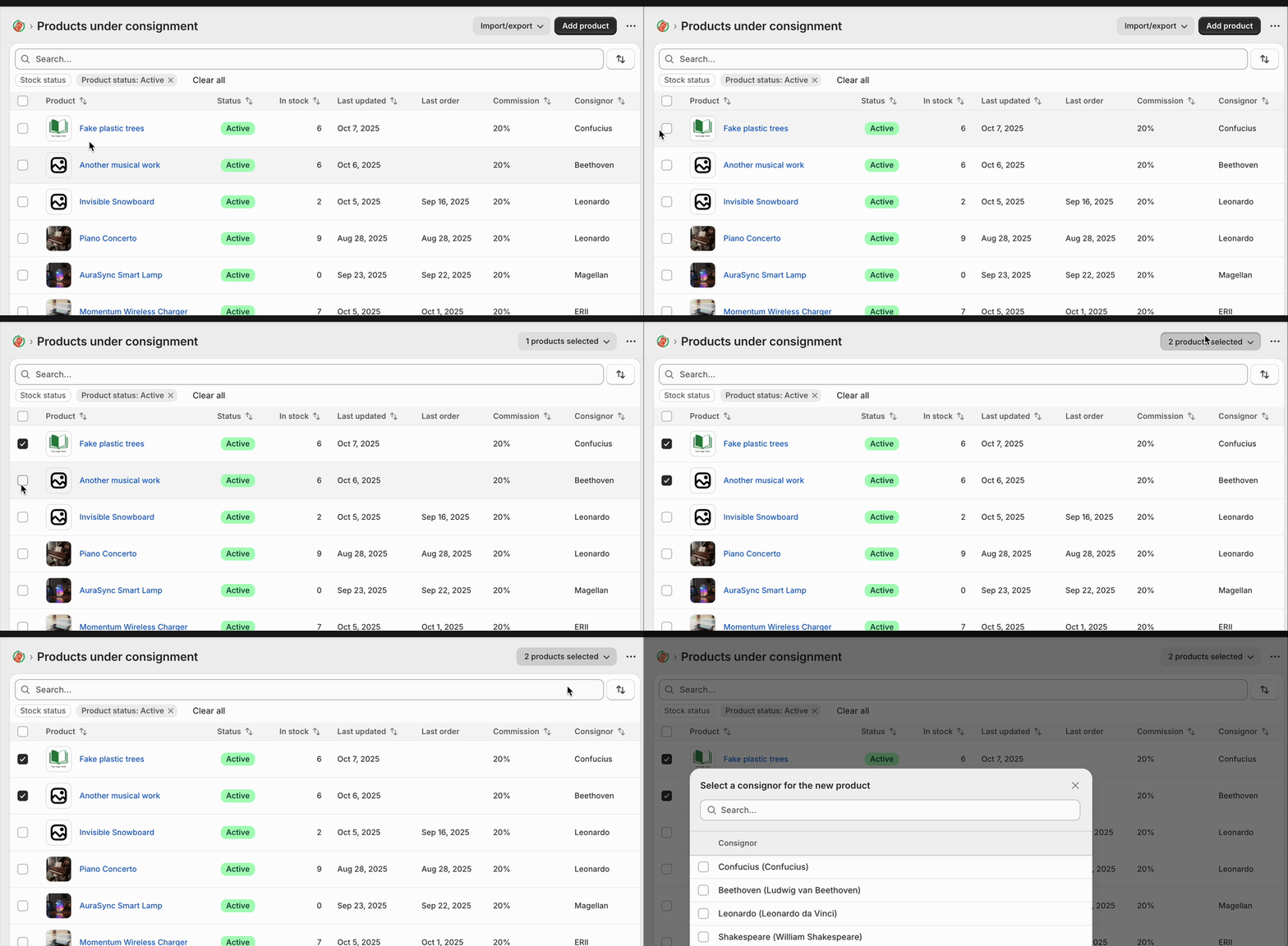
output

import { useCallback, useState } from "react";

interface DemoProduct {
  id: string;
  name: string;
  sku: string;
  price: string;
  stock: number;
  status: "active" | "archived";
  createdDate: string;
}

const DEMO_PRODUCTS: DemoProduct[] = [
  {
    id: "1",
    name: "Wireless Headphones",
    sku: "WH-001",
    price: "$79.99",
    stock: 45,
    status: "active",
    createdDate: "2024-10-15",
  },
  {
    id: "2",
    name: "USB-C Cable",
    sku: "UC-002",
    price: "$12.99",
    stock: 120,
    status: "active",
    createdDate: "2024-09-22",
  },
  {
    id: "3",
    name: "Phone Case",
    sku: "PC-003",
    price: "$24.99",
    stock: 0,
    status: "archived",
    createdDate: "2024-08-10",
  },
  {
    id: "4",
    name: "Screen Protector",
    sku: "SP-004",
    price: "$9.99",
    stock: 200,
    status: "active",
    createdDate: "2024-10-01",
  },
  {
    id: "5",
    name: "Portable Charger",
    sku: "PC-005",
    price: "$49.99",
    stock: 32,
    status: "active",
    createdDate: "2024-09-15",
  },
];

export default function TableDemo() {
  const [rowSelection, setRowSelection] = useState<Record<string, boolean>>({});

  const selectedCount = Object.values(rowSelection).filter((v) => v).length;

  const handleSelectAll = useCallback((checked: boolean) => {
    if (checked) {
      const allSelected: Record<string, boolean> = {};
      DEMO_PRODUCTS.forEach((product) => {
        allSelected[product.id] = true;
      });
      setRowSelection(allSelected);
    } else {
      setRowSelection({});
    }
  }, []);

  const handleRowSelect = useCallback((productId: string, checked: boolean) => {
    setRowSelection((prev) => ({
      ...prev,
      [productId]: checked,
    }));
  }, []);

  const allSelected = DEMO_PRODUCTS.every((p) => rowSelection[p.id]);

  return (
    <s-page heading="Table Demo">
      {selectedCount > 0 && (
        <>
          <s-button
            commandFor="bulk-actions-menu"
            accessibilityLabel="Selected product bulk actions"
            slot="secondary-actions"
          >
            {selectedCount} products selected
          </s-button>
          <s-menu accessibilityLabel="Bulk actions" id="bulk-actions-menu">
            <s-button icon="person">Assign to consignor</s-button>
            <s-button icon="person-remove" tone="critical">
              Remove from consignor
            </s-button>
            <s-button icon="money">Set commission</s-button>
          </s-menu>
        </>
      )}
      <s-section padding="none">
        <s-table>
          <s-table-header-row>
            <s-table-header listSlot="inline">
              <s-checkbox
                checked={allSelected}
                onChange={(e) => handleSelectAll(e.currentTarget.checked)}
              />
            </s-table-header>
            <s-table-header listSlot="primary">Product Name</s-table-header>
            <s-table-header>SKU</s-table-header>
            <s-table-header format="currency">Price</s-table-header>
            <s-table-header format="numeric">Stock Level</s-table-header>
            <s-table-header listSlot="secondary">Status</s-table-header>
            <s-table-header>Created Date</s-table-header>
          </s-table-header-row>

          <s-table-body>
            {DEMO_PRODUCTS.map((product) => (
              <s-table-row key={product.id}>
                <s-table-cell>
                  <s-checkbox
                    checked={rowSelection[product.id] ?? false}
                    onChange={(e) =>
                      handleRowSelect(product.id, e.currentTarget.checked)
                    }
                  />
                </s-table-cell>
                <s-table-cell>{product.name}</s-table-cell>
                <s-table-cell>{product.sku}</s-table-cell>
                <s-table-cell>{product.price}</s-table-cell>
                <s-table-cell>{product.stock}</s-table-cell>
                <s-table-cell>
                  <s-badge
                    tone={product.status === "active" ? "success" : "auto"}
                  >
                    {product.status}
                  </s-badge>
                </s-table-cell>
                <s-table-cell>{product.createdDate}</s-table-cell>
              </s-table-row>
            ))}
          </s-table-body>
        </s-table>
      </s-section>
    </s-page>
  );
}

Hey @_Ryan, thanks so much for sharing that code snippet! Really helpful.

I think there are a couple of things that might improve the experience with what’s currently available in the Web Components. You may be able to use the clickDelegate attribute on your s-table-row elements to make the entire row clickable for selection, which might help with the interaction feel:

Essentially, you’d set it to the ID of your checkbox like clickDelegate="id-here" and that delegates row clicks to toggle the checkbox.

Second, the table component supports a variant="list" prop that might render better on mobile compared to the default table view. A bit more info here:

Could you give those two approaches a try and let me know if that gets you closer to the experience you’re looking for? If those workarounds don’t quite cut it or you’re still running into issues, just reply back here and I’ll absolutely get a feature request filed for proper built-in selection and bulk action support. Happy to help get this sorted out for you!

@Alan_G Appreciate your review. I’m presently using the clickDelegate to go into the resource represented by the table – I didn’t include this in the minimal snippet but it is in my app. I hadn’t thought about it toggling the check box, which might be nice. But I think toggling the check box is a “secondary” thing to navigating into the resource details.

Also, regarding the list variant, the default switches to the list variant automatically on smaller screens, so I’ve been using that and tracking it. The list variant is nice, but would be nicer if we could have additional control over the rendering. The different list Slots are nice, but it would be nice to have another slot that just keeps certain things, like icons or “extra” info from being rendered at all.

The selection UI on Shopify’s own tables (like products) is very nice on mobile, so I’d be keen on a way to make that work in the web components. It does seem important to have a standard way of selecting and performing actions on tables. This is used across Shopify and in apps, and in the past has been handled reasonably consistently – so I’m surprised it’s been lost here.

On the other hand there are lots of just basic functionality bugs with the web components, so it’s clear there’s a lot for the team to do. Maybe the release was a bit premature.

Hey @_Ryan, I really appreciate you taking the time to share this detailed feedback and I hear where you’re coming from (in terms of how it can sometimes feel like a step back).

Re: the clickDelegate point, totally valid that you’re already using it for navigation, definitely can see how it might be odd to repurpose it for checkbox toggling when the row click should take you into the resource, but just wanted to suggest this as a workaround.

I’m going to make sure this gets logged as a feature request as well specifically native row selection UI (especially the mobile long-press pattern) and better integration between table selection state and bulk actions.

On the bugs you mentioned, if you’re willing to share any others that you’ve come across, I’d be happy to look into those too. Even if it’s just a quick list of the top 3-5 things that aren’t working as expected, that would be super helpful for me to look into.

I really appreciate you sharing your feedback. Let me know if you’d like me to set up a DM with you if that would be easier and I can get that started on my end.

@Alan_G Thanks for putting row selection on the roadmap. It’s been requested in these forums a few times, and certainly if Shopify is going to use these web components on its own pages (which have selection and bulk actions) there will need to be some improvements.

The other table thing that is missing is a way to render column totals, like what was done with the old DataTable component. I wasn’t able to think of a good way to do this with the current web components, so I’m just leaving DataTable in my app for now.

Regarding bugs, as I find them I come to these forums to report or chime in on threads where someone else has reported. Some of have been resolved already, but here’s a sampling of what I mean (including some fixed ones):

I do appreciate that fixes to things that are clearly broken – like the non-functional breadcrumbs – have come pretty quickly.

1 Like

Hey @_Ryan, thanks for this, appreciate you sending over the exact examples there.

Re: column totals: totally get the need for that, especially if you’re still relying on the old DataTable for this functionality. I’m going to make sure this gets logged alongside the row selection request so we can look at parity with the DataTable component. Again, I can’t guarantee anything, but I’ll speak with some folks internally to see if this is on the roadmap.

Re: bugs: I really appreciate you taking the time to report these in the forums as you find them as well. Definitely helpful for the team to have real-world examples like the page actions icons and tooltip issues you’ve shared. And glad to hear the fixes for things like breadcrumbs have been coming through quickly.

If there are any other blockers or things that would make the biggest impact for you to have fixed/added, feel free to flag them here or in the forums and I’ll make sure they get the right visibility.

Thanks again for the thoughtful feedback :slight_smile:

Hey again @_Ryan,

Thanks for your patience while I checked in with some folks internally! I have a bit of good news, bulk actions and row selection are definitely on the roadmap for the table component. I can’t give exact timelines, but it’s something we are actively planning for.

In the meantime, you can achieve some row selection functionality using clickDelegate on the table like we discussed, but I understand this may not cover all your use cases.

Also want to confirm that the column totals feedback has been logged alongside the row selection request.

Again, really appreciate you taking the time to share the detailed feedback and examples. If any other gaps come up that are blocking you, please keep flagging them!

the picker you made is really sick!

The tab sidebar I would have never thought of but is a great use of space

1 Like

Thanks dude :heart:

Post must be at least 20 characters