Shopify backup rates triggering prematurely

I’ve had a lot of reports from merchants saying backup rates are triggering for their orders.

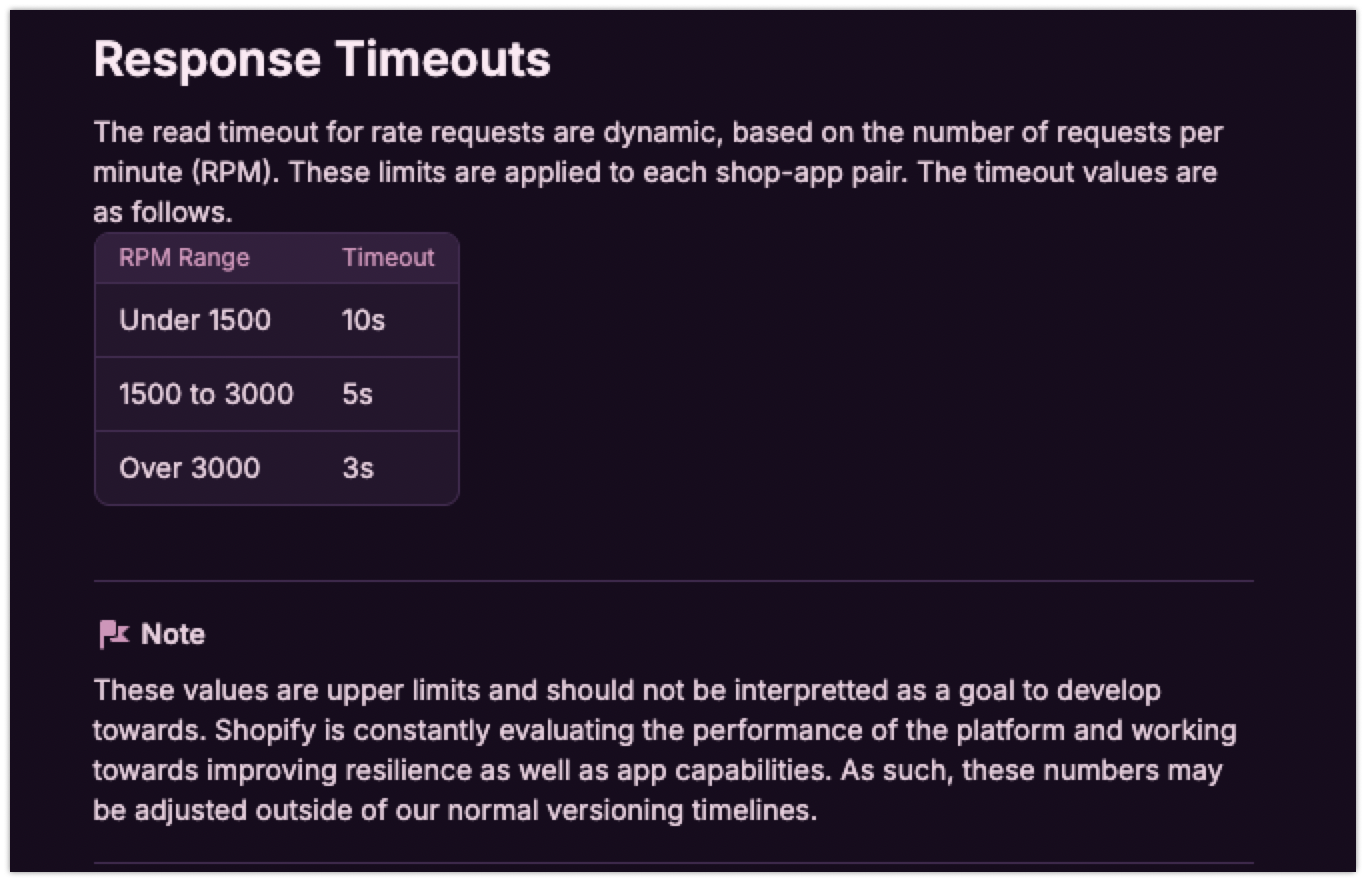
I’ve done some testing and it looks like these are now trigger at 5s despite docs saying 10s, the header sent in the carrier service request also indicates the timeout is 10s not 5s.

Can someone look into this please as it’s causing lots of pain for merchants.

Hi @Alan_G, would you be able to have a look into this one for me please?

I’ve also gotten this response back from Shopify via another merchant.

Bespoke Shipping was right that these aren’t timeout errors. What’s actually happening is that Bespoke’s system takes 4-5 seconds to calculate rates, and when your customers update their cart during that window (very common behavior - applying discounts, changing quantities, refreshing), our platform drops the duplicate request to protect the checkout experience and shows backup rates instead. This is working as designed on our side - we’re protecting your customers from waiting indefinitely and making sure they can complete checkout smoothly.

What is alarming about this response is:

  1. This behaviour is not documented
  2. If the cart changes, then Shopify should refresh rates as there is a genuine need for new rates, throwing incorrect rates instead is absurd - this is akin to clicking a link on your browser and if the page takes too long to load, the user clicks on another link, and instead of serving you the page you clicked on, it severs you a random page to ‘keep you engaged’
  3. This is really also reframing the timeout to the timing of the first interaction which can be much lower than 10s, if so what is the point of the published timeouts?

So for this merchant, they are sourcing live rates and their carrier simply takes that long to calculate a rate as they are sourcing it from multiple sources. There isn’t anything we can do here to speed up the issue.

To clarify for the test we ran on our dev store:

  1. The HTTP_X_SHOPIFY_TIMEOUT header is 10s on this payload
  2. there is no iteraction to the checkout after entering the address and waiting for rates to load
  3. backup rates thrown at 5s not 10s

@NickLozon @Joel_Reeds you guys may be interested in this too.

Hi @Min_Liu,

Before addressing your concerns with the shipping request timeout, I’d like to point out that per our Community Forums Code of Conduct, we ask that you please do not ping individuals on any threads that they have not been involved in.

Do not tag individuals unless they have previously engaged with the topic, and do not tag groups.

Regarding the timeout with the Carrier Service Request defaulting to the backup rates after 5 seconds, this can be expected behaviour as the timeout rate is dynamic and determined based on the amount of requests per minute that your app receives.

I reviewed the ticket that you were referencing above, and this limitation was actually communicated by our Support Team in the support ticket, and is mentioned in the following Shopify.dev Documentation.

Regarding the “dropped duplicate requests”, what the support advisor was referring to is shipping rate caching, which is also discussed in the documentation linked above.

very common behavior - applying discounts, changing quantities, refreshing

This part however is slightly incorrect however, as apply discounts and refreshing the cart will cause cached rates to be used, and won’t send a new shipping rate request, but updating the quantities will send a new shipping rate request.

As mentioned in the documentation I linked above, the cached shipping rates will be used (ie: no new shipping requests) unless the change on the cart is to one of the following fields.

Server-side caching of requests

Shopify provides server-side caching to reduce the number of requests it makes. Any shipping rate request that identically matches the following fields will be retrieved from Shopify’s cache of the initial response:

  • variant IDs
  • default shipping box weight and dimensions
  • variant quantities
  • carrier service ID
  • origin address
  • destination address
  • item weights and signatures

If any of these fields differ, or if the cache has expired since the original request, then new shipping rates are requested. The cache expires 15 minutes after rates are successfully returned. If an error occurs, then the cache expires after 30 seconds.

So this means, if the first shipping rate request timed out and we used the default rates instead, these rates are then cached for the cart. If the cart is updated, but none of the above fields are actually changed, then the cached rates will be used. If one of those fields are changed in the cart update, then a new shipping rate request will be made.
Hi @Kellan-Shopify

Thanks for your response and explanation re caching, for the dynamic timeout, i’ve already checked the timeout sent by shopify in the header which indicates the timeout for this particular request is 10s not 5s and have communicated this previously too, if we are indeed being throttled to 5s then I would expect this header to accurately reflect this. As such, as this is indicating the timeout is indeed 10s i would expect backup rates to be surfaced at 10s not 5s.

Also, docs indicate this is applied per shop/app pair, for this particular merchant they only receive a handful of requests per day, there is no way they have reached the limit, also when testing on our dev server, there was less than 10 requests for the entire day, again there is no way we have reached any limit there either.

In this case we’d need to look at specific examples of the HTTP Request Headers and Body received.

I do see that the Merchant on the support ticket is asking to have you added to the conversation, I may recommend reaching out to the merchant and asking them to CC you on the email chain directly, and you can discuss this further in a fully authenticated support ticket where our support team can help look into any specific examples you have further.

yes I’ve asked them to do this but they are communicating via chat so couldn’t find a way to cc us. It’s also occurring across many merchants and reproducible on our dev store so will look to engage with support there instead.

1 Like

@Min_Liu Thanks for the heads up. I’ll forward this to the team to see if we can recreate it on our dev shops as well.