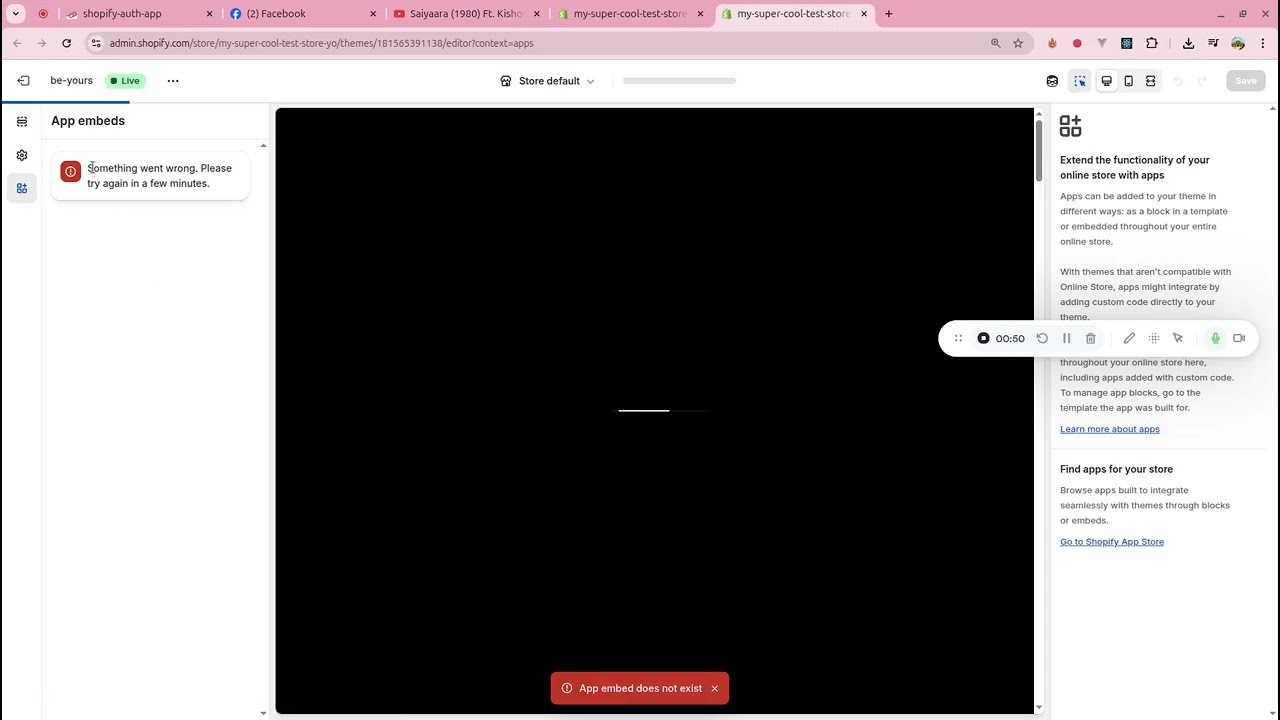
After updating to the latest shopify cli version and next gen dev platform apps are showing in the admin panel’s theme editor.
Here is what happended:
I tried to ran the dev server of one of my dev server(pnpm dev). Received the following error.
pnpm dev

> auth-app@ dev /home/ki/work/shopify/auth-app
> shopify app dev

╭─ error ────────────────────────────────────────────────────────────────────────────────────────────────────────────────╮
│                                                                                                                        │
│                                                                                                                        │
│  The Partners GraphQL API responded unsuccessfully with errors:                                                        │
│                                                                                                                        │
│  [                                                                                                                     │
│    {                                                                                                                   │
│      "message": "This app has been migrated to the new Next-Gen Dev Platform. Please use CLI version 3.84.0 or higher  │
│   to manage this app.",                                                                                                │
│      "locations": [                                                                                                    │
│        {                                                                                                               │
│          "line": 3,                                                                                                    │
│          "column": 5                                                                                                   │
│        }                                                                                                               │
│      ],                                                                                                                │
│      "path": [                                                                                                         │
│        "app"                                                                                                           │
│      ]                                                                                                                 │
│    }                                                                                                                   │
│  ]                                                                                                                     │
│                                                                                                                        │
│  Request ID: b1167811-5add-4b1e-a5c2-8afe3e23d68c-1757055437                                                           │
│                                                                                                                        │
│                                                                                                                        │
│  To investigate the issue, examine this stack trace:                                                                   │
│    at makeRequest (home/ki/.local/share/pnpm/global/5/.pnpm/@shopify+cli@3.83.2/node_modules/@shopify/cli/dist/chunk-  │
│    Q76H7OUL.js:27347)                                                                                                  │
│    at processTicksAndRejections (node:internal/process/task_queues:105)                                                │
│    at rawGraphQLRequest [as request] (home/ki/.local/share/pnpm/global/5/.pnpm/@shopify+cli@3.83.2/node_modules/@shop  │
│    ify/cli/dist/chunk-M3TVLW4G.js:136554)                                                                              │
│    at async runRequestWithNetworkLevelRetry (home/ki/.local/share/pnpm/global/5/.pnpm/@shopify+cli@3.83.2/node_module  │
│    s/@shopify/cli/dist/chunk-Q76H7OUL.js:27402)                                                                        │
│    at async makeVerboseRequest (home/ki/.local/share/pnpm/global/5/.pnpm/@shopify+cli@3.83.2/node_modules/@shopify/cl  │
│    i/dist/chunk-Q76H7OUL.js:27413)                                                                                     │
│    at async retryAwareRequest (home/ki/.local/share/pnpm/global/5/.pnpm/@shopify+cli@3.83.2/node_modules/@shopify/cli  │
│    /dist/chunk-Q76H7OUL.js:27500)                                                                                      │
│    at (home/ki/.local/share/pnpm/global/5/.pnpm/@shopify+cli@3.83.2/node_modules/@shopify/cli/dist/chunk-M3TVLW4G.js:  │
│    136572)                                                                                                             │
│    at (home/ki/.local/share/pnpm/global/5/.pnpm/@shopify+cli@3.83.2/node_modules/@shopify/cli/dist/chunk-4NC2NVYY.js:  │
│    30309)                                                                                                              │
│                                                                                                                        │
╰────────────────────────────────────────────────────────────────────────────────────────────────────────────────────────╯

 ELIFECYCLE  Command failed with exit code 1.
Then I updated the cli:
#old version
shopify --version/cli/3.83.2
linux-x64
node-v22.17.1
#new version
pnpm install -g /cli@latest
shopify --version/cli/3.84.1
linux-x64
node-v22.17.1
then again i ran (pnpm dev), It told me that my theme app extensions need a uid.
pnpm dev

> auth-app@ dev /home/ki/work/shopify/auth-app
> shopify app dev

╭─ info ─────────────────────────────────────────────────────────────────────────────────────────────────────────────────╮
│                                                                                                                        │
│  Using shopify.app.toml for default values:                                                                            │
│                                                                                                                        │
│    • Org:             Test buseness                                                                                    │
│    • App:             auth-app                                                                                         │
│    • Dev store:       my-super-cool-test-store-yo.myshopify.com                                                        │
│    • Update URLs:     No                                                                                               │
│                                                                                                                        │
│   You can pass `--reset` to your command to reset your app configuration.                                              │
│                                                                                                                        │
╰────────────────────────────────────────────────────────────────────────────────────────────────────────────────────────╯

╭─ error ────────────────────────────────────────────────────────────────────────────────────────────────────────────────╮
│                                                                                                                        │
│  Your app has extensions which need to be assigned `uid` identifiers.                                                  │
│                                                                                                                        │
│  Next steps                                                                                                            │
│    • You must first map IDs to your existing extensions by running `shopify app deploy` interactively, without         │
│      `--force` , to finish the migration.                                                                              │
│                                                                                                                        │
│  Reference                                                                                                             │
│    • Migrating from the Partner Dashboard
Then, I ran shopify app deploy and an uid was generated for me:
 info ─────────────────────────────────────────────────────────────────────────────────────────────────────────────────╮
│                                                                                                                        │
│  Your configuration file has been modified                                                                             │
│                                                                                                                        │
│  The `include_config_on_deploy` field is no longer supported, since all apps must now include configuration on         │
│  deploy. It has been removed from your configuration file.                                                             │
│                                                                                                                        │
│  See Shopify CLI documentation.                                                                                        │
│                                                                                                                        │
╰────────────────────────────────────────────────────────────────────────────────────────────────────────────────────────╯

╭─ info ─────────────────────────────────────────────────────────────────────────────────────────────────────────────────╮
│                                                                                                                        │
│  Using .env for default values:                                                                                        │
│                                                                                                                        │
│    • Org:             Test buseness                                                                                    │
│    • App:             auth-app                                                                                         │
│                                                                                                                        │
│   You can pass `--reset` to your command to reset your app configuration.                                              │
│                                                                                                                        │
╰────────────────────────────────────────────────────────────────────────────────────────────────────────────────────────╯

Generating extension IDs

login-widget | Added ID: i removed the id


?  Release a new version of auth-app?
✔  Yes, release this new version


Releasing a new app version as part of auth-app

             login-widget │ Running theme check on your Theme app extension...
             login-widget │
             login-widget │ [warning]: HardcodedRoutes
             login-widget │ Use routes object {{ routes.account_login_url }} instead of hardcoding /account/login
             login-widget │
             login-widget │ 361  action="/account/login"
             login-widget │ Bundling theme extension login-widget...


╭─ success ──────────────────────────────────────────────────────────────────────────────────────────────────────────────╮
│                                                                                                                        │
│  New version released to users.                                                                                        │
│                                                                                                                        │
│  auth-app-21                                                                                                           │
│                                                                                                                        │
│  Next steps                                                                                                            │
│  • Commit to source control to ensure your extension IDs aren't regenerated on the next deploy.                        │
│                                                                                                                        │
│  Reference                                                                                                             │
│  •  Migrating from the Partner Dashboard                                                                               │
│                                                                                                                        │
╰────────────────────────────────────────────────────────────────────────────────────────────────────────────────────────╯
And now my dev server works, but none of the apps work. None of them,
Here is a video: