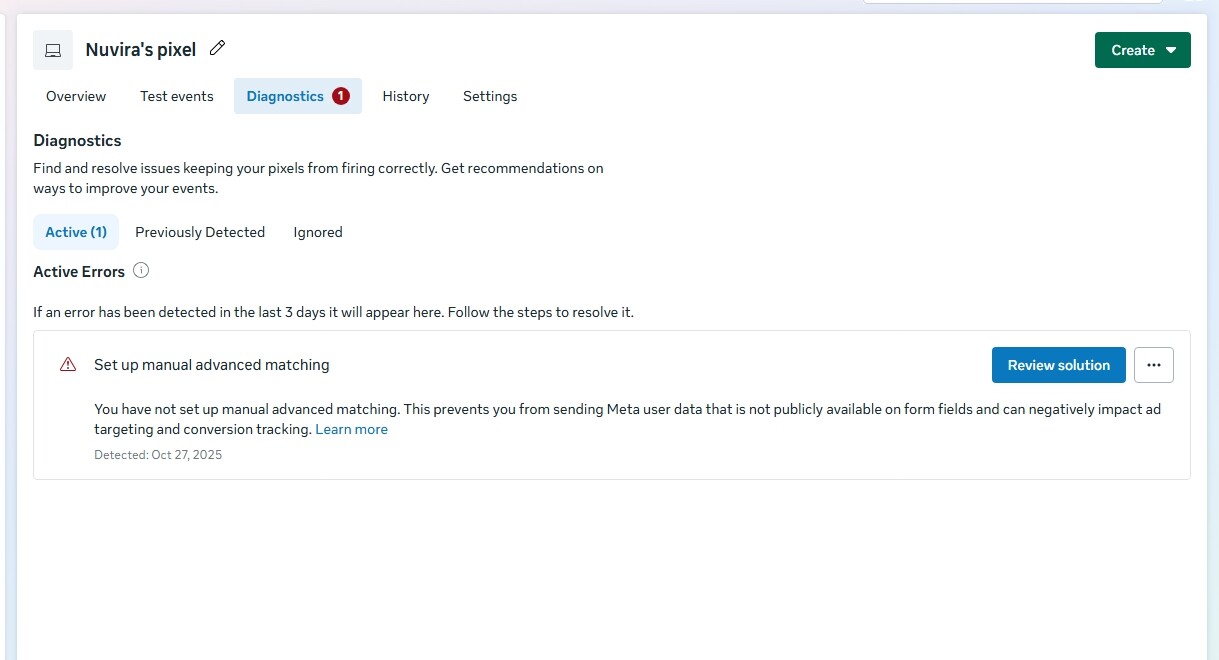
Hey Guys,
can you help me with this issue , meta contacted me and said a developer can help you
@Geard_Roas yeah sure , waiting
Hi, @Abdul_Wali_Nazari
I can help your issue.
Ok how would you solve this , because I can’t see the Kpi correctly?
I saw the error in the diagnostics. The main issue is that “Manual Advanced Matching” isn’t set up.
Here’s how to fix it in two simple steps:
Click the “Review solution” button at the bottom of the error message.
Follow the on-screen prompts to enable the feature. It just means confirming that you want Meta to use information (like a hashed email) from your website’s form fields to better track conversions.
Once you turn this on, the error should clear, and your KPIs (like purchases or sign-ups) should be tracked more accurately.
Let me know if you need a hand with the steps.![]()
After clicking review solution, I can see ( send) when I click it, then there is four things, email, copy, screenshot, message.
Choose “Email” and enter the email address associated with your Meta account or the one used for tracking. Then click “Send”.
This should resolve the Manual Advanced Matching setup and help your KPIs display correctly.
Let me know if you need more help!
I chose the email and shared then I received and email but the problem didn’t solve