In my store, I create a new app inside dev dashboard, and installed it.
With the Client ID and Secret, I was creating "orders/create", "orders/paid", "orders/updated" webhooks.
It was working fine previously and worked for my other stores too
But suddenly it started throwing this error
'You do not have permission to create or update webhooks with orders/updated topic. This topic contains protected customer data.
Anyway to solve this problem?
hi @mcnaveen,
That thread you linked wasn’t exactly related to the error you’re experiencing here.
In that thread George was asking specifically about the new app creation workflow causing the merchant to need to approve scope changes made to the app, when with the legacy custom app creation workflow, scope changes were done in the store admin directly and didn’t need the merchant’s approval since it would be done by a staff member with sufficient app permissions on the store.
In your case the protected customer data error indicates that you need to request access via the Partner Dashboard in order to retrieve Customer data that is returned in the webhooks you’re trying to subscribe, in addition to requiring the read_orders access scope.
This is required specifically for Public Apps, as Custom Apps created by a Partner account will have access by default, however Custom Apps created by the merchant (not a partner account), and on Basic Shopify Plans or below, won’t have access at all.
You can read more about accessing Protected Customer Data, including how to request access via your Partner Dashboard in the following Shopify.dev documentation.
Hi @Kellan-Shopify Thanks for your reply
I don’t understand one thing. I’m creating an app using Dev Dashboard in my own shopify store (Not even publishing it for public usage) and I’m installing it only on my store and using it credentials to setup webhook etc. Then why it’s not allowed?
It was working fine until 2 days ago. Suddenly stopped working
Is manually creating webhook is the only option for me now? is it reliable as the one created via API?
@mcnaveen,
What are you selecting for the Distribution method when you’re creating the app? Also are you logged into your Partner Account or Merchant Account when creating the app in the Dev Dashboard?
If you selected Custom for the app distribution, which would be the correct distribution method if you’re only installing this on your own store. Then it depends on what account you created the app from, and what plan your Shopify store is on.
Manually subscribing to the webhooks via the API, or subscribing via the App’s TOML configuration file, will not matter in this situation, both would return the protected customer data access error, if your app does not have access to protected customer data.
If you’re creating the app via a Partner Account, or the store plan is NOT Basic or Starter Plan, can you provide me with the name of the app in your partner account, and the x-request-id of the API call returning this error? If the error is occurring when running a Shopify CLI command instead, you can use the --verbose flag to see the x-request-id from the failed call.
I’m creating app from the merchant store
By going to Settings → Apps and sales channels → Develop Apps → Build Apps in Dev Dashboard → Create App with below scopes
read_customers,write_orders,read_products,write_script_tags
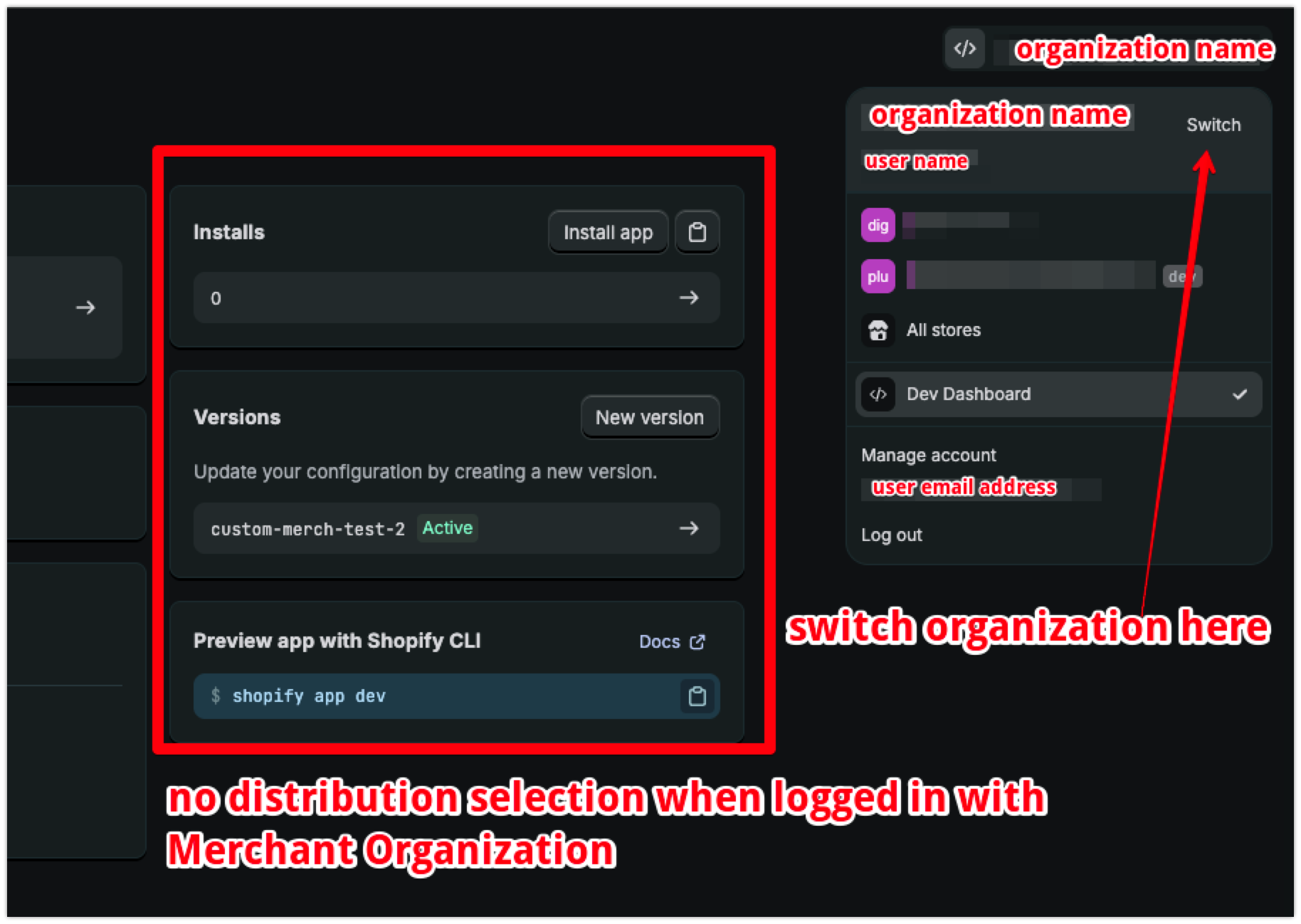
and Installing via this button, I don’t have any distribution method selected.
Once installed, I’m grabbing the Client ID and Secret to create webhooks and setup script tags.
Setting up script tags is working fine. But creating webhooks throws error
This setup was working for a long time and suddenly it stopped working.
Hi @mcnaveen,
Thank you for sharing the screenshot, this definitely helps answer the issue here.
The fact that you have Distribution as a selectable method here, indicates that you are actually logged in to the Dev Dashboard with your Partner Organization, rather than the Merchant Organization.
I looked into this on my own test store, with my own Merchant Account and Partner Account, and I can confirm that when logged in with a Merchant Organization specifically, there is no option to select the distribution method, since all Merchant Apps will be Custom by default.
In the upper right section of the page you can see what Organization you are logged into the Dev Dashboard with, and switch the org’s here as well.

To correct this issue, you will need to do one of the following:
Using the existing app you’ve already created and installed via the Partner Org:
- uninstall app from the store
- select the
Custom distribution method
- reinstall on the store via the installation link that is provided after selecting the
Custom distribution method
OR
Create a new app from the Merchant Org:
- Switch the Org you are logged in with, to the Merchant Org (see screenshot)
- Select
Switch in the profile details at the top right of the Dev Dashboard.
- In the account selection screen, select the store in your Merchant Org that you want to install the app to. This will open the store’s admin
- In the store admin, select your profile in the upper right and click
Dev Dashboard. This will open the Dev Dashboard with the correct Merchant Organization context.
- Create new app from the Merchant Org and install on non-Basic or Starter plan stores that are a part of your Merchant Org
I created a brand new store and it just worked (When I clicked on the top right menu Dev Dashboard) so it means, this app is exclusive for that particular store and not public access right? (This is what I exactly want)
This is super confusing. If I invite another member it’ll turn into a Partner Org or what?
Hi @mcnaveen,
I’m glad to hear you got it working!
A Partner Account is something that you need to sign up for directly via our Shopify Partner portal: Build. Earn. Grow. – Become a Shopify Partner Today - Shopify
If you add more staff members to your store specifically, that would not turn it into a partner account.
If you have any specific accounts you’d like us to help look into further to confirm if you’re working with a Partner Account or a Merchant Account, we will need you to reach out to our Shopify Support Team via the Shopify Help Center, while logged into the account in question, and we can absolutely help confirm what type of account you are working with exactly.
Here’s also some more information in the Shopify Help Center regarding the Shopify Partner program.
Hi @Kellan-Shopify Thank you so much. Appreciate your patience and support 

Hi @Kellan-Shopify
Looks like Shopify made some internal changes. The flow was working great. But throwing error now.
You do not have permission to create or update webhooks with orders/updated topic. This topic contains protected customer data.
This happens with my own app created inside the Dev Dashboard and added to my store.
Hi @mcnaveen,
This would be expected behaviour if the app was created from a Partner Account, as Partner apps do require permission to access protected customer data.
Additionally, if this is a custom app created from a Merchant Account, protected customer data can not be accessed at all if the store is on the Shopify Basic Plan, and must be on the Shopify Growth Plan or higher.
Here’s a page in the Shopify.dev documentation with more info on working with Protected Customer Data, including how to request access for a specific app, via the Partner Dashboard (not the Dev Dashboard)
If you believe the app doesn’t require permission for Protected Customer Data, as described in the dev docs linked above, and would like some more direct help looking into the specific app and store that you’re working with. I’d recommend reaching out to our Support Team via the Shopify Help Center, while logged into the account that created the app, and we can help look into this in further detail in a fully authenticated support interaction.